Trainers
Learn how a vendor in your Imagina world can teach ability ranks and sell lasting stat upgrades, covering the Training switch, offers, prices, requirements, lessons taught in the story, and what players see on the shop card.
Beta
The RPG system is in beta and only accounts with the RPG beta can set it up. It may still change.
A trainer is a vendor that sells more than items. It can teach an ability at a given rank, and it can sell an upgrade, a lasting bonus to one of the player's numbers or bars. The player buys both on the same shop card as items, with the same currency, and no turn is spent.
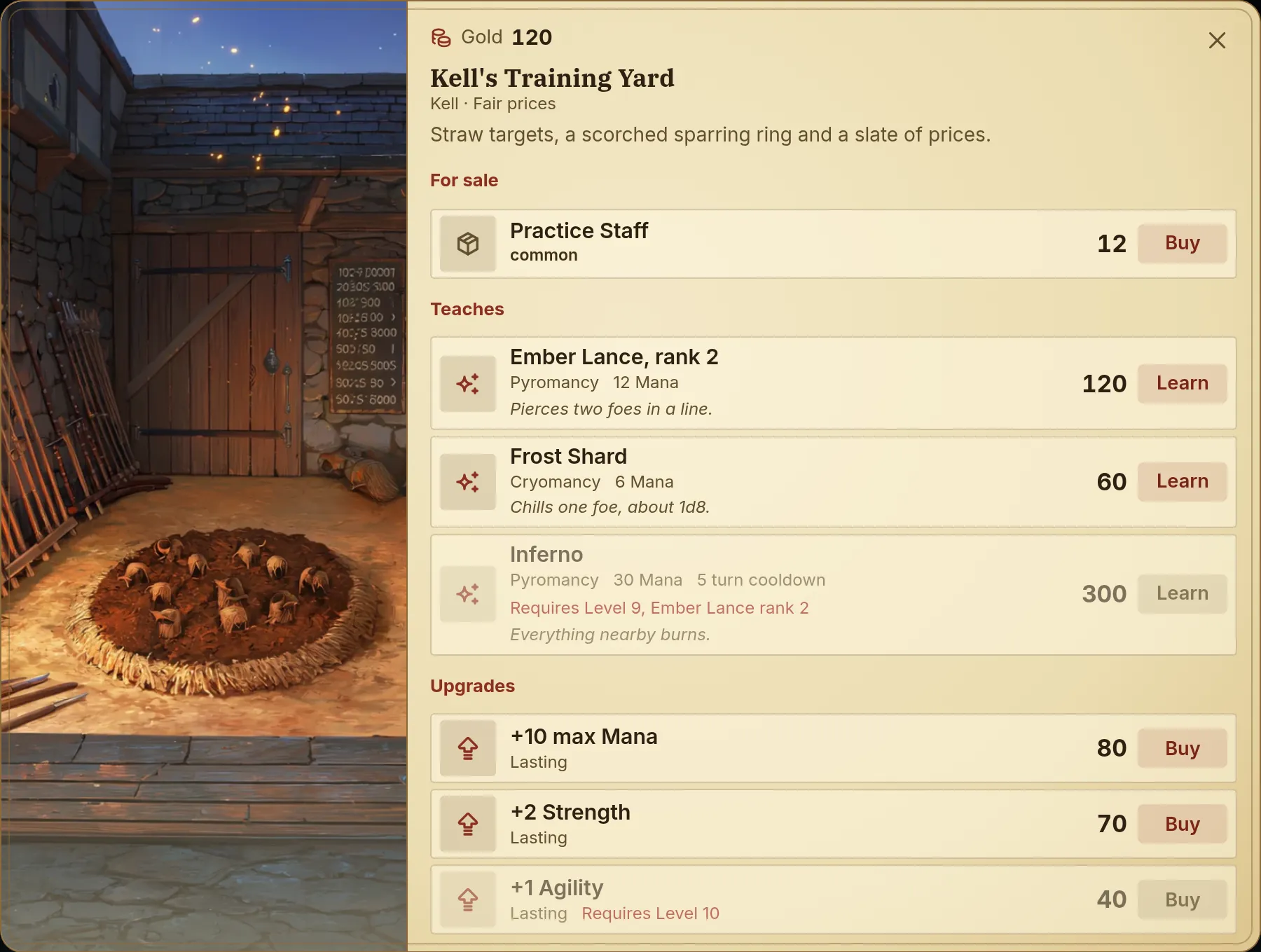
There is no separate trainer to create. Any vendor becomes one as soon as one of its offers teaches an ability or sells an upgrade. In the demo world, Kell's Training Yard sells a Practice Staff, teaches Ember Lance rank 2, Frost Shard and Inferno, and sells upgrades such as +2 Strength.
Before you start
Training sits on top of shops, so set those up first. See Shops.
- Open RPG game system → Features (Game rules → RPG game system while the system is off) and turn on Enable the RPG game system.
- In step 3 of the page, turn on the Shops and money card, then the Training card ("Shops can teach abilities and sell permanent stat upgrades."), which needs it. Living world and Classic RPG turn both on in one click. While Shops and money is off, the Training switch is disabled and the card shows the chip Needs Shops and money, with a Turn on both button.
- In the Shops entry of the group, whose page is headed Vendors, pick a Currency and create a vendor with Add vendor. Without a currency, nothing can be bought.
Two more things depend on what you plan to sell:
- Ability offers need the Abilities switch on, at least one ability written, and a Skills list on the character sheet. See Abilities and Character sheets.
- Upgrades need none of that. They only need a number or a bar to raise.
Turning Training off deletes nothing. Every offer stays in the editor, and the storyteller stops seeing them until you turn it back on.
Players do not need the RPG beta to buy from a trainer in your world.
Adding a lesson or an upgrade
Open a vendor and go to its Offers list. Each offer has a Sells control with three options: Item, Ability and Upgrade. A new offer starts on Item when the world has items, otherwise on Ability, otherwise on Upgrade. Changing the option replaces what the offer sells and keeps its price, sale, requirements and Under the counter setting. An option the world has nothing for is greyed out.
When the world has no items, no abilities and no number to raise, Add offer is disabled and the editor shows Add items or abilities to the world first.
Teaching an ability
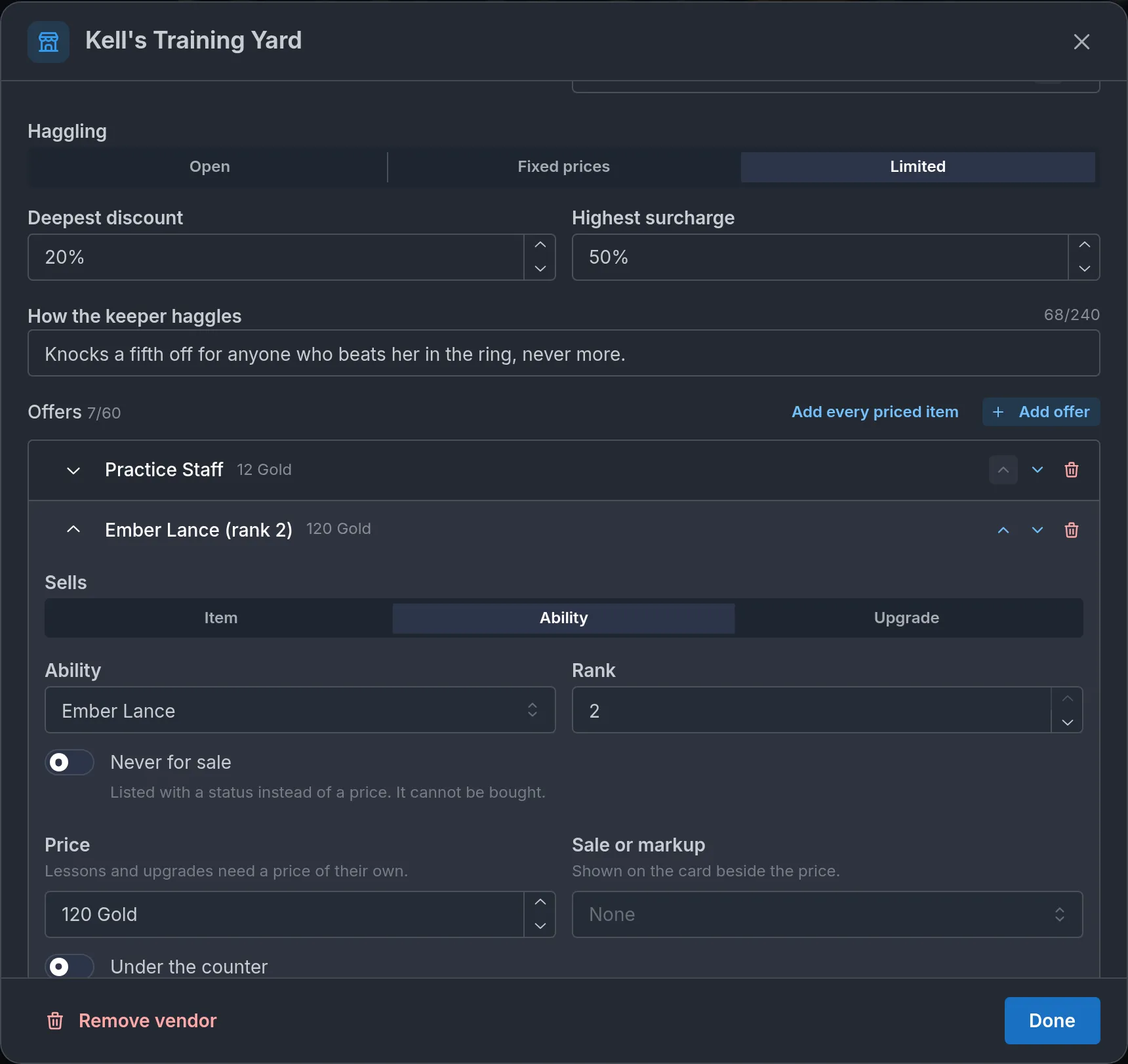
Choose Ability, then pick one of the world's abilities in the Ability select. When that ability has more than one rank, a Rank field appears beside it. The rank is what the offer teaches: rank 2 teaches rank 2.
A rank above the first needs the rank below it known first. Mara already knows Ember Lance, so the rank 2 offer at Kell's Training Yard is open to her. A character who never learned Ember Lance sees that row locked with Requires Ember Lance rank 1. If you want players to climb an ability at one trainer, give it one offer per rank.
Selling an upgrade
Choose Upgrade, pick what it raises under Raises, and set the amount under By (a whole number from 1 to 1000). The Raises list holds the world's numeric trackers and the number and bar rows of the character sheet, including rows a sheet variant adds.
The caption under the two fields says it all: Sold once per journey. A bar grows its maximum.
- On a bar, the upgrade adds to the maximum and fills the bar by as much. A Mana bar at 30/30 raised by 5 becomes 35/35.
- On any other number, it adds to the value. If the row has a maximum of its own, an upgrade that would pass it is refused.
Each upgrade offer sells once per journey. To sell the same raise twice, add two offers. The same upgrade offered by two vendors is bought separately at each.
In the folded offer, the title reads +10 Mana. On the player's card the same offer reads +10 max Mana, because Mana is a bar.
Price and availability
Lessons and upgrades use the same price controls as items, with one difference. An item can fall back on its own price. An ability or an upgrade has none, so the Price field reads Lessons and upgrades need a price of their own.
Leave the price empty and the offer is not listed. The folded offer shows No price in red, and the field warns Without a price it is not listed. A price of 0 is allowed and shows as Free on the card.
The rest works as on any offer:
- Sale or markup applies a step from -100% to +200%, shown on the card beside the price, with an optional Sale reason.
- Never for sale lists the offer with a Status in place of the price, and it cannot be bought. A lesson or an upgrade still needs a price of its own to be listed.
- Under the counter hides the offer until the storyteller brings it out when opening the shop.
Requirements
Under Requirements (The player needs all of them to buy it.), Add requirement adds a row. An offer takes up to four. Each row starts with a kind:
- Level: a minimum level.
- Stat or counter: one of the player's numbers and the minimum it must reach.
- Skill: a skill by name, with an optional minimum rank.
- Knows an ability: an ability the buyer must already know, picked from the world's abilities, with an optional Minimum rank (Any rank when empty). It is offered once the world has an ability.
- Holds an item: the player carries at least one copy.
- Class or race: choose Class or Race and type the value. Capitals do not matter.
Changing a row's kind resets its values.
A level requirement reads the level your world uses, set under Level on the Linked fields page. It reads the main level, never another progression track. See Levels and points. If the world gives characters no level, or the level is a word with no number such as "Novice", a level requirement can never be met.
The Stat or counter list holds the world's trackers and the base sheet's number and bar rows. Rows added by a sheet variant are not in it, although Raises does list them.
An ability can carry requirements of its own, set where you write the ability. They are added to the offer's on the card, so the row stays locked until the character meets both lists.
Teaching by lesson
By default, an ability is taught on the spot: the player pays and the ability is on the sheet.
Turn on Teaches by lesson (An ability bought here is paid for, then taught in the story.), under the vendor's offers list, to make the teaching a scene. The switch covers every ability offer of that vendor. A vendor cannot mix the two ways. Upgrades and items are not affected and always apply at once. Until the vendor has an offer that teaches an ability, the switch is greyed out and reads Needs an offer that teaches an ability.
With the switch on:
- The player presses Pay. The price is taken right away and the row turns Lesson paid. The ability is not on the sheet yet.
- On the next turn, the storyteller is told the lesson was paid and plays it in the scene.
- When the lesson ends, the storyteller grants the ability at the paid rank.
The offer's requirements and the ability's own are checked when the player pays, so a lesson the character cannot take is refused before any money moves. When the player cannot pay, there is no lesson and no debt.
Until the ability is granted, the storyteller is reminded on every turn that the lesson is owed. How long the lesson takes and how it plays out are the storyteller's call. There is no time limit and no refund: a lesson the story never gets to stays owed.
A paid lesson does not count as known. The next rank of that ability cannot be bought until the first has been granted.
What players see
When the storyteller opens the shop, the player gets an Open shop button. Items come first. When a card has both items and training, the items sit under For sale, followed by two groups.
Teaches
Each ability row shows the ability's picture, its name (with the rank after a comma when the ability has several, as in Ember Lance, rank 2), then a line with its group, the cost of the taught rank, its cooldown and a state. The cost names the player's own Energy row, so Mara reads it in Mana. The rank's effect, or the ability's description, sits underneath.
The button reads Learn, or Pay at a vendor that teaches by lesson. A lesson vendor also shows Taught as a lesson in the story once paid. under the heading.
A row can be in one of these states:
- Known: the character already has the ability at that rank or higher. The price is hidden and the button stays, greyed out.
- Lesson paid: paid for and not taught yet. The button stays, greyed out.
Requires Level 5and the like: what the character is missing. The row is dimmed and its button is disabled.Not enough Gold: the character cannot afford it. The currency's name is yours. A journey with no Gold tracker at all readsNo Gold to pay with.
Upgrades
An upgrade row shows its name (+10 max Mana for a bar, +1 Strength for another number), the word Lasting, the price and a Buy button. Once bought it reads Bought, with its button greyed out, and stays that way for the rest of the journey. The same requirement and money states apply.
Training rows have no detail view and no quantity.
After a purchase
The card stays open and the purse drops. The character sheet updates at once with the new ability at its rank, or the raised number or bar. A line starting with Bought: under the list names what was bought and what each cost.
When a purchase is refused, a red line under the list says why:
- You don't meet its requirements yet.
- You already know this.
- Already paid for.
- Already bought.
- That is already as high as it goes. The upgrade would pass the number's own maximum.
- No room for another ability. The skill list is full, at 24 skills.
Once the story moves on, the card closes. The turn keeps a quiet record of the visit that opens a receipt, with each line and what it cost. The Bought and Lesson paid states survive a reload.
In a shared journey, a guest buys for their own character, under the same money rule as in shops. An upgrade raises their own row, an ability lands on their own sheet, and a lesson is owed to them. See Playing together.
What the game settles and what the storyteller does
The game settles every purchase on its own. It checks that the offer is on the open card and still for sale, then the requirements, then that the character can pay. Either all of it passes or nothing happens. Then it takes the money and writes the result: the ability on the sheet, the raised number, or the owed lesson.
The storyteller's part is the scene around it:
- It opens the shop and can bring out an Under the counter offer.
- It can put a percentage discount or markup on a lesson or an upgrade for the visit, inside the vendor's haggling setting. A vendor with fixed prices accepts no change. It never names a price itself: the card does.
- It can mark a row as not for sale for the visit.
- After a purchase, it is told what was bought and narrates the hand-over. It is told not to charge or teach again. A raise to a plain number bought on the card is also refused if the narration applies it a second time.
- At a lesson vendor, it plays the lesson and grants the ability when the lesson ends.
A lesson or an upgrade is only ever bought on the card. The storyteller cannot sell one in the narration. A discount for a favor shows up as a percentage on the card.
Lessons and upgrades land on the buyer's own character only. A party companion is never taught and never raised by a purchase, so Brannoc gains nothing at Kell's Training Yard.
Two more things to know:
- An ability marked only if NSFW is on disappears from a journey with NSFW off, and its offer goes with it.
- Removing an offer, or turning Training off, never takes back what a player already has. A learned ability stays, and so does a raised number.
Limits
- 30 vendors per world, 60 offers per vendor.
- 4 requirements per offer.
- By: 1 to 1000, whole numbers.
- Price: 0 to 1,000,000,000.
- Rank: up to the ability's own number of ranks, 5 at most. If the ability later loses ranks, the offer teaches its highest remaining rank.
- Status and Sale reason: 120 characters each.
Common mistakes
- An offer with no price. A lesson or an upgrade without a price of its own is not listed. Set one, even 0.
- Nothing picked. An Ability offer with no ability, or an Upgrade with nothing under Raises, is left off the card without a warning. Only the folded offer's title says so: Missing ability or No stat picked.
- Ability offers with Abilities off. The Sells control still offers Ability when the Abilities switch is off or the sheet has no Skills list. Those rows never reach the card. Upgrades are not affected.
- A higher rank with no way to the one below. A rank 2 offer on its own only serves characters who learned rank 1 somewhere else.
- A level requirement in a world without numeric levels. The row reads
Requires Level 5forever. - Expecting an upgrade to restock. It sells once per journey. Add a second offer for a second purchase.
- Requirements meant for a variant's row. The Stat or counter list leaves out rows a sheet variant adds.
Frequently asked questions
Shops and money
Learn how to give your Imagina world shops and a currency. Covers the Money tracker, item prices, vendors and their offers, haggling rules, shop looks and pictures, under the counter goods, improvised stalls priced by rarity, and what players see when they buy.
Abilities
Learn how to give your Imagina world spells and techniques with ranks, costs paid from each character's Energy, cooldowns and learning requirements, and what players see in the spellbook.