Character sheets
Learn how each character of your Imagina world gets a sheet of their own, with sheet variants, the rows the game reads as Health, Energy or Level, and the RPG game system group on character pages.
Beta
The RPG system is in beta and only accounts with the RPG beta can set it up. It may still change.
A character sheet is the set of bars, numbers, choices and lists a character carries through a journey. With one switch, every character holds a sheet of their own, and one page tells the game which row is Health, which is Energy and which is the level. Shops, abilities, levels, points and fights all rely on those answers.
Where it lives
Open the RPG game system group in the sidebar. Once Enable the RPG game system is on, three of its entries matter here: Features, where the cards switch each piece on, then Character sheet, then Linked fields.
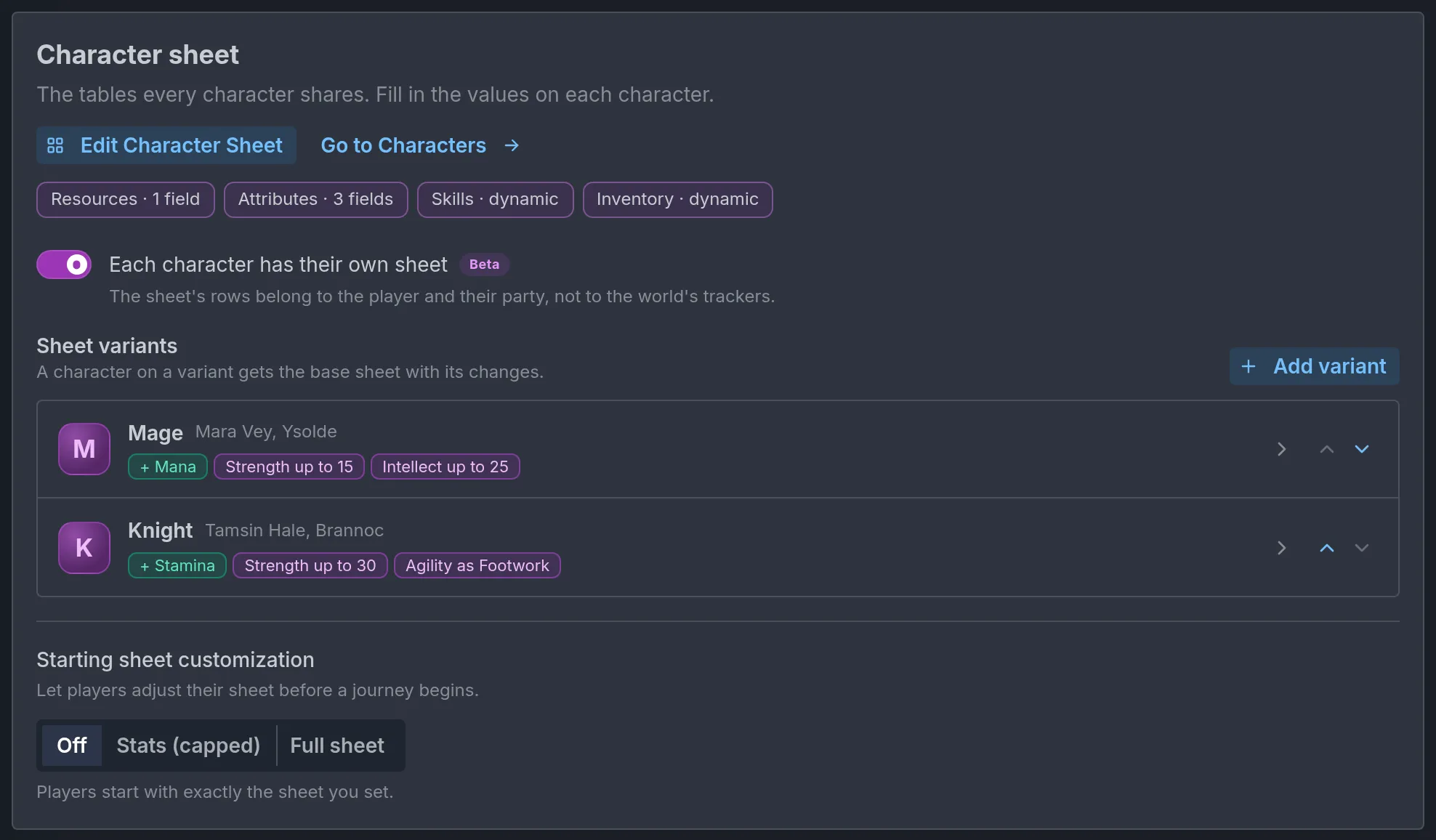
The Character sheet page holds the Edit character sheet button (Define Character Sheet while the world has no sheet), a Go to characters button, one chip per table of the sheet, then the Per-character sheets switch and its variants. The same switch is also a card on Features. Building the sheet, its tables and its row types is covered in RPG mode and dice.
Per-character sheets
The switch reads: "The sheet's rows belong to the player and their party, not to the world's trackers." With it on, Mara Vey's Health and Brannoc's Health are two separate bars, each with its own value and its own cap. The world keeps one base sheet, and optional variants change it for some characters.
A game system enabled for the first time starts with the switch on and a ready-made sheet: an Overview table with the bars HP and MP, a Stats table with Strength, Dexterity, Constitution, Intelligence, Wisdom and Charisma, then the lists Skills, Inventory, Bonds, Status and Affinities. Nothing in Linked fields is chosen yet.
Existing worlds never switch by themselves. An RPG world made before November 18, 2026 shows an Upgrade with Ima button under the switch on the Character sheet page while it is off. See Upgrade with Ima.
Turning the switch off deletes nothing. Variants, each character's variant and the choices in Linked fields stay stored and come back when you turn it on again. While it is off, a role that named a row looks for a tracker of that name and shows No such tracker when there is none.
Starting values on the base sheet
With the switch on, the rows of the sheet editor carry starting values. Bar and number rows get Starts at, Maximum (on a bar) or Cap (on a number), and Unit. Choice rows get Starts as. Every character starts from these unless a variant or their own page says otherwise.
When a journey begins, a row nobody filled in starts like this:
- A bar starts at its Starts at, else at its Maximum, else at 100. Its maximum is its Maximum, else the larger of its start and 100.
- A number starts at its Starts at, else at 10, and has its Cap as its limit.
- A choice starts at its Starts as, else at its first option.
- A text row starts with the Starts as text a variant gives it. Without one, the character has no such row yet.
Alternate sheets
A variant is the base sheet with a few changes, for characters that differ in kind. In the demo world, Mara Vey is on the Mage variant, which adds a Mana bar, and Brannoc is on the Knight variant, which adds Stamina. Without variants, every character uses the base sheet.
Under Alternate sheets, Add variant creates one and opens it. Each row of the list shows the variant's name, the characters using it, and a chip per change:
+ Staminafor a row the variant adds.Health as Vitalityfor a base row it renames.Strength up to 30for a base row the variant changes, when the row has a cap. A changed row without a cap shows its name alone.- The row's name struck through when the variant leaves it off.
- "Same as the base" when it changes nothing.
Rows can be dragged to reorder, and Remove variant deletes one.
Editing a variant
The variant opens in a dialog with four parts.
- The variant's name and Who uses it. The name is what you pick on character pages. Who uses it is a short note shown beside that pick, such as "Spellcasters of the academy".
- Rows from the base sheet. A table with the columns Row, Called here, Starts at, Cap and Unit, grouped by the base sheet's tables. Each row shows its type: Bar, Number, Choice or Text. Called here renames the row on this variant only. A bar takes Starts at, Maximum and Unit, a number takes Starts at, Cap and Unit. A choice row takes Starts as and Choices on this sheet, and a text row takes Starts as. Anything left blank stays as the base. The eye button, Leave off this sheet, removes the row from this variant, and Put back on this sheet restores it.
- Rows only this sheet has. Add a row adds one. Give it a name, a Type (Bar, Number or Text), optionally the Table it joins, a Starts at and a Cap. A row with a table goes after that table's last row. Without one, it goes after the last row of the same type, else at the end of the sheet.
- Linked fields on this sheet. One choice each for Health, Energy and Experience, covered under Roles per variant.
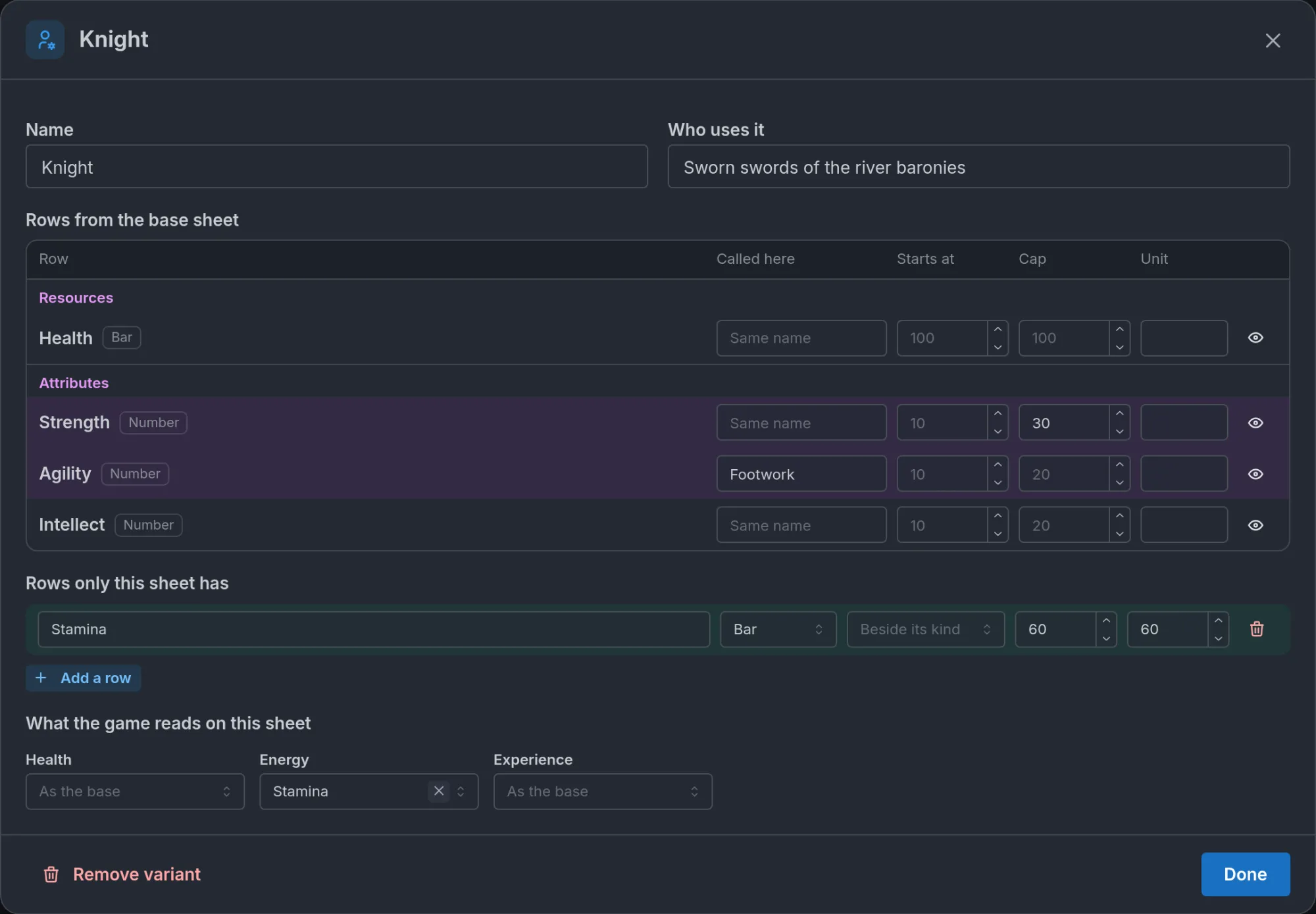
A row added by a variant cannot be a Choice, has no unit, and a text row added this way has no starting value. A bar added with a Starts at and no maximum gets a maximum of the larger of its start and 100, so Mana starting at 40 with no cap is 40/100.
Linked fields
The sheet is yours to name. A world can call its life bar Health, HP or Vitality, so once the page is set the game does not guess from a name. The Linked fields page assigns each mechanic to a row, and every other piece of the RPG system asks the card.
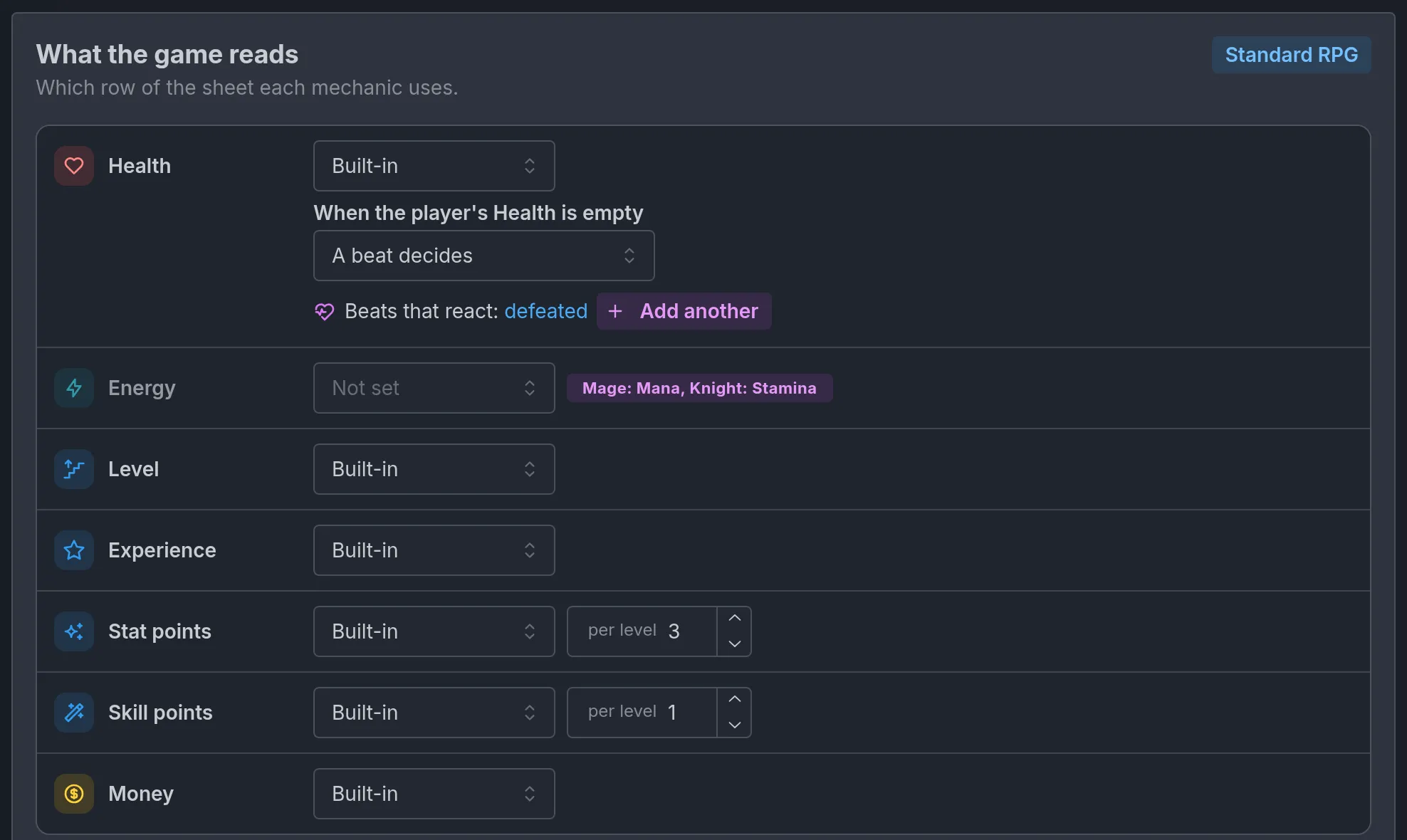
The roles on the page follow the cards on Features. With none of them applying, the page reads "Turn on Character stats or Levels and identity to choose them."
| Role | Shown when | Can read |
|---|---|---|
| Health | Character stats is on | A bar |
| Energy | Character stats is on | A bar |
| Level | Levels and identity is on | A number row |
| Experience | Character stats and Levels and identity are both on | A number row or a bar |
| Stat points | Level-up points is on | A number row |
| Skill points | Level-up points is on and the sheet has a Skills list | A number row |
| Money | Shops and money is on | A tracker |
The choices
Each role has one select. It reads Not set until you choose, and you cannot go back to it.
- Not set. Each mechanic behaves as it did before the card existed. Fights look for a bar named like health (HP, Health). The level is the character's own level. There is no currency, so shops have no money to take. An ability with an Energy cost is refused.
- Built-in. The game supplies the row. Every role but Energy offers it.
- A row of the sheet. A second select, Pick a row, lists the rows of a fitting type. Rows that only a variant adds are listed with the variant's name, such as "Mana (Mage)". If the row is later renamed or removed, the role shows Not on the sheet.
- None. Switches the mechanic off, and a grey line says what that costs. For Health: "No bar decides who is still standing." For Money: "Shops cannot sell."
What Built-in supplies depends on the role:
- Health reads a health bar the sheet already has under another name (HP, Hit points, Health points, Vitality or Life), as if you had picked that row. Otherwise it adds a bar named Health, at 100 out of 100, to the base sheet unless a row of that name exists. It goes in the first table that has bars, else in a new Resources table placed first. On a world without Per-character sheets, it adds a Health tracker to the world's starting trackers instead. Choosing something else later leaves the bar in place.
- Level reads the character's level, the one shown with their class, race and title.
- Experience, Stat points and Skill points give every new journey ready-made trackers starting at 0. The skill pool appears only when skills have ranks to raise. A tracker of yours named exactly like one of them (Experience, XP, Stat Points, Skill Points) is used instead of a duplicate.
- Money adds a world tracker named Gold, at 0, and makes Gold the currency.
Money always reads a tracker, never a row of the sheet, so its option is A tracker. On a world without Per-character sheets, every role offers A tracker instead of a row, and the card reads the player's trackers.
Standard RPG, at the top of the page, sets every role shown except Energy to Built-in in one click. A role already set to a row of the sheet or to a tracker keeps it, a custom currency included.
Under the roles, a Levels block lists the world's progression tracks, the levels that can rise by themselves at an amount of Experience. See Progression tracks.
Points per level
Stat points and Skill points have a per level box, a whole number from 0 to 20: how many points a level-up grants. Left empty, it is 3 for stat points and 1 for skill points while Experience, Stat points or Skill points is on Built-in. Otherwise it is 0, and the box's placeholder shows the number that applies. A role on None grants nothing. Spending them is covered in Levels and points.
How a level is read
Everything that compares or counts levels goes through the Level role: encounter levels, requirements on abilities, items and training, point grants and fights. A level reads as a number when it holds digits ("Lv. 12", "Rank 2", "Tier 3 Adept") or a Roman numeral in capitals from 1 to 39 ("Rank II", "Tier IV"). Letter ranks such as "S" or "C-rank" and words such as "Master" do not read as a number: no level, no comparison, no points.
When points are granted per level, a yellow line under Level names each player character, and each NPC who starts as a companion, whose level is not a number.
A player character's page has no level field. To start one at a given level, add a number row to the sheet and set Level to read it.
When the player's Health is empty
With Health set to a row or to Built-in, and Fights on, a control appears under it: When the player's Health is empty. The story decides is the default. Out of the fight marks the player as out when their Health reaches 0, under the word in Shown as ("Down" when blank, up to 24 characters). They cannot act or be hit until their Health rises. A beat decides hands the fall to a story beat you write, such as one that takes a life and wakes the character at a shrine. See Fights.
Roles per variant
A variant can read its own row for Health, Energy and Experience, in Linked fields on this sheet. Each select lists the variant's rows of a fitting type, and "As the base" keeps the card's choice. Level, Stat points, Skill points and Money are the same for the whole world.
This is how one cost is paid from two bars. The Mage variant reads Mana as Energy and the Knight variant reads Stamina, so an ability that costs 10 Energy takes 10 Mana from Mara Vey and 10 Stamina from Brannoc. On the card, a purple badge on the role lists the variants that differ: "Mage: Mana, Knight: Stamina".
A variant's own choice also works when the card says None for that role. The reverse needs care: if a variant renames or leaves off the row a role reads, its characters have no such role until the variant picks a row of its own.
The RPG game system group on character pages
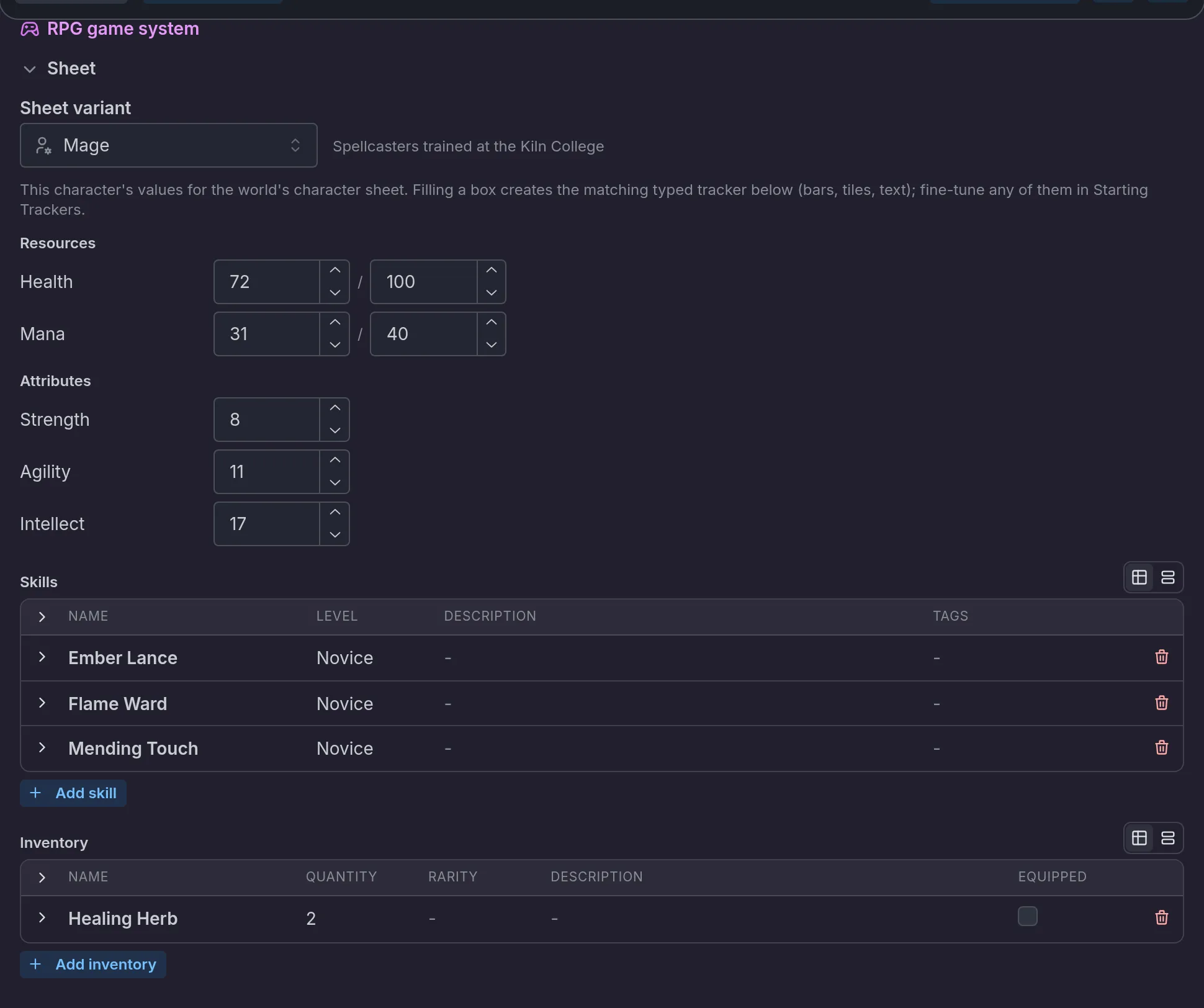
Each character's page has a purple group titled RPG game system. It is where one character gets their variant and their values. The group is absent while the world's game system is off, and what you filled in is kept.
On a player character
The group sits after the Opening block and before Starting Trackers, and holds one part, Sheet:
- Sheet variant picks Base sheet or one of the world's variants, with the variant's Who uses it note beside it. It appears once the world has at least one variant. Changing it changes which rows the page shows. Values already typed are not moved or deleted.
- The grid below lists the tables of the character's sheet. A bar takes two numbers, current and max. A number takes one box, a choice a select, a text row a text box. Lists such as Skills or Inventory take starting entries with a button like Add skill, and an inventory entry from the item catalogue with a slot or bonuses can be ticked Equipped (see Items and inventory).
Each box you fill creates the matching entry in Starting Trackers, where you can fine-tune it. With Per-character sheets on, a box left blank starts the row at the base sheet's or the variant's default. A choice you set here is kept as it is: the storyteller does not redecide it by default.
The chevron on the Sheet heading folds the part. The fold is remembered on your device, for every character at once.
On an NPC
The group sits after Outfits and before Author notes. Its Sheet part needs the NPC sheets card on in Features, except on an enemy template. Starts in the party shows only with the Party system card on. A character already marked keeps it while the party system is off, with the helper "Not used while the party system is off."
- Starts in the party. "Travels with the player from the opening, on scene too. The story and the player can change it later." Brannoc has it on. See Party.
- Sheet. The Sheet variant pick, then the stat block: Class, Race, Title, Level and Threat / disposition, one block per table of the character's variant, the lists the sheet has, and a Preview of the card players see.
An NPC's values are stored as you write them, a bar as "88/100" and a number as "22". Boxes left blank are filled by the storyteller during the story. A filled stat block is revealed to the player the first time the character appears, as a card they can skip.
The other parts of the group (Fights, Out of the fight, and Battle sprites on an enemy) are covered in Fights and Enemies.
What players see
Every character is drawn with the same card: bars as current over maximum, numbers as tiles, text as lines. Tables come in your order, under your titles. Bars are sorted with Health first, then Energy, then the sheet's order. The Health bar is warm red. Other bars take a color from their name (blue for mana, green for stamina, gold for experience). An Energy bar with no such name is blue, and any other bar is teal.
- The player's own sheet shows a header with the level, class and race when Levels and identity is on, the points waiting to be spent, the tables of their variant, any tracker no table names, then Skills and Inventory.
- An NPC's card shows their name, title, level line and threat, their appearance, the tables, then their lists. A companion's card adds a line such as "Experience 120 · 2 stat points unspent". With progression tracks, the Experience moves into a list of the companion's levels and the line keeps "2 stat points unspent".
- The party screen shows the same bars, tiles and tables on each member's page, and the window for spending points groups stats by the tables of the character's variant.
Two kinds of sheet sit behind that one card. The player, the members of the party (past ones included) and enemies made from a template hold real numbers with caps: every row of their sheet shows, even at its default, and the game moves the values. Every other NPC holds what you wrote and what the storyteller adds, so only rows with a value show.
What the storyteller decides, what the game settles
The storyteller decides when anyone levels up or down (except on a track that rises by itself at an amount of Experience), which rows move and by how much, and what to write on the sheet of an NPC outside the party. It is told which row each role reads, per variant, and that each character holds their own stats while world trackers describe the world and the story.
The game settles the rest:
- Before every turn it completes each sheet: missing rows are added at their default, and a cap or unit the sheet defines is added to rows that lack one. The same step converts a journey in progress when its world gains per-character sheets, with values kept.
- Caps hold. A value cannot pass its maximum or its cap.
- Roles are resolved per character. The variant's choice comes first, then the card's.
- Joining the party turns an NPC's written values into real numbers. Each bar and number row takes the number from the stat block, and a choice snaps to one of its options. A row with no usable value takes the sheet's default, and the storyteller is told once which rows did. Class, race, title, skills and gear stay as written, and a text row keeps its written value. Leaving the party keeps the sheet.
Two things decide whether a journey gets any of this. The first is the world owner's account: with the owner on the RPG beta, per-character sheets, variants and what is read from the card play for every player, whoever started the journey. Companions hold real values only with Party system on too. Without it, only the player, guests' characters and enemies do. In a shared journey, a guest's character keeps the Sheet variant picked on their player character's page (see Playing together). The second is the journey's copy of the world, which a journey already started keeps until the player updates to the latest version.
Limits
- 24 variants per world, and 40 row changes per variant. Changes to base rows and added rows both count.
- A variant's name holds 60 characters, Who uses it 300, and a unit 12.
- On a variant's rows, Starts at, Maximum and Cap accept values between -1,000,000,000 and 1,000,000,000, a row's name and Starts as text hold 120 characters, and a choice row holds up to 40 options.
- Nothing is trimmed to fit. A value over a limit is refused when you save.
Common mistakes
- Renaming a row a role reads. Renaming a row in the sheet editor does not update the card or the variants that refer to it. The role shows Not on the sheet until you pick the row again.
- A variant that renames Health. If Health is read from the row Health and a variant calls it Vitality, that variant's characters have no Health. Set Health to Vitality in the variant's Linked fields on this sheet.
- A level the game cannot read. "S-rank" or "Master" pays no points on a level-up. Write the level with a number.
- A variant without a name. It is ignored, and its characters read the base sheet.
- Expecting Built-in rows to go away. The Health bar and the Gold tracker that Built-in adds stay after you choose another option. Remove them yourself.
Frequently asked questions
RPG system
An overview of the RPG system of an Imagina world, covering how to turn it on, what a new world starts with, the Features page with its sets and cards, the RPG game system group of the editor, who has the beta, and how the sheet, levels, party, shops, abilities, encounters, enemies, quests, fights and statuses fit together.
Levels, experience and points
Learn how levels, experience and level-up points work in an Imagina RPG world. Covers the built-in trackers, points per level, spending from the character sheet, companions' points, and the editor warning about levels the game cannot read.