RPG system
An overview of the RPG system of an Imagina world, covering how to turn it on, what a new world starts with, the Features page with its sets and cards, the RPG game system group of the editor, who has the beta, and how the sheet, levels, party, shops, abilities, encounters, enemies, quests, fights and statuses fit together.
Beta
The RPG system is in beta and only accounts with the RPG beta can set it up. It may still change.
The RPG system gives the characters of a world a sheet that the story keeps up to date: stats, bars, a level, skills and an inventory. On top of the sheet sit optional pieces with a switch each: a party, shops and money, trainers, abilities, encounters by place, enemies, quests, fights, statuses and bars on stage.
This page covers the switch, the Features page where each piece is turned on, where everything sits in the editor, and how the pieces fit. Every piece has its own page, linked from How the pieces fit.
Turning it on
While the system is off, its section is at Game rules → RPG game system. The card RPG game system holds one switch, Enable the RPG game system. Nothing else is needed to turn it on.
Once it is on, a purple group named RPG game system appears in the sidebar, after Game rules, and the section you were in becomes its first entry, Features. From then on the path is RPG game system → Features. The switch stays at the top of that page. Below it come Presets and the cards, in four numbered steps.
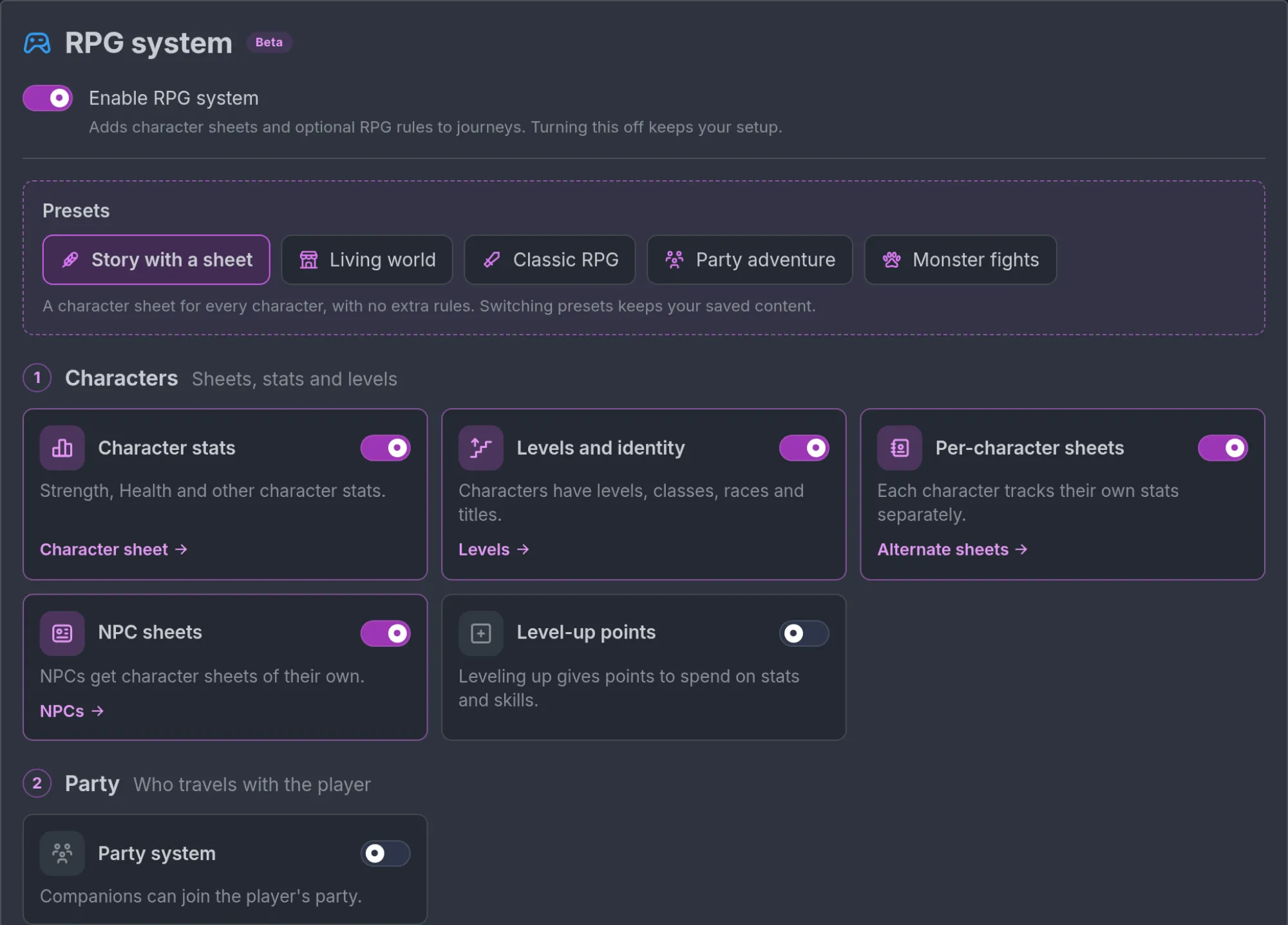
Turning the switch off keeps your setup. The sheet, the cards you turned on, the shops, the abilities, the enemies and every value you filled in stay stored, and they come back when you turn it on again. While it is off, the storyteller and the play screen ignore them, the RPG fields on characters, items and places are hidden in the editor, and the section is back at Game rules → RPG game system.
What a new world starts with
The first time you turn the switch on in a world that has no sheet yet, Imagina writes a default sheet with seven tables:
- Overview, with HP and MP.
- Stats, with Strength, Dexterity, Constitution, Intelligence, Wisdom and Charisma.
- Skills, Inventory, Bonds, Status and Affinities, five lists.
Change it with Edit character sheet in the Character sheet entry (the button reads Define Character Sheet while the world has no sheet).
A new world starts on the Story with a sheet set: Presets shows that chip highlighted, and the cards read like this.
- Character stats, Levels and identity, NPC sheets and, on an account with the RPG beta, Per-character sheets are on.
- Every other card is off: Level-up points, Party system, Shops and money, Training, Abilities, Location encounters, Enemies, Quests, Fights, Bars on stage and Statuses.
So a new world keeps the sheets and the levels, with none of the world or fight rules, until you turn a part on or click another set.
The LitRPG System pop-ups switch, in the System pop-ups entry, starts off, so progression stays in the prose until you turn it on.
Nothing else is set up for you. No shop, ability, enemy, encounter or status exists yet, and the Linked fields page has no row picked. Its Standard RPG button picks the standard rows in one click.
This happens only for a world with no sheet. Turning the system off and on again later writes nothing new, and a world that already has a sheet keeps it.
The Features page
Features is where the world chooses what it uses, one switch per piece. A switch never deletes anything: off, the storyteller and the play screen stop using that piece, and its data stays.
Presets
Under the main switch, a dashed box headed Presets holds five chips. One click on a chip sets the cards at once: on for the cards of that set, off for all the others.
All five sets turn on Character stats, Levels and identity and NPC sheets. They differ in the rest:
| Set | Its line | Also turns on | Turns off |
|---|---|---|---|
| Story with a sheet | "A character sheet for every character, with no extra rules." | Nothing else | Every other card but Per-character sheets |
| Living world | "Shops, trainers, abilities, quests and a party. No enemies or fights." | Level-up points, Party system, Shops and money, Training, Abilities, Quests | Location encounters, Enemies, Fights, Statuses, Bars on stage |
| Classic RPG | "Levels, a party, shops, training, abilities, quests, enemies and fights." | Level-up points, Party system, Shops and money, Training, Abilities, Location encounters, Enemies, Quests, Fights, Statuses, Bars on stage | Nothing |
| Party adventure | "Companions in a party, with levels, abilities, shops, quests and fights." | Level-up points, Party system, Shops and money, Abilities, Quests, Fights, Statuses, Bars on stage | Training, Location encounters, Enemies |
| Monster fights | "Location encounters, enemies, levels and fights. No shops." | Level-up points, Location encounters, Enemies, Fights, Statuses, Bars on stage | Party system, Shops and money, Training, Abilities, Quests |
The lines of Classic RPG, Party adventure and Living world do not mention quests, but all three sets turn Quests on. None of the lines mentions statuses, and Classic RPG, Party adventure and Monster fights turn Statuses on.
Living world is the set with a world around the story and no danger in it: shops, trainers, abilities, quests and a party, with no encounters, enemies, fights, bars on stage or statuses.
A set never touches Per-character sheets, and it deletes nothing. A piece it turns off keeps its vendors, abilities, enemies, quests or statuses, ready for when you turn the card back on.
The chip that matches the world's switches is highlighted, and its line is shown under the chips, followed by "Switching presets keeps your saved content." When the switches match no set, no chip is highlighted and only that line shows. On a computer, hovering a chip shows its line before you click.

A set is a starting point, not a mode. Nothing stops you from clicking Party adventure and then turning Enemies on by hand.
The four steps
The cards are grouped in four numbered steps, each with a title and a short hint:
- Characters: "Sheets, stats and levels".
- Party: "Who travels with the player".
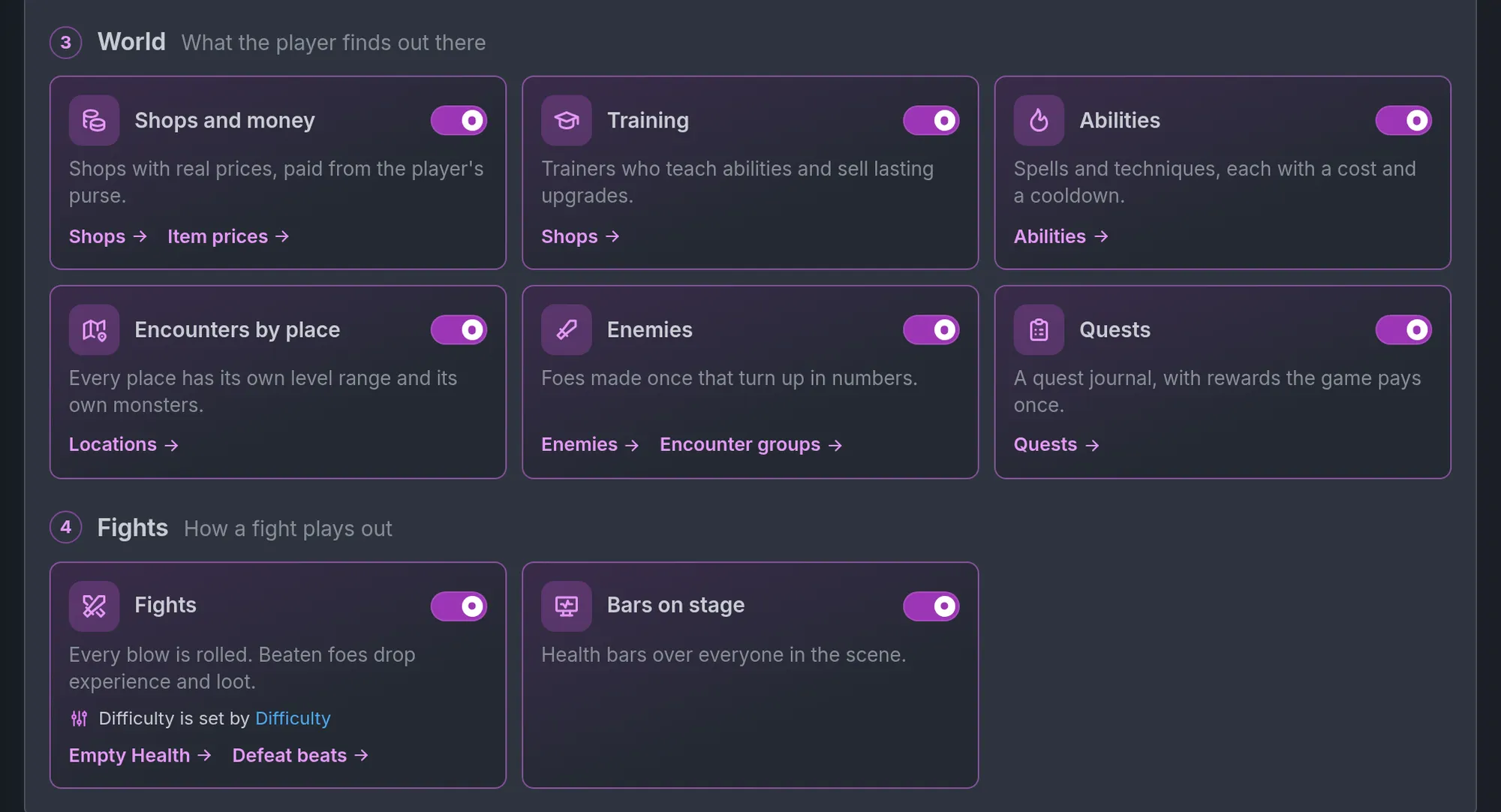
- World: "Shops, quests, abilities and locations".
- Fights: "Combat rules and stage bars".
Each card has a name, a switch and one line under it. Once a card is on, links at its foot open the place where that piece is set up.
| Step | Card | Its line | Needs | Links once on |
|---|---|---|---|---|
| 1 Characters | Character stats | "Strength, Health and other character stats." | Character sheet | |
| 1 Characters | Levels and identity | "Characters have levels, classes, races and titles." | Levels | |
| 1 Characters | Per-character sheets | "Each character tracks their own stats separately." | Alternate sheets | |
| 1 Characters | NPC sheets | "NPCs get character sheets of their own." | NPCs | |
| 1 Characters | Level-up points | "Leveling up gives points to spend on stats and skills." | Character stats and Levels and identity | Points per level |
| 2 Party | Party system | "Companions can join the player's party." | ||
| 3 World | Shops and money | "Shops with prices paid in your world's currency." | Shops, Item prices | |
| 3 World | Training | "Shops can teach abilities and sell permanent stat upgrades." | Shops and money | Shops |
| 3 World | Abilities | "Spells and techniques, each with a cost and a cooldown." | Abilities | |
| 3 World | Location encounters | "Give locations a level range, enemy types and encounter frequency." | Locations | |
| 3 World | Enemies | "Reusable enemy types that can appear in groups." | Enemies, Encounter groups | |
| 3 World | Quests | "A quest journal with one-time rewards." | Quests | |
| 4 Fights | Fights | "Attacks roll automatically. Defeated enemies drop Experience and loot." | NPC sheets and Character stats | When Health hits 0, Defeat story beats |
| 4 Fights | Bars on stage | "Shows health and resource bars over characters on stage." | NPC sheets | |
| 4 Fights | Statuses | "Effects like poison, stuns and blessings tracked on characters." | Statuses |
Three things to know about the cards:
- Several cards do nothing until you add content. Shops and money is silent until a vendor exists, Location encounters until a place has an encounter, Enemies until an enemy exists, Statuses until a status exists.
- Fights do not need Enemies. The card asks for NPC sheets and Character stats only.
- A link can leave the group. Levels, Points per level and When Health hits 0 open Linked fields. Alternate sheets opens Character sheet at the variants. NPCs opens your characters, Item prices opens Items, Locations opens Locations and Defeat story beats opens Story Beats.
Cards that need another card
A card that needs a piece that is off cannot be switched. It shows a chip instead, such as "Needs Shops and money" on Training or "Needs NPC sheets and Character stats" on Fights, and a button next to it:
- Turn on both when one piece is missing. It turns on that piece and the card.
- Turn them all on when more than one is missing. It turns on every missing piece and the card.
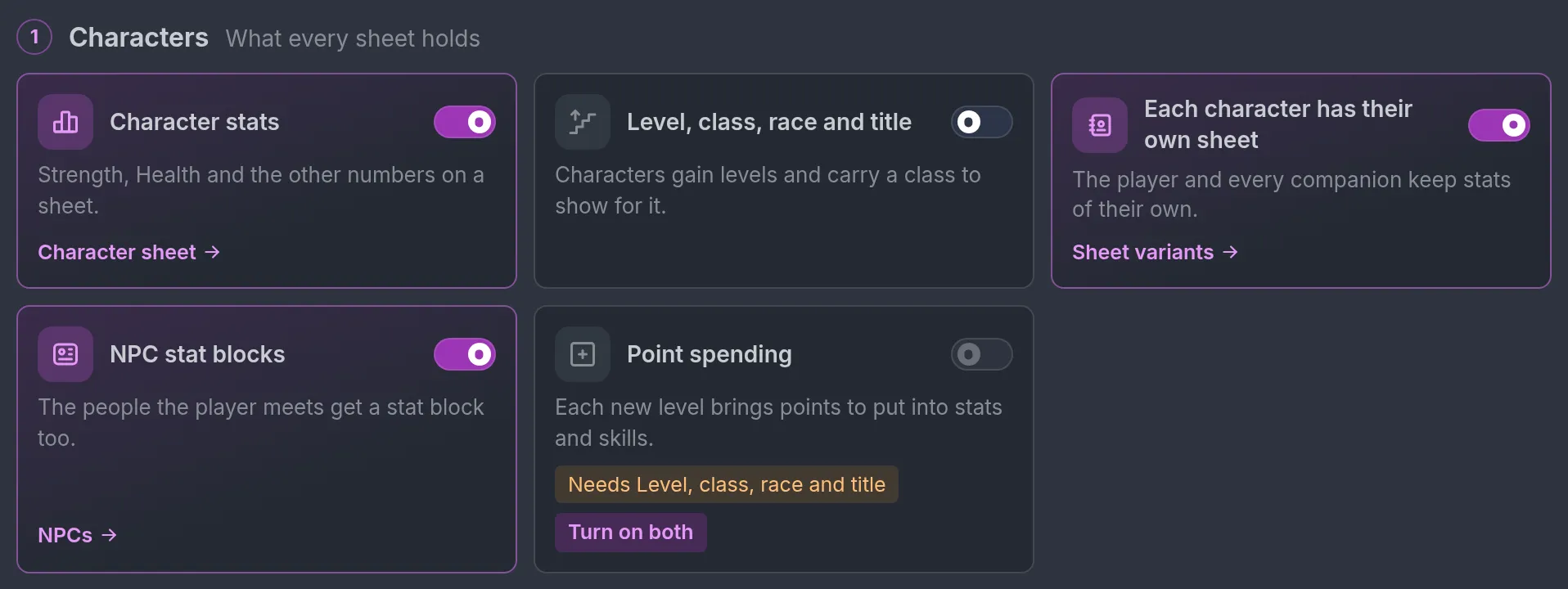
A blocked card shows only the chip and the button. Its links come back once it is on.
Two cards carry a chip of another kind, shown while the card is already on. Abilities can read "Add a Skills table to the sheet", which opens Character sheet. Location encounters reads "Turn on Locations" while Locations is off, and the chip opens Locations. These two point at something outside the cards, and the chip itself is the link.
Works-with lines
A card that is on can show one more line while a piece it works best with is off, followed by a link that reads Turn on and the name of that piece, such as Turn on Bars on stage:
- Training: "Ability training needs Abilities."
- Enemies: "Shows enemies in their own group on stage."
- Fights: "Shows health and resource bars over characters in fights."
- Quests: "Lets quest steps count defeated enemies."
- Statuses: "With Fights, statuses adjust rolls and skip stunned turns." and "With Bars on stage, statuses appear on character bars."
Nothing is blocked here: the card stays on either way. A set that leaves that other piece out does not show the line at all, so a world on Living world is not told to turn Enemies on for its quests.
Difficulty on the Fights card
While Fights is on, its card also holds the difficulty control. At first it is a button, Add difficulty setting. One click adds an entry named Difficulty to World Settings, with the options Story, Easy and Normal, and opens it. Once a setting carries fight rules, the card reads "Difficulty is set by" followed by the name of that setting, as a link. See Difficulty.
Pieces without a card
Some pieces have no switch of their own. They are reached through a card or live on the thing they belong to:
- Extra levels and the points paid per level are on Linked fields, reached from Levels and Points per level.
- Encounter groups are on the Enemies entry, reached from Encounter groups.
- Defeat story beats are in Story Beats, reached from Defeat story beats.
- Whether a character starts in the party is set on that character.
Where things are in the editor
The RPG game system group
With the group showing, the sidebar reads Essentials, World & lore, Story events, Game rules, RPG game system, then Images & display. The group is purple, with a gamepad icon, and holds nine entries in this order:
| Entry | What it holds |
|---|---|
| Features | The main switch, Presets and the cards. |
| Character sheet | The tables every character shares, with Edit character sheet and Go to characters. It also holds the Per-character sheets box, with the sheet variants, and Starting sheet customization. |
| Linked fields | Which row of the sheet each mechanic uses: Health, Energy, Level, Experience, Stat points, Skill points and Money. Also Levels and When the player's Health is empty. |
| Shops | Shopkeepers and trainers, with what they sell. |
| Abilities | Spells and techniques with ranks, costs and cooldowns. |
| Enemies | Stock foes that fight as numbered copies, then the Encounter groups card. |
| Quests | Jobs the player takes, with steps and rewards the game pays once. |
| Statuses | Conditions the game keeps on characters and counts down each turn, such as Poisoned or Stunned. See Statuses. |
| System pop-ups | The LitRPG System pop-ups switch and its settings: pop-ups in the story for level-ups, new skills and loot. See RPG mode and dice. |
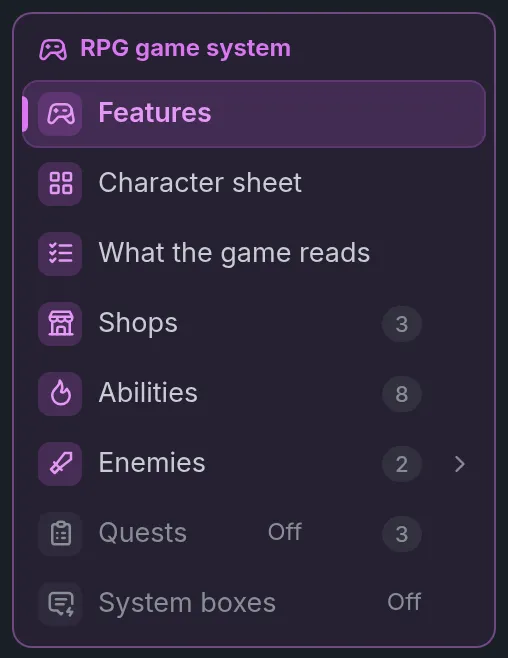
At the top of a section, a back link names its group, RPG game system.
Abilities, Enemies, Quests and Statuses are in this group and nowhere else. World & lore keeps Lore Book, Locations, Codex and Items. Game rules keeps Trackers, World Settings, Dice, World clock & date, Outcome System and Tables.
Dice are separate. The Dice section works with or without the RPG system.
Pieces that are off
An entry never leaves the group and never moves when you flip a switch. A piece that is off keeps its row, greyed, with the tag Off.
Opening the row of Shops, Abilities, Enemies, Quests or Statuses while its card is off shows a dashed card: "Shops and money are off", "Abilities are off", "Enemies are off", "Quests are off" or "Statuses are off", the line of its card, and a Turn on button. The Shops row belongs to the Shops and money card.
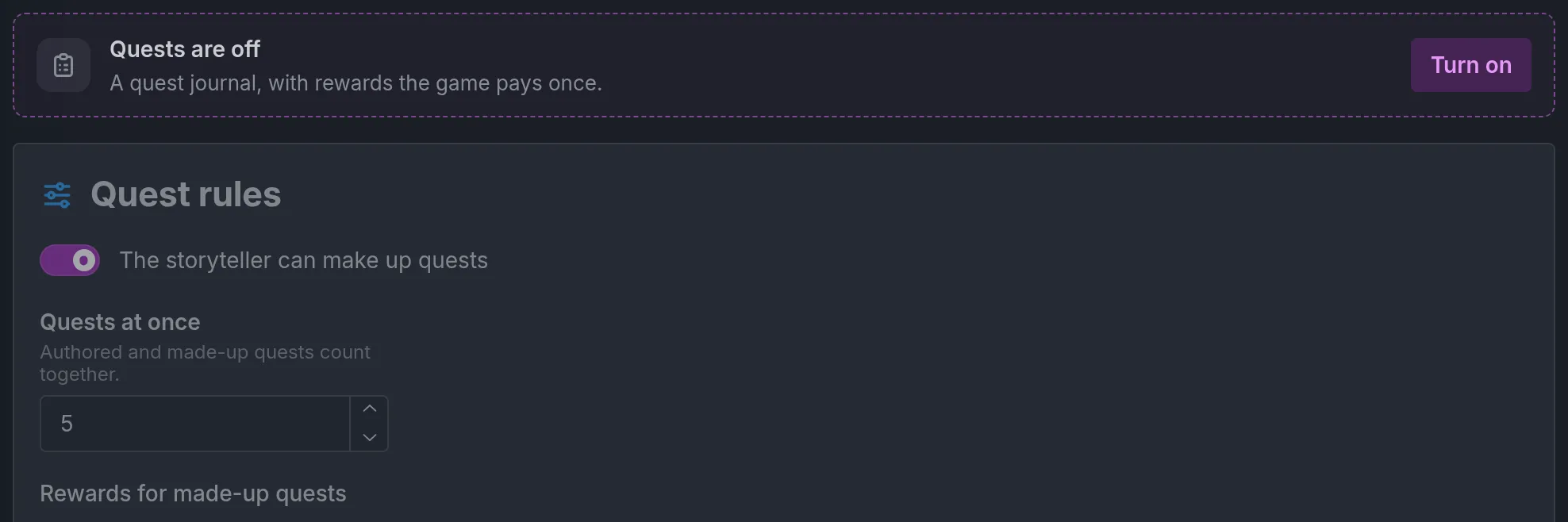
Under the card, the section stays as you left it, dimmed: your abilities, shops, enemies, quests or statuses are kept and can still be edited.
System pop-ups works differently. Its row is greyed Off while LitRPG System pop-ups is off, and the entry opens on that switch itself, with no dashed card.
Features, Character sheet and Linked fields are never marked off.
RPG fields on characters, items and places
Characters, items and places stay where they were, and each carries its RPG fields in a purple box with the same gamepad icon:
- On an NPC the box is titled "RPG game system" and holds the Sheet part, which folds. An NPC can also have Starts in the party, On a hit and Out of the fight, and an enemy has Battle sprites.
- On a player character it appears when there is a sheet to fill or the world has variants.
- On an item the box is titled Price, and a second one, When used, holds the statuses the item gives or cures.
- On a place it is titled Encounters.
Without the group
The group shows only to an author with the RPG beta, on a world with the system on. Everyone else keeps the older layout: one RPG game system section under Game rules, with everything stacked in it, and Abilities under World & lore. There, an Abilities section that is off shows a yellow line, "Abilities are off for this world, so the storyteller and players do not see them.", with the link Turn them on in RPG game system.
The older layout can also show for a moment while the editor is still loading your account.
Who has the beta
The Beta badge on the card title is shown to everyone, so it tells you nothing about your account. Turn the system on and look at the editor instead.
With the RPG beta, the purple group appears and Features shows the cards in four steps. One beta covers every piece in this guide.
Without it, the controls of the beta pieces are simply not shown. On a world that holds none of those pieces yet:
- The section stays under Game rules, with a box of four switches instead of the cards: Character stats, Levels and identity, NPC sheets and Level-up points.
- There is no Linked fields, no Per-character sheets switch and no shops.
- The Abilities, Enemies, Quests and Statuses sections are missing from the editor, and so are the Encounters group on places, the Price on items, the Party system switch and Starts in the party on characters.
The base system needs no beta: the switch itself, the sheet, stats, level, class, race and title, NPC sheets, LitRPG System pop-ups and Starting sheet customization are open to every author. Level-up points is visible to everyone. With it on, the window where points are spent opens for every player on a world that pays level-up points the game knows: built-in trackers, a per-level rate, a sheet per character or a row picked in Linked fields.
A world that already holds a beta piece keeps showing its control to an author without the beta, so the piece can be turned off or removed. A world with a vendor still shows its vendors, for instance. Adding is another matter: a save that would add or change a beta piece is refused unless the world's owner or the person saving has the beta. That covers the editor, Ask Ima, AI refinement and imports. Removing a piece is always allowed.
Whose account counts in play
Players never see the word beta. A piece that is closed for a journey is simply absent from it, and nothing is deleted.
One account is read in play: the world owner's. Every piece follows it. Shops and money, abilities, encounters, trainers, bars on stage, enemies and fights, the party, a sheet for each character, sheet variants and the rows picked in Linked fields work for every player of the world, as long as the owner has the beta and the world has them on. Nothing follows the player who started the journey, and a guest who joins it needs nothing either.
Say the owner of The Tollroad Wardens has the beta and a player without it starts a journey. Odile's Remedies opens as a shop, the Tollroad shows its enemy levels, Bandits come in and the game rolls the fights. Brannoc is in the party, Mara Vey plays on her Mage sheet, and the window where points are spent is there.
An owner who loses the beta closes the beta pieces for every journey of the world. Besides the shops, abilities, encounters, trainers, bars on stage, enemies, fights, quests and statuses, along with extra progression tracks and beats on fights, the world then plays as if Party system, Per-character sheets, the roles, the built-in trackers and the per-level rates were off.
The owner's account is read each time a journey loads. When it gains or loses the beta, journeys already under way follow on their next turn.
How the pieces fit
- The sheet is the center. A world has one sheet, the tables every character shares. With Per-character sheets on, each character holds their own values, and a variant can change the sheet for a class: Mara Vey is on the Mage variant, Brannoc on the Knight variant. See Character sheets.
- Roles say which row is what. Linked fields has seven: Health, Energy, Level, Experience, Stat points, Skill points and Money. A row shows only when the cards that use it are on. Once a role is set, no other piece reads a row by its name. A shop takes Gold because Gold is the Money role. Mara's abilities cost Mana and Brannoc's cost Stamina, because each is the Energy row of their variant. Without per-character sheets, a role points at one of the player's trackers instead.
- Levels grant points. Points are earned on level-up and spent on stats and skills, through the Stat points and Skill points roles. See Levels and points.
- A world can have more than one level. Up to four levels per world, each with its own Experience earned its own way. The Tollroad Wardens has Warden rank next to Level: Level rises with fights and quests, Warden rank with keeping the road and its travellers safe. See Progression tracks.
- The party says who the rules act on. With Party system on, party members get a sheet with real values and caps, earn experience, hold points and appear in the party screen. In a journey played together, each guest's character is a member by definition. Everyone else keeps a loose sheet the storyteller writes freely. See Party.
- Shops sell items for the Money role. Odile's Remedies sells herbs and tonics for Gold. See Shops.
- Trainers are shops that teach. Kell's Training Yard teaches Frost Shard and sells upgrades like +2 Strength. Lessons in abilities also need Abilities on. See Trainers.
- Abilities cost Energy. See Abilities.
- Encounters give a place a level range. The Tollroad is Dangerous, with enemy levels 3 to 7. The storyteller is told how the player's level compares with that range. When several people play together, the strongest player counts. Companions do not. See Encounters.
- Enemies are templates the story copies. A Bandit the storyteller brings in on the Tollroad is a copy with a sheet of its own, and its level follows the player's, kept inside the place's range and the enemy's own range. See Enemies.
- Encounter groups are enemies that turn up together. Each dangerous place picks its groups as Common, Uncommon or Rare. The storyteller decides when an encounter happens, and the game rolls which group and how many. On the Tollroad, the Toll gang (2 to 4 Bandits) is Common and the Boar sounder is Uncommon. See Encounter groups.
- Quests fill a quest journal. It holds quests you write, with steps the game checks and rewards it pays once, and quests the storyteller makes up from your rules. Break the Toll Gang sends Mara to the Tollroad to beat three Bandits and report back to Pell. See Quests.
- Fights read Health. The game rolls the blows, and a beaten enemy gives experience and loot. See Fights.
- Statuses are conditions the game counts down. Poisoned, Stunned or Blessed come from the world's own list. Abilities, enemies, items, beats and the storyteller give and remove them, and the game applies what they do each turn. See Statuses.
- Defeat and respawn are beats. They sit in the purple RPG game system group of the beat editor: a player character is defeated, End the fight, a defeat scene per character, a respawn point. When Mara is defeated, the fight ends as lost, she loses a life, and she wakes at the respawn point, the Wayside Shrine. See Defeat and respawn.
- Difficulty bends the fight rules. A setting can let a journey have its fights told by the story instead of rolled, or change the damage the party takes or deals. See Difficulty.
- Older worlds. On an account with the beta, a world made before November 18, 2026 shows an Upgrade with Ima button in the Character sheet entry, inside the Per-character sheets box, while the system is on and that switch is off. See Upgrade with Ima.
- Several players. In a journey played together, each guest's character plays on the player's side, as a party member when Party system is on, and the host keeps what is shared, such as the party's one bag. See Playing together.
What the storyteller decides and what the game settles
The storyteller starts things. It opens a shop, grants a level, has a character use an ability, brings an enemy in, decides when an encounter happens, and narrates the result.
The game settles them. It works out the price, the points and the cost of the ability, rolls which encounter group turns up and how many, rolls the blows of a fight, checks the steps of a quest and pays its rewards once, and refuses what the rules do not allow. It also keeps a record of each turn, so the storyteller cannot write a number by hand that the game owns, such as what a purchase cost or what an ability spent.
Common mistakes
- Reading the Beta badge as your access. Every author sees it. A system that is on with no purple group in the sidebar means your account does not have the beta.
- Clicking a set to add one piece. A set turns off every card that is not on its list, except Per-character sheets. Party adventure on a world that uses trainers and enemies turns Training, Location encounters and Enemies off. Nothing is deleted, but turn the one card on by hand instead.
- Expecting a card to do something on its own. Shops and money needs a vendor, Location encounters needs a place with an encounter, Enemies needs an enemy.
- Leaving Linked fields empty. A new world starts with no row picked. With no Money role set, shops cannot sell. Press Standard RPG, then pick Energy by hand: it is the one role the button leaves empty.
- Turning the system off and on to reset the sheet. The default sheet is written only when the world has no sheet. If the world has one, the switch only hides and restores your setup.
- Looking for Abilities under World & lore. With the group showing, Abilities, Enemies, Quests and Statuses are entries of RPG game system.
- Reading a greyed row as an empty one. Off means the piece is not used in play. Its vendors, enemies or quests are still stored.
- Expecting a party without the switch. A world has no party until you turn on Party system on Features, in step 2, new or old alike: a new world starts without it.
- Waiting for a card to be on already. A new world starts with only the sheets and the levels on: Level-up points, Party system, Shops and money, Training, Abilities, Location encounters, Enemies, Quests, Fights, Bars on stage and Statuses are off until a set or a click turns them on.
Frequently asked questions
RPG mode and dice
Learn how to use RPG mode to add stats, gear, abilities, and dice to your Imagina world. Covers character sheets, LitRPG systems, and how to keep mechanics in service of story.
Character sheets
Learn how each character of your Imagina world gets a sheet of their own, with sheet variants, the rows the game reads as Health, Energy or Level, and the RPG game system group on character pages.