Beats and story arcs
Learn how to use story beats and story arcs to structure your Imagina world. Control when events fire, reveal information in the right order, and keep cause and effect intact across a long journey.
Instructions alone cannot keep every promise. You can tell the storyteller "the mentor dies in act two", but without something that enforces it, the story might forget, rush it, or never get there. A beat ties a story moment or a lasting change to a condition you can check, such as finding four clues, and an arc chains those changes into stages. That is how key moments land when they should and information surfaces in the right order.
This is the most complex feature set in Imagina, and the one with the steepest learning curve. The page starts with why beats exist and when you need them, then teaches the mechanics. Start simple: one or two beats for the moments that matter most, before you build elaborate structures. This page assumes you know instructions and trackers.
What are beats and story arcs?
A story beat is a conditional story event. You define what must be true for it to fire (its conditions) and what happens when it does (a note to the storyteller, a lasting change to the story's context, and effects on the world's state). The engine checks every turn: are the conditions met? If so, the beat fires, once, unless you make it repeatable.
A story arc is a staged plotline. It chains beats into stages, where each stage's instructions replace the previous stage's, so the storyteller's brief evolves as the story progresses: peace, then invasion, then resistance, then aftermath.
A concrete example: a mystery world where the player investigates a murder. An Evidence tracker counts the clues they collect. A beat fires when Evidence reaches 5. It reveals a secret lore entry with the killer's identity and swaps the "Investigation" instruction block for a "Confrontation" one. Without the beat, the storyteller might reveal the killer too early, too late, or never.
Beats do three jobs, and the rest of this page takes them in turn:
- Guarantee key moments (the building blocks).
- Control information so the storyteller cannot spoil what it does not yet know.
- Enforce cause and effect together with trackers.
When do you need beats?
If your story has moments that must happen at the right time, or information that must be revealed in the right order, you need beats. If the storyteller can handle it through instructions alone, you probably do not.
Genres that benefit:
- Mystery: gated revelations, clue chains, a final reveal that fires only when the player has earned it.
- Quest-driven adventure: act structure, staged objectives, a villain's plan advancing on a timeline.
- Romance progression: relationship milestones that change how a love interest behaves.
- Horror: escalating dread, the moment the threat becomes real, the point of no return.
- Progression, isekai, LitRPG: tier transitions, power shifts, world-state changes at key levels.
- Heist and thriller: planning, execution, and escape phases with distinct tones and rules.
When you can skip them:
- Sandbox: the player sets their own goals and the storyteller responds freely.
- Slice of life: the charm is in the lack of structure. Beats would feel artificial.
- Freeform exploration: if the order of events does not matter, beats add complexity without value.
Beats: the building blocks
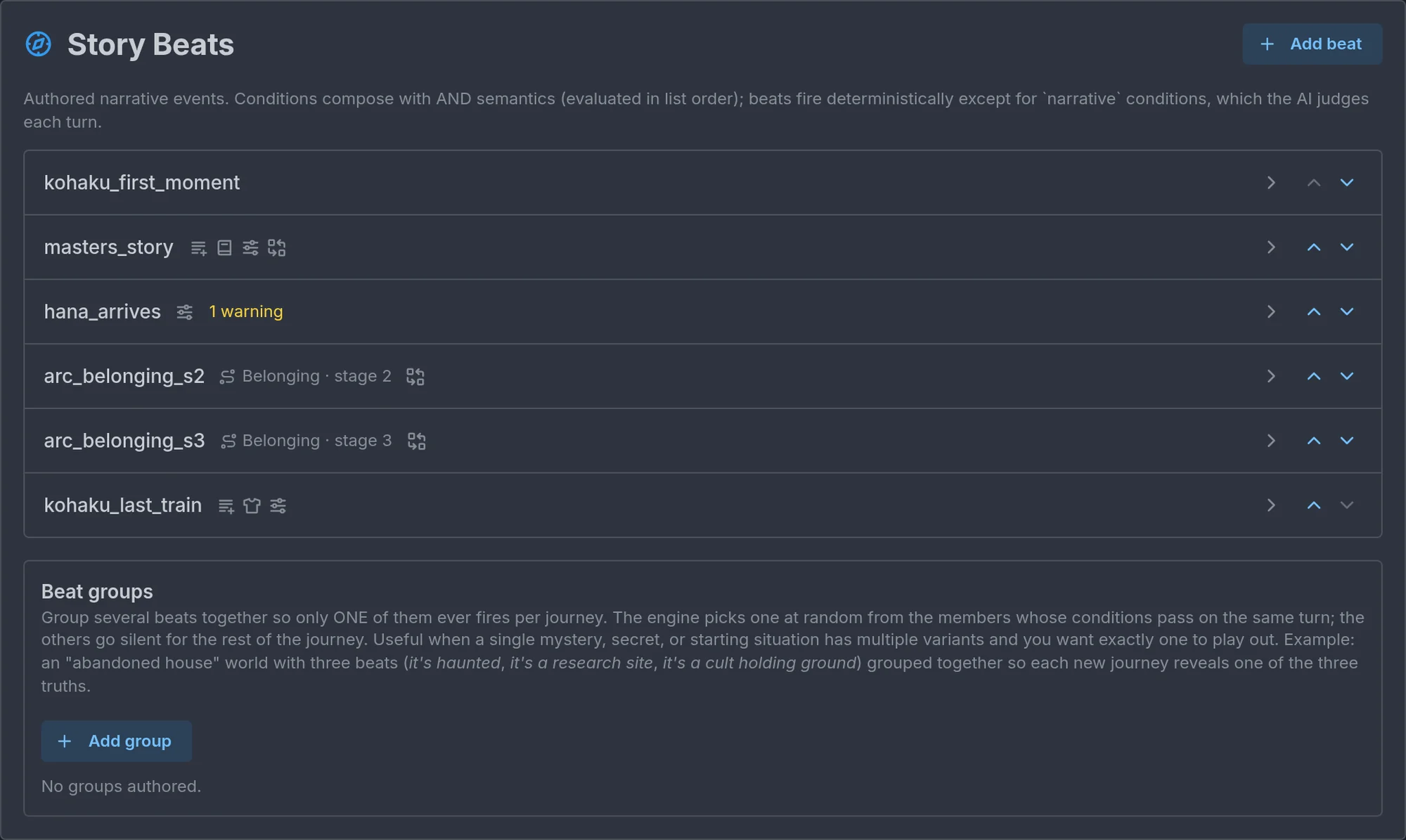
Beats live under Story events → Story Beats. The labels below are the editor's own, so you can match what you read here to what you see on screen. The list shows one row per beat, with up and down arrows to reorder them, and once a world has more than eight beats a search box appears above it that filters by id, text, arc or condition.
The parts of a beat
- Id. A stable name, unique within the world. New beats get
beat_1,beat_2, and so on. Rename them to something you will recognize, likeact1_storm_breaks, because other beats reference them and the Debug panel lists them by id. - One-shot. On by default: the beat fires once. Turn it off and set Cooldown turns to let it fire again after a minimum gap.
- Only if NSFW is on. Off by default. Turn it on and the beat exists only in journeys where NSFW content is on: for everyone else it never fires and its effects never apply, so a spicy scene can sit in a world everyone plays. The shared rule, and the other items that carry the switch, are in Only if NSFW is on.
- React on the same turn. Off by default. Turn it on and a beat waiting on a tracker, a table row, a location or the world clock is checked again right after the storyteller writes the turn, so its effects land on the turn of the change rather than the one after. Not available with a random chance, an AI-judged narrative moment, a Location set to enters or leaves, or a forced roll. See Timing below.
- What the narrator hears: Describe to AI. An optional one-time note the storyteller sees on the turn an automatic beat fires, then never again. Use it for the moment itself: "The king's expression hardens as he reads the letter. He does not finish it." It supports macros such as the player's name. A beat with a narrative condition is fired by the storyteller while it writes and does not receive this note, so put the essential moment into the condition's description instead.
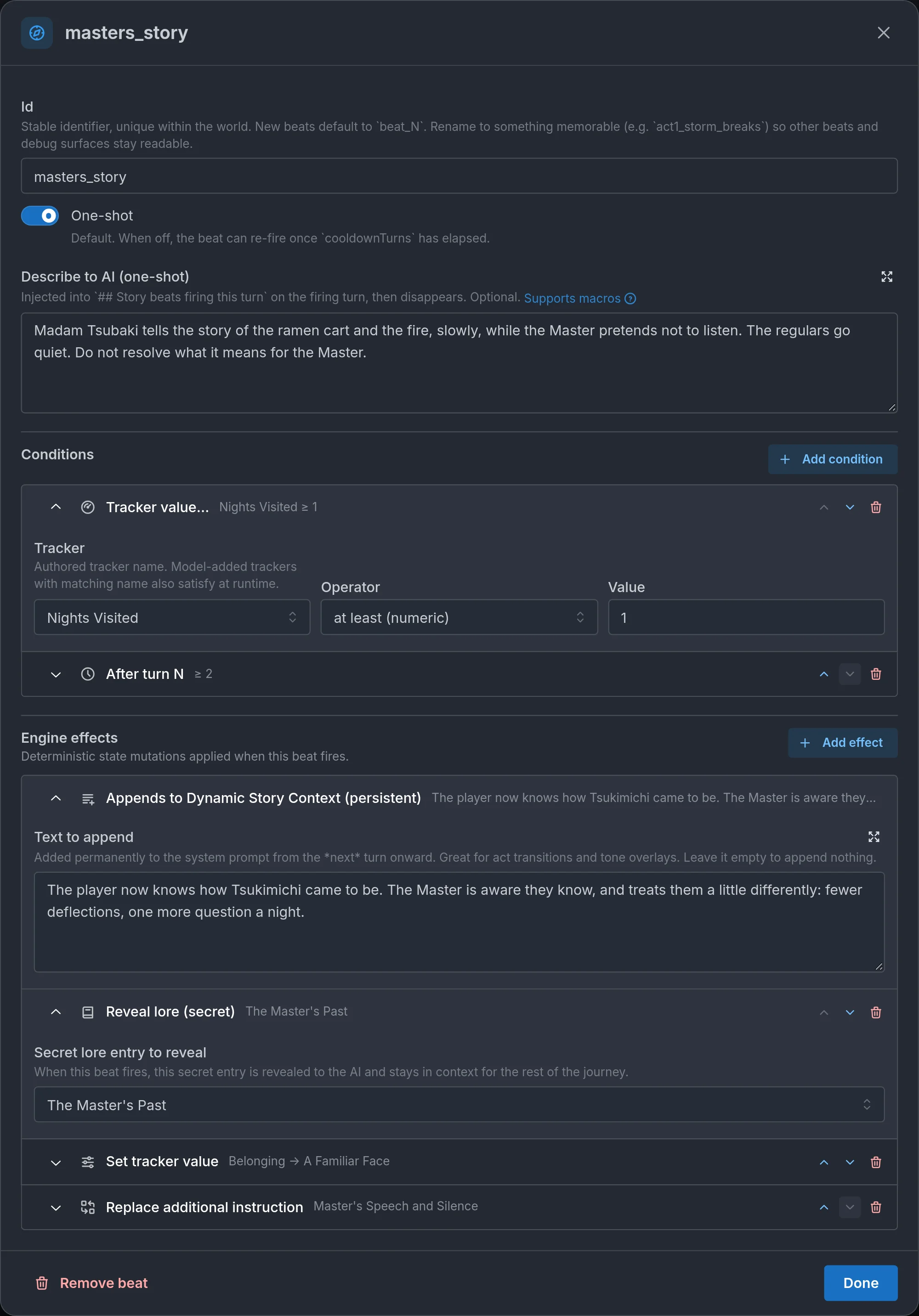
- When it fires: Conditions. Every condition must be true for the beat to fire. With no conditions, the beat fires on turn 1.
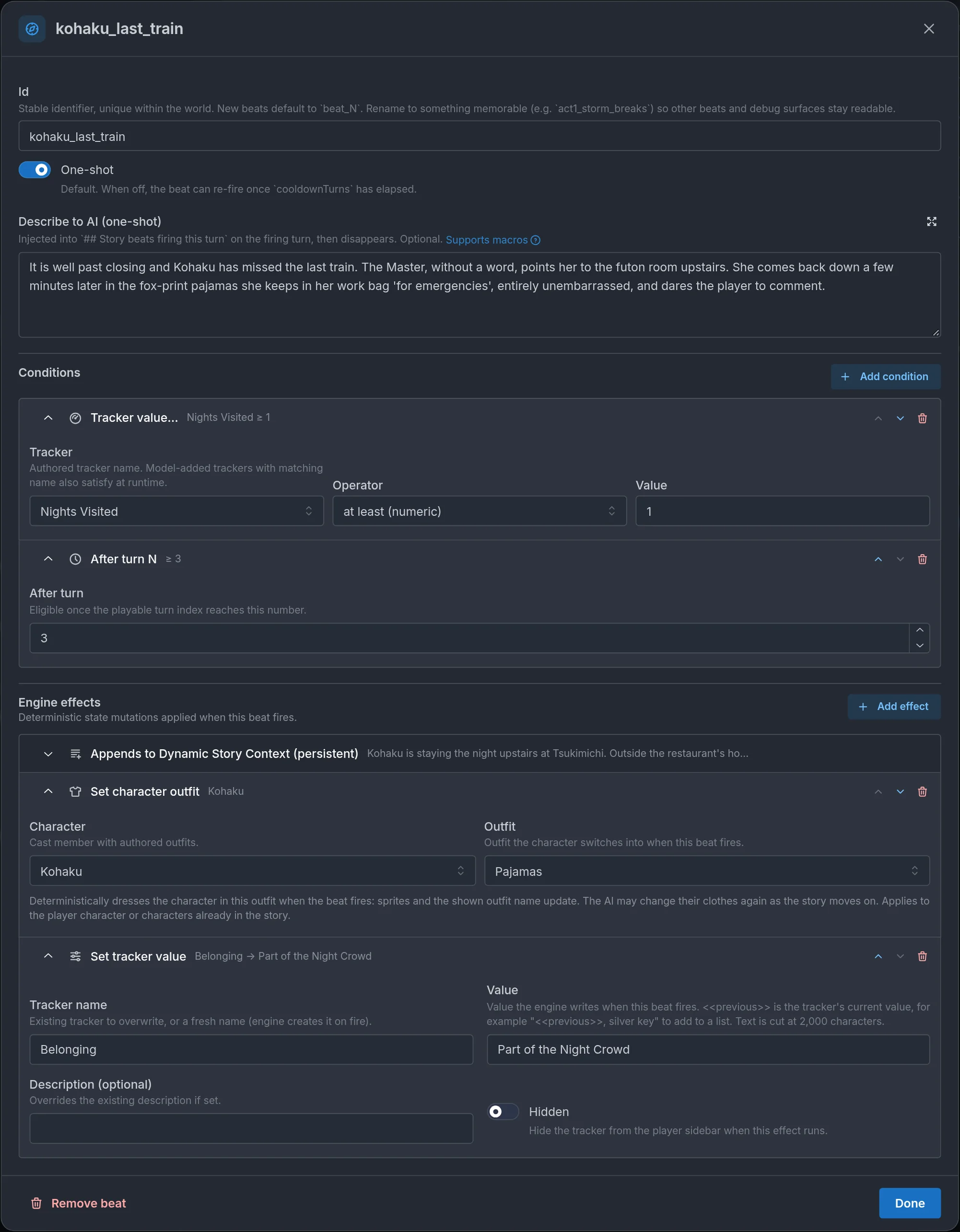
- What changes: Engine effects. Optional deterministic changes applied when the beat fires. With no effects, the beat only injects text. Effects run in the order listed.
- What stays: Appends to Dynamic Story Context. The first row of Engine effects, always there and pinned in place: it cannot be moved or removed. Open it to write optional text added permanently to the storyteller's context from the next turn onward. Great for act transitions and tone overlays: "The king is dead. The court speaks in whispers now." Leave it empty and it does nothing.
Conditions and effects are collapsible rows. Each row shows its icon, its kind, and a one-line summary of its settings, such as "Nights Visited ≥ 1" or "Belonging → A Familiar Face". Click a row to open and edit it. The arrows move it up or down, and the bin removes it, except for the pinned context row, which stays first.
Conditions you can use
Add as many as you need. They all have to pass together.
- Turn number: compare the journey's turn count with a number. Current turn is offers at least (≥) (the default: from that turn on), after (>), exactly (=), at most (≤) and before (<), and the collapsed row shows the symbol and the number ("< 2"). Turns count the journey's playable turns, the first being turn 1. It is a gate like every other condition, not a trigger: an exactly beat whose other conditions fail on that turn never fires, and a before or at most window that has passed cannot open again. Uses: before 11 keeps a hint or tutorial beat to the first ten turns, exactly 1 is for the very first turn, and at least 5 with at most 10 (two Turn number conditions) makes a window. It works inside a Match any of group too.
- World clock...: check the in-story date and time kept by the world clock. The world clock is offers at or after and before, each with a Day number and a Time (24-hour, like 18:30, empty for midnight): "at or after Day 3, 18:00" passes from that moment on, "before Day 3" until midnight starting Day 3. on day takes a Day alone and passes at any time during it. between (time of day) takes From and Until times and passes on any day while the time of day is in the window, Until excluded; an Until earlier than From runs past midnight, so From 22:00 Until 05:00 is the night. The help line under the fields shows when the clock starts and how the player reads the moment in the world's own format ("Day 3, 6:00 PM"). The clock is read when the player acts and moves at the end of a turn, so a beat waiting for 18:00 fires on the turn after the one that took the clock past it, the same one-turn lag a tracker has. Time only moves forward: once a before moment or an on day day is behind the clock, the beat can never fire. A repeatable beat on "between 22:00 and 05:00" passes every night turn, so give it a cooldown or a second condition; a one-shot one fires on the first night turn. Uses: a festival on Day 5, a shop closed between 20:00 and 08:00 (between for anything daily, since at or after stays true forever), a creature that only stalks the player at night, a deadline that closes at Day 3, 12:00 with before. It works inside a Match any of group too. It is only offered while the world clock is on (greyed out otherwise). Turn the clock off later and the condition stays, with an error on it and a warning on the beat; saving still works, and in play it never passes.
- Player character is...: only when the player picked one of the listed characters.
- Tracker value...: compare a tracker with equals, does not equal, at least, at most, exists, or missing. This is the most common trigger. A value the storyteller changes during a turn is seen on the next one (a clock tracker is the exception), see Timing below.
- Table row...: check a row of a world table or of the player's character sheet. Pick Where (Player's character sheet or World table). With the sheet, Whose sheet chooses the player's character (the default) or one of the world's NPCs, so a beat can check what a rival carries or how far a companion's quest has come. An NPC the story has not met yet has no rows, so only is missing passes for them. Then pick the Table: one of the world's dynamic tables, or one of the sheet's lists (Inventory, Skills, Bonds, Status, Affinities, or a list you named, such as Quests). Fixed stat tables are not offered, since their rows are trackers: use Tracker value for those. Name the Row (a bonds table autocompletes the world's characters). Leave Column empty to test the row itself with exists or is missing. Name a column and the operators become has a value, is empty, equals, does not equal, at least and at most, with a Value for the comparisons (a Choice column offers its options). Comparisons work like tracker comparisons: equals ignores case and surrounding spaces, at least and at most compare numbers. Hidden rows count, an inventory item with no quantity set counts as 1, and a row that does not exist only passes is missing. A row the storyteller writes during a turn is seen on the next one, the same one-turn lag a tracker has. Three uses: the player carries the Moon Key (sheet, Inventory, row Moon Key, exists), a quest is done (Quests, row "Find the Moon Key", column Status, equals Done), the player has enough gold (Inventory, row Gold, column Quantity, at least 100). It works inside a Match any of group too.
- Location...: check where the scene is. Pick When the player (enters, leaves, or is at) and the Location, one of the world's seeded locations, with sublocations listed under their parent ("Kitchen (in Inn)"). The story moves the scene at the end of a turn, so enters and leaves pass on the turn after the move, the same one-turn lag a tracker has, and the journey's starting location counts as entered on the first turn. is at passes every turn the player is there, so it cannot be a beat's only condition: pair it with a tracker, After beats fired or a narrative moment, or use enters for the arrival itself (a beat with nothing but is at shows a warning and never fires). A place counts as inside its parent, the one named in its Within field: with a Kitchen inside an Inn, "is at Inn" passes in the Kitchen, and "enters Inn" passes when the player walks in from the street, even straight into the Kitchen, but not when they go from the Kitchen to the common room. A room the story invents on its own counts as inside the place it is named after. Uses: an ambush when the player enters the bridge, a shopkeeper's greeting the first time they walk into the shop, or "is at Chapel" with "Dread at least 60" for a scene that only happens there once the fear has built. If the world turns location tracking off, these conditions never pass (the editor says so). enters and leaves work inside a Match any of group. is at does not: "is at the Inn or anything else" passes every turn spent at the Inn, which is the same as using it alone, so the editor does not offer it inside a group, and one already there shows a warning and is ignored.
- Random chance per turn: a percentage rolled each turn, only once every other condition already passes.
- After beats fired: after another beat (or any, or all, of a list) has fired. This is how you chain acts.
- Not after beats: only if a listed beat has not fired. Branch exclusion.
- AI-judged narrative moment: the storyteller judges whether the player's action matches a description you write, phrased from the player's perspective: "when the player decides to confess their feelings to Claire." Use it sparingly, and for moments that depend on what the player does rather than on a number.
- Match any of (OR group): a group where any one option passing is enough. The beat's other conditions still apply on top. Groups cannot contain a narrative condition.
Timing. Every condition except the narrative moment is checked by the engine once per turn, before the storyteller writes, against the state as it was when the player acted. The storyteller changes that state while it writes: tracker values, table rows (the sheet's lists included), the scene's location, and the world clock, which moves at the end of the turn. Beats only see those changes at the next check, so a beat waiting on one of them fires the turn after the change, once the player has acted again. The player picks up the cursed amulet on turn 8, the storyteller writes the Inventory row during turn 8, and "Inventory has Cursed Amulet" fires on turn 9: to the player it can look as if the game did not notice at first. Turn number, Player character is, Random chance, After beats fired and Not after beats do not lag, and neither does a clock tracker, since the engine ticks clocks before it checks beats. The editor shows a grey note under a beat's Conditions when it waits on something that lags, pointing at the two fixes below (turn on React on the same turn, or describe the action in an AI-judged narrative moment); it goes away once the switch is on. It is information, not a warning: a one-turn delay is fine for most act transitions and for thresholds that build up over many turns.
To react on the turn of the change, turn on React on the same turn on the beat. It is still checked before the turn as usual; in addition, once the storyteller has written the turn, it is checked again against the state that turn left. If it passes then, it fires right away, and its engine effects (trackers, table and sheet rows, reveals, achievements, cards, scene images, player prompts) land on that same turn, so the player sees them with the turn that caused them. The player picks up the cursed amulet on turn 8, and the curse's effects, say a Cursed tracker and a character card, show on turn 8. What cannot be part of that turn is the beat's text: the prose is already written when the beat fires, so the storyteller is told at the start of the next turn that the beat happened at the end of the previous one, and opens that turn with it. Turn 9 starts with the amulet burning cold against the player's skin. While the switch is on, an orange note under Describe to AI reminds you of this: write the note as a consequence the story can pick up, not as a scene that has to happen right now. Persistent context and instruction or narration changes from such a beat apply from the next turn too.
Some conditions and effects cannot work this way, and the editor greys them out while the switch is on: Random chance per turn (it would be rolled twice a turn), AI-judged narrative moment (such a beat is already fired by the storyteller on the same turn), Force a dice roll (a forced roll has to stop the turn before the attempt is written), and the enters and leaves forms of a Location condition, which compare with where the player was at the check before the turn. A new Location condition then defaults to is at, and Location is not offered inside a Match any of group at all. A beat that already has one of these keeps the switch but ignores it, and shows a warning saying why. So "the player arrives somewhere" with enters cannot react on the same turn: use is at together with another condition, the tracker or After beats fired that matters, to fire on the turn they get there.
When the moment itself has to be narrated in the same response, use an AI-judged narrative moment instead, describing the action itself in place of the condition that waits for its result. The storyteller judges it while it writes, so the beat's state effects land that turn, and its lasting text or instruction changes apply from the next turn. For automatic beats, persistent context applies from the firing turn.
Effects you can apply
- Set tracker value: write a value to a tracker, creating it if needed. One field takes every form: an absolute value ("6"), a delta ("+5", "-3"), a new current and max for a bar ("12/35"), or a scale step ("Warm"). Create the tracker with the right display type first, because a tracker created by a beat holds plain text. In the value,
<<previous>>stands for the tracker's value just before the write (empty for a tracker that does not exist yet), so<<previous>>, silver keyturns "torn map" into "torn map, silver key" every time the beat fires. It is meant for text trackers, since numeric ones already take deltas like "+5". A text value written this way is cut at 2,000 characters: when the value starts with<<previous>>the oldest text at the start is dropped, otherwise (as insilver key, <<previous>>) the end of the previous value is, and the cut side is marked with "…". - Retire tracker: remove a tracker from play.
- Reveal tracker: show a tracker set to Revealed later on the player's sheet from this turn on, without changing its value. Pick the Tracker. Use it when the story names the thing before its value has moved: a priest recognizes the curse, a poster puts a price on the player's head. It does nothing on a tracker that is already visible, or on a hidden one. See Trackers that appear later.
- Replace additional instruction: swap a named instruction block's content for the rest of the journey.
- Alter character: permanently change an NPC's or player character's description, physical description, or example dialogue, by replacing it or adding on top. Pick the Character, the Field and the Mode, then write the text. The first entry in the Character picker, <Current player character> (where new effects start), targets whoever the player is playing when the beat fires, whatever name they gave the character or a beat gave it since, so a transformation arc on a world with several player characters needs one effect instead of one beat per character. With it selected, the Field picker offers Description and Physical description only. In multiplayer it is the host's character; to alter the character a friend plays, pick that character by name. Built for transformation arcs. Example dialogue is the character's sample voice lines, one per line, and the storyteller matches that voice from then on without quoting them: a curse that makes a knight speak in riddles, or a shy NPC who finds their confidence. The dialogue change is skipped for the character the player is playing, since the storyteller never voices them, and lines the player rewrote in the journey's cast editor win over the beat. Pair it with a Describe to AI note so the turn narrates the change.
- Set character outfit: dress a character in one of their authored outfits. Pick the Character, any cast member with authored outfits (player characters and NPCs), then one of their outfits in Outfit. It applies to a player character, or to an NPC already in the story (an NPC the story has not brought in yet is left alone). The first entry in the Character picker, <Current player character> (where new effects start), targets whoever the player is playing when the beat fires, and in multiplayer the host's character. With it selected, the Outfit list shows the outfits of every player character, merged by name (two characters each with a "Casual" outfit show one "Casual"), and the outfit is matched by name on the character being played, capitalisation aside. A character with no outfit of that name is left as they are, so give every player character an outfit with that name: the editor warns and names the player characters missing it. When it fires, their sprites and the outfit name shown update. The story can dress them again later.
- Rename character: give an NPC a new name from the turn the beat fires. Pick the Character and fill in New name. Their portrait, gallery, sprites and outfits carry over, along with their role, sample voice lines and authored stats, so you do not need to reattach anything. The storyteller uses the new name, as do the cast list, character sheet and bond row, without forgetting who they were. Pair it with a Describe to AI note for the moment the name changes on screen. Who knows them by which name stays with the fiction. You can rename them again later, targeting their authored or current name. The effect does nothing if the new name is blank, unchanged or already used by another character in the journey, or if a guest is playing the target character in multiplayer. It never targets the character the player is playing: use Rename player character for that.
- Rename player character: give the character the player is playing a new name or title for the rest of the journey: the story, their character sheet and the name the storyteller uses, which is told the old name now means the new one. Fill in New name. In it,
<<player_name>>stands for the name the character goes by when the beat fires, so<<player_name>> the Ashenbuilds a title on the player's own name ({{user}}works the same). Portraits, outfits and Player character is... conditions keep working, since they follow the character the player picked, not the name. Replace a name the player chose is off by default: a fixed new name (one without<<player_name>>) is then skipped when the player renamed their character before starting the journey, so their choice stands. Turn it on and the new name always applies. The switch is disabled when New name uses<<player_name>>, and absent under a prompt's When the player answers and its answer cases, because the intended use is letting the player choose: add a Request player input (or a Present choice to player listing titles) and put this effect under When the player answers with New name<<answer>>. The answer is then used even if the player named their character at the start, since they are choosing again. Names are trimmed to one line and cut at 60 characters, and a blank or unchanged name does nothing. In multiplayer only the host's character is renamed and friends keep their characters' names. As an answer effect it only applies when the host is the one answering: a friend's answer skips the rename and the prompt's other answer effects still run. Pair it with a Describe to AI note so the turn shows the moment. Rename character still covers NPCs only. - Unlock character: bring a hidden character into the story. Pick the Hidden character. From the turn the beat fires they are part of the cast like everyone else, not yet met by the player, so pair it with a Describe to AI note that has them actually show up. The editor warns when the character is not hidden: they are already in the story, so the effect only matters if a setting option left them out. Hidden characters are set up on the NPC, see NPCs.
- Transform character: turn a character into another authored NPC, keeping their story so far. Pick the Character and the New form, usually a hidden NPC. They keep their relationship with the player, their memories, what has happened to them and whether the player has met them, and take everything authored on the new form: description, appearance, portrait, images, outfits, voice lines and stats. On RPG worlds, if the character's stat block is already in play and the new form has one, resource bars with the same name on both forms keep how full they were (30/100 HP becomes 60/200 on a form with 200), so give both forms the same resource names. Status effects carry over. A stat block not revealed yet shows the new form's when it is. Turn on Take the new form's name to rename them. Leave it off and they keep the name they go by. The storyteller is told the transformation happened, and portraits the player generated for the old form stop overriding the new form's art. Pair it with a Describe to AI note so the change happens on screen. A form is held by one character at a time, and transforming back later (a second beat with the original entry as the new form) works. The player character is never transformed this way, and neither is a friend's character in party play. The editor warns when the new form is not hidden: if the story has already brought that character in, the transformation does nothing.
- Write table row: write a row to one of the world's dynamic tables, deterministically. Pick the Table, name the Row, and fill in one field per column. Filled columns are set and blank ones keep their value, the same way the storyteller's own tool works, so a row is added when missing and patched when present. Remove the row instead of writing it takes it off the table, and Player visibility leaves the row as is, hides it, or shows it to the player. Use it to open a quest, mark it done, or take a bounty off the board without relying on the AI. Each text column has a small ± button inside its field. Turn it on and the field reads Adds to the current value and takes a signed number (+50, -1), added to the first number in the cell with the text around it kept: "100 gold" with -25 becomes "75 gold", "Lv.2" with +1 becomes "Lv.3". An empty cell counts as 0, a non-numeric amount is flagged, and Choice columns cannot add. The editor warns when the table does not exist or is not dynamic (the effect then does nothing), and flags columns the table does not declare. See Tables.
- Write character sheet row: the same thing on a character sheet: give, update or take away an item, a skill, a bond, a status, an affinity, or an entry in a list you named, or set a fixed stat such as HP. Whose sheet comes first: The player's character (the default) or one of the world's NPCs, the authored ones plus the player characters that join the cast as NPCs when someone else is played. Then pick the Table: every table of the sheet is listed, Identity first (the built-in table every sheet has, the one the sheet editor shows as always on), then the lists and the fixed tables in the sheet's own order (Overview and Stats on the default sheet). For a list, name the Row (for a bonds table, the character the bond is with, with the cast autocompleted), and fill in one field per column: the sheet's built-in columns (Quantity, Rarity and Description for inventory, Level, Description and Tags for skills, Tier and Notes for bonds, Kind (buff or debuff) and Note for status, Note for affinities) plus any you added; a built-in column switched off in the sheet editor is not offered. Filled columns are set and blank ones keep their value, the same way the storyteller's own sheet tools work. A new inventory item starts at quantity 1 and an item whose quantity reaches 0 is removed. Remove the row instead of writing it, Player visibility (here, on the player's own sheet) and the ± toggle work as on Write table row (word-only columns such as Rarity, Description, Tags or Notes have no ±). The storyteller is told the row was already written, so it narrates the hand-over without granting the item a second time. A bond row must name a character of the world, and an unknown name does nothing. Each list has a cap (30 items, 24 skills, 12 bonds, 12 statuses, 12 affinities, 30 entries in a list you named), and a write into a full list does nothing. With the player's character as the target, the row goes on the sheet of the character being played, and on the host's sheet in multiplayer. With an NPC as the target, the row goes on that character's sheet once the story has met them, and the effect does nothing before that, so fire it on a moment where they are already in the scene. Their Inventory table is the gear on their sheet. If you wrote a stat block for them that has not come into play yet, it is put in play first, so the row joins it rather than replacing it. Columns work the same, and the caps are smaller (8 gear items, 10 skills, 8 bonds, 8 statuses, 8 affinities, a list you named still 30). It works on a friend's character in multiplayer too, since guests play characters that are NPCs on the host's journey. On a world in LitRPG mode, a row written to the player's sheet also shows a System card on the turn the beat fires: "Item acquired: Moon Key", "Item used: Healing Potion" with "Quantity 3 -> 2", "Skill improved: Ember Step" with "Level Lv.2 -> Lv.3", "Quests: Find the Moon Key" with its columns, or "Item lost: Moon Key" when the row is removed. Show a card to the player controls it, on by default and only offered on LitRPG worlds for the player's sheet. Hidden rows, NPC sheets and worlds in plain RPG mode never show one, and the storyteller is told the card is already on screen, so it does not write its own. Pick a fixed table instead and Row becomes a dropdown of its rows (HP, MP), with a Value input below it and, for a Number Range row like HP, a Maximum input too. Both have the ± toggle, which adds a signed amount to the current value instead of replacing it: a trap beat on Overview, row HP, Value -10 with ± on takes 10 HP off the bar, and +10 on Maximum raises its ceiling. A Choice row shows a dropdown of its options with no ±, and a Text row is a plain text input. On the player's character a fixed row is the tracker of the same name, so the beat writes that tracker, and creates it with the row's type if the journey does not have it yet. On an NPC it writes that stat on their sheet, under the same rules as list rows: only once the story has met them, with an unrevealed authored stat block put in play first. Fixed rows cannot be removed and never show a System card, so Remove the row instead of writing it and Show a card to the player are not offered, and Player visibility is offered for the player's sheet only. Conditions still only read the sheet's lists, so to test a fixed row like HP use a Tracker value condition on it. Pick Identity and Row becomes a dropdown of Level, Class, Race and Title, with a Value input below it that replaces that field on the character (left empty, the field stays as it is), so a beat can grant the title "the Ashen" after a boss fight or raise the level by 1. Only Level has the ± toggle, which adds a signed amount to the number in it ("Lv. 3" with +1 becomes "Lv. 4"). It writes the player's character or an NPC under the same rules as the other sheet writes, cannot remove the row, never shows a System card and has no Player visibility option, and a sheet table of your own named Identity is the one written instead. The editor warns when the table is not on the sheet, when a column is unknown, when a fixed row is not one of its table's rows, when a bonds row names no authored character, and when the sheet's owner is not an authored character. Use it to hand over a key item, teach a skill, or open a quest without relying on the AI, or to slip a copy of the key into a rival's pack.
- Change objective: update the journey objective, optionally showing the player a new objective card.
- Change narration style: replace the world's narration instructions from this point on.
- Present choice to player: offer a structured choice with up to six options. On the firing turn the player picks one, and the storyteller sees the question beside the pick. It has the same When the player answers effects as Request player input, with
<<answer>>standing for the option the player picked, whatever they pick. The rules below for the input's answer effects (which effects are offered, multiplayer rounds, commands, retries) apply here too. - Request player input: ask the player for free text. Fill in Prompt, the question shown above the input field, and optionally Placeholder, the hint shown inside it. On the firing turn the player's usual action box is replaced by your prompt and a text field, suggested actions are hidden, and whatever they type is sent as that turn's action. The storyteller sees it beside the question, so a one-word answer makes sense. Under When the player answers, use Add effect to attach effects that apply on the turn the player answers, before the story continues, so the storyteller already writes that turn with them in place and other beats that turn can react to them. In any text field of those effects,
<<answer>>is replaced by what the player typed. The canonical use is Rename character with New name set to<<answer>>: the player names the stray dog, and the cast list, bond row and portrait follow. Rename player character with the same<<answer>>lets the player pick their own name or title. It also works in a Change objective ("Find food for<<answer>>"), a table row or a tracker value. The answer is trimmed to one line of at most 80 characters, and an empty answer applies none of the effects. Every effect is offered here except the two player prompts themselves, since a question cannot nest inside an answer: objective, narration style, instruction blocks, trackers, tables, character effects (alter, outfit, rename, player rename, unlock, transform, Show character card), lore, locations, maps, Codex entries, achievements, and the image and sprite effects (Show scene image, Force AI scene image, Show character image, Change character portrait, Show or hide character sprite), which show on the answer turn like the rest (when a beat firing that turn shows one too, the answer's wins), plus two effects that only exist on an answer: Appends to Dynamic Story Context and Continue with beat, both described below. To ask the next question, Continue with beat into a beat that asks it. These effects do not apply in multiplayer rounds where everyone acts at once, or when the player sends a command such as /retry instead of answering. Retrying the turn applies them again cleanly. - Answer cases: on either prompt, effects that depend on what the answer was. Below When the player answers, Branch on the answer (then Add answer case) adds a bordered block. On a choice it reads "Answer case N: when the player picks" and takes a selection of the choice's options. On an input it reads "Answer case N: when the answer is any of" and takes a list of values (Enter or a comma adds one). Under Then, Add effect attaches the effects that case runs, the same kinds as above, with
<<answer>>available. Once a case exists, an If no answer case matches section appears for the effects that run when none of them does. On the answer turn, the When the player answers effects run first, then the first matching case, and only that one, otherwise the no-match effects. Matching ignores case, accents, punctuation and extra spacing, and the rest must be exactly equal: "Mellon!" matchesmellon, "I say mellon" does not. There is no fuzzy or meaning-based matching. The editor warns about a case with nothing to match (it never runs), a choice case whose values match none of the options, and a case with no effects. It is a narrow tool. On a choice, it gives each option its own deterministic consequence without a Narrative condition: "Left" springs a trap tracker, the others do not. On an input, it handles an exact password or riddle answer: at "Speak, friend, and enter",mellonopens the door and anything else sets a tracker the guards notice. For most branching, beats with conditions remain the right tool. - Continue with beat: an answer-only effect that hands the turn to another beat. Under When the player answers, in an answer case or under If no answer case matches, pick the Beat. On the answer turn that beat fires as well, whatever its own conditions, one-shot state, cooldown or beat group, with
<<answer>>filled into its Describe to AI note, its context line and its effects. That is how an answer leads to what plain answer effects cannot do: a one-time note to the storyteller, or the next question. A beat that some answer continues to never fires on its own, and its conditions are ignored. The editor shows a "Continued from ..." notice on it, and warns when a beat uses<<answer>>but no question leads to it (the macro would stay empty). A beat can continue to itself to ask again, the wrong-password loop, and that works even when it is one-shot. One Continue with beat per answer: once a list holds one, the picker stops offering it, and the always-run list and the answer cases exclude each other, though each case can have its own. Every hop waits for a new answer, so a chain of questions plays out one turn at a time. Example:gate_passwordasks "The guard waits. What is the password?". An answer case formelloncontinues togate_opens, whose Describe to AI reads "The gate swings open at the word<<answer>>" and whose effects reveal the courtyard location. Under If no answer case matches, Set tracker value adds +1 to Guard Suspicion and Continue with beat points back togate_password, so the guard asks again. - Appends to Dynamic Story Context (on an answer): the answer-time twin of a beat's pinned context row. Under When the player answers or in an answer case, write the line to add to the storyteller's context for the rest of the journey, from the next turn on, with
<<answer>>filled in: "The player gave the oracle their true name:<<answer>>." An empty text adds nothing. - Reveal lore (secret): reveal a hidden lore entry to the storyteller. See the next section.
- Reveal location: make a hidden seeded location known.
- Move scene to location: move the scene to a seeded location.
- Reveal secret map: hand the player one of the world's secret maps. Pick the Secret map: the world map, or a location's map listed by the location's name. Only secret maps are listed. A place's map also makes that place known. Pair it with a Describe to AI note so the turn narrates the find. A map that is already found, or not secret, is left alone. The editor warns when the target map is not secret (players already have it, so the effect does nothing) or does not exist. Secret maps are set up in Locations.
- Reveal Codex entry: hand the player one of the world's secret Codex entries. Pick the Secret Codex entry. Only secret entries are listed. This is player-facing only: the storyteller never reads the Codex, so nothing changes in what it knows. The editor warns when the target entry is not secret (players already have it, so the effect does nothing) or was deleted. Codex entries are set up in Codex.
- Show scene image: display one of the world's Extra Images with the turn.
- Force AI scene image: generate an illustration on the firing turn, bypassing the journey's image pacing. It does nothing when turn images are off for the world or the player turned them off for their journey. Orientation sets the frame shape: Auto lets the moment decide, Portrait or Landscape forces it.
- Show character image: display a specific gallery picture of a character with the firing turn. Adult pictures need an adult journey, and in immersive mode a sprite takes the character's spot on stage instead of sitting beside the prose.
- Change character portrait: make one of a character's gallery pictures their portrait for the rest of the journey. Pick the Character, then the Gallery image. It lands in the journey's portrait history, so the player can switch back to an earlier one, including the original, and a later regeneration or beat replaces it. Adult pictures need an adult journey. Built for transformation arcs, alongside Alter character and a Describe to AI note.
- Show or hide character sprite: in immersive mode, force a character's sprite into the scene or keep it out, for the turn the beat fires on. Pick a Character: <Current player character>, or any player character or NPC by name. Then set Sprite this turn to Show or Hide. With the player character as target, the effect overrides the player's own Show your character's sprite setting for that turn: Show displays their sprite even when the setting is off, Hide hides it even when it is on. After the turn, the player's setting decides again, unless another beat overrides it. With an NPC as target, Show displays their sprite whatever the scene says, even if the player has not met them yet (this does not add them to the player's cast list), and Hide hides it even if the storyteller put them in the scene. Hide is the horror move: the scene is there and the character is not. A shown sprite takes a spot even when the stage is full, bumping sprites that are only there because the scene put them there, and a beat's pick is never bumped by the scene. On Show, leave the picker on Automatic for the usual mood matching, or pin one exact sprite (a gallery picture labeled
spriteorsprite:<state>). With <Current player character> selected, the picker lists every player character's sprites, grouped by character. A pinned sprite only applies when the player is playing the character that owns it, so a world with several player characters can carry one effect per character. A beat can carry several of these effects for different characters, showing one and hiding another. If the pinned picture is gone, is not a sprite cutout on that character, or is an adult picture on a non-adult journey, the mood picker chooses instead. An NPC with no sprite at all cannot be shown, and a name that no longer matches a character does nothing (the editor warns you about it). - Show character card: display a character's card in the story on the turn the beat fires, after the turn's prose. It works on every world, not only RPG ones. Pick the Character: <Current player character>, or any player character or NPC by name. Card heading is an optional line shown above the name ("True name revealed", "A new rival"), up to 80 characters, with
<<player_name>>replaced by the player character's name. Style sets the shape: Card (portrait with name and role, the default), Compact (a slim one-line strip with a small round portrait, name and subtitle) or Banner (a large centered title card with a big portrait, for an entrance). The card shows the character's portrait (their current one in the journey, including one the player regenerated, otherwise their authored portrait, and initials when there is none or the player's discreet mode hides images), the name they go by once the beat's other effects have run, and a one-line subtitle: the NPC's role, or for a character with a character sheet their level, race and title (for the player character: level, class, race and title when set). Put it in the same beat as Rename character or Rename player character, in any order, and the card shows the old name struck through above the new one, with the heading defaulting to "Now known as" when you leave it empty. Without a rename and without a heading, no heading line shows. It can show an NPC the player has not met yet, with their authored portrait, name and role, and this does not add them to the player's cast list. It is also offered under a prompt's When the player answers, so a Request player input that names a character (Rename character with New name<<answer>>) can reveal their card on the answer turn. One card per character per turn (the first wins), and at most three cards per turn. A name that no longer matches a character does nothing (the editor warns you about it). On the newest turn the card animates in once, the strike-through drawing across the old name, and players with reduced motion see it without animation. Tapping the portrait opens it full size.
Beat groups
At the bottom of the Story Beats section, Beat groups let you group several beats so that only one of them fires at a time. A group has the same two settings a beat has. With One-shot on (the default), only one member ever fires per journey: when more than one member's conditions pass on the same turn, the engine picks one at random and the others go silent for the rest of the journey. Use it when a single mystery, secret, or starting situation has several variants and you want exactly one to play out: an abandoned house that is haunted, or a research site, or a cult's holding ground, with each new journey revealing one truth.
Turn One-shot off and a Cooldown turns field appears (5 by default, a whole number of turns from 1 to 1000, required). The group then repeats: whenever it is not cooling down, the engine collects the members whose conditions pass that turn and fires exactly one, picked at random (when only one qualifies, that one fires). After a member fires, the group waits that many turns, counted from its latest fire, then picks again. Members keep their own One-shot and Cooldown turns on top. Members left one-shot are used up one by one, each firing at most once, and the group then goes quiet: the editor warns that every member is one-shot, so the group fires at most as many times as it has members. Turn One-shot off on the members so they can come back; give one a longer cooldown of its own and it sits out of the draw meanwhile, which avoids the same event twice in a row.
The canonical use is "every 5 turns, one of these four things happens": four beats with One-shot off, each with its own Describe to AI note (a gull steals a snack, sea fog rolls in, and so on), grouped, with the group's One-shot off and Cooldown turns at 5. Two timing details. The group fires on the first turn any member can fire, and the cooldown runs from that fire, not from the start of the journey: to delay the first event, give the members a Turn number condition such as at least 5. And if members carry a Random chance condition, only those whose roll passes that turn are in the draw; when none pass, nothing fires, no cooldown starts, and the group tries again next turn.
Members can also carry an AI-judged narrative moment condition. Then the storyteller fires the group, not a member: it is offered as one possible story moment under the group's id, with the members' narrative condition as its trigger. Give every member the same condition; if they differ, the storyteller sees them all joined as alternatives. When the storyteller fires it, the engine draws one member at random among those whose other conditions pass that turn (trackers, table rows, the world clock still gate each member), runs its effects, and hands its Describe to AI note to the storyteller. The storyteller never sees member ids or notes beforehand, so it cannot pick the outcome. One-shot and Cooldown turns on the group apply as above; a repeatable group with cooldown 1 can fire on consecutive turns, and members that should come back need One-shot off themselves. A member without a narrative condition whose conditions pass is picked by the engine as usual, and the draw waits. Use this for a random outcome the player's own action triggers: a gacha pull, a card drawn, a fortune told, a loot chest opened. For example, a "Pull" group whose members share the trigger "the player pulls at the Summoning Shrine", one per unit, each with a Wishstones at least 160 condition and effects that spend 160 Wishstones and add the unit's card.
Warnings, not walls
The editor checks your wiring as you go: a beat that references a deleted beat, a tracker no character starts with, an instruction block that does not exist, a secret lore entry with no revealing beat. These show as warnings on the beat and never block saving, so you can leave unfinished wiring in a draft and come back to it.
Controlling information
One of the most common frustrations in AI storytelling is the storyteller spoiling its own surprises: naming the killer before the investigation is done, describing a place the player has not found, revealing a twist the player was supposed to uncover. Beats solve this by controlling what the storyteller knows and when.
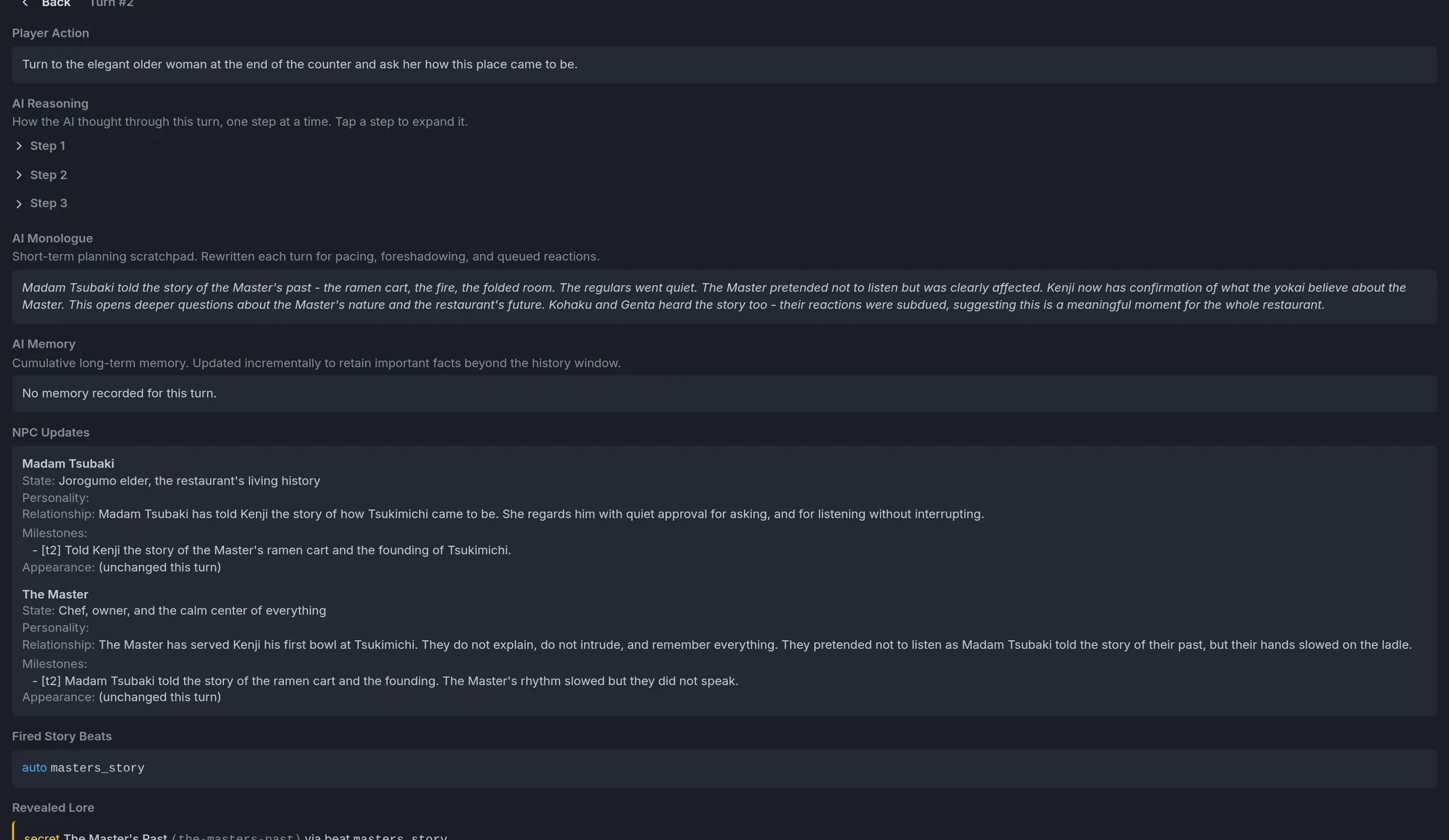
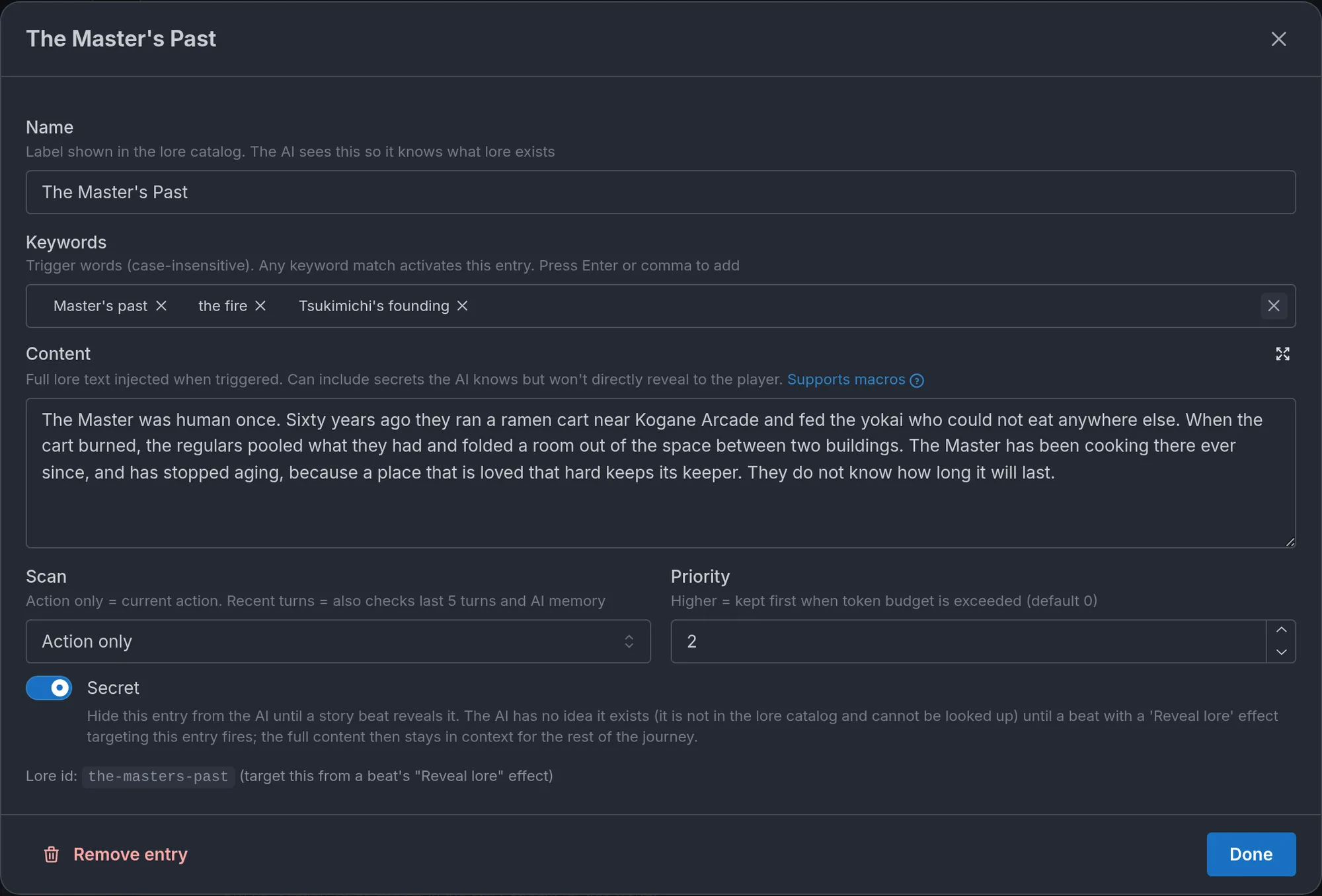
- Secret lore. A lore entry marked Secret is invisible to the storyteller until a beat with a Reveal lore effect fires. It cannot leak what it cannot see. Once revealed, the entry stays in the storyteller's context for the rest of the journey. Use secrets sparingly, for high-impact, earned reveals, and always pair each one with a revealing beat: the editor warns you until you do. Write the cover story (what everyone believes) as ordinary lore or in the instructions, so the storyteller has something true-enough to narrate before the reveal.
- Hidden locations. A location with Known to the player from the start turned off stays out of the storyteller's catalog until the scene arrives there or a Reveal location beat fires.
- Secret maps. A map with Secret map turned on is held back from the player until the story hands it over: the storyteller does it on its own when the map has a How it's found line, or a beat with a Reveal secret map effect fires. Revealing a map the player already has does nothing, so a late beat (Turn number at least 40, say) is a safe net for a chart the player never found naturally. Secret maps are set up in Locations.
- Secret Codex entries. The player-side counterpart of secret lore. A Codex entry with Secret turned on is not in the player's Codex until the journey reveals it: a beat with a Reveal Codex entry effect, a lore entry it is tied to through Reveal with lore entry, or a matching item picked up with Reveal when the player picks it up. It hides things from the player, not from the storyteller, which never reads the Codex, so it does not replace secret lore. The two pair well: tie the Codex entry to the secret lore entry, and the beat that reveals the lore reveals both. Codex entries are set up in Codex.
- Trackers that appear later. A tracker with Player visibility set to Revealed later is tracked by the storyteller from turn one but stays off the player's sheet until its value first changes or a Reveal tracker beat fires. Use it for state that starts dormant, like a curse or a bounty, and Hidden for what the player should never see. See Trackers.
- Hidden truths on characters. An NPC's hidden truth is different: the storyteller always knows it and plays the character consistently with it, but keeps it from the player until the story earns the reveal. Use a hidden truth when the character should behave as if the secret is true from turn one, and secret lore when the storyteller itself should not know.
- Replacing an instruction block. The Replace additional instruction effect is how you correct a false belief after a reveal: the "What everyone believes" block becomes the "What is actually true" block.
- Persistent context. Appends to Dynamic Story Context makes a permanent change part of the storyteller's understanding: "the king is dead" for the rest of the journey.
- Narration style changes. A Change narration style effect shifts how the story is written from the firing turn on (from the next turn for a narrative-triggered beat), so the tone turns at the right moment rather than at random.
A worked mystery. The lore entry "Who killed the steward" is marked Secret. An ordinary entry, "The official story", says the steward fell from the tower. An Evidence counter rises as the player finds clues. A beat with the conditions Tracker value: Evidence at least 4 and AI-judged narrative moment: the player confronts Vanda about the missing report carries a Reveal lore effect targeting the secret. Before it fires, the storyteller only has the official story and will deflect speculation with it. After, the truth is canon and the storyteller can play the confrontation with full knowledge. The full walkthrough is in How do I make secret lore entries?.
Cause and effect: beats and trackers together
Trackers are the most common beat trigger and the most common beat effect, and together they form a loop:
- The player's choices change trackers, through the update instructions you wrote.
- A beat fires when a tracker reaches a threshold.
- The beat changes the world: it adjusts another tracker, replaces an instruction block, reveals something.
- The changed world shapes everything that follows.
Example. In a political drama, the player's choices move a Crown Favor gauge. When it drops below 30, a beat fires. Its Describe to AI note says the king's desperation shows for the first time. Its persistent context says the court has started hedging its bets. Its effects replace the "Court politics" instruction block with one where the nobles plot against the player openly. The player's earlier choices caused all of this. The beat made it reliable.
Patterns worth knowing:
- Chain beats with After beats fired to build acts: beat B fires only after beat A.
- Use a beat with effects and no text to silently set state, such as flipping a hidden flag when the player crosses a line, without a visible story moment.
- Gate a reveal behind a tracker threshold plus Reveal lore. The classic mystery pattern.
- Let a player setting seed a tracker, then branch on it with Tracker value conditions. This is how "which faction did you pick?" becomes different beats.
Story arcs: staged plotlines
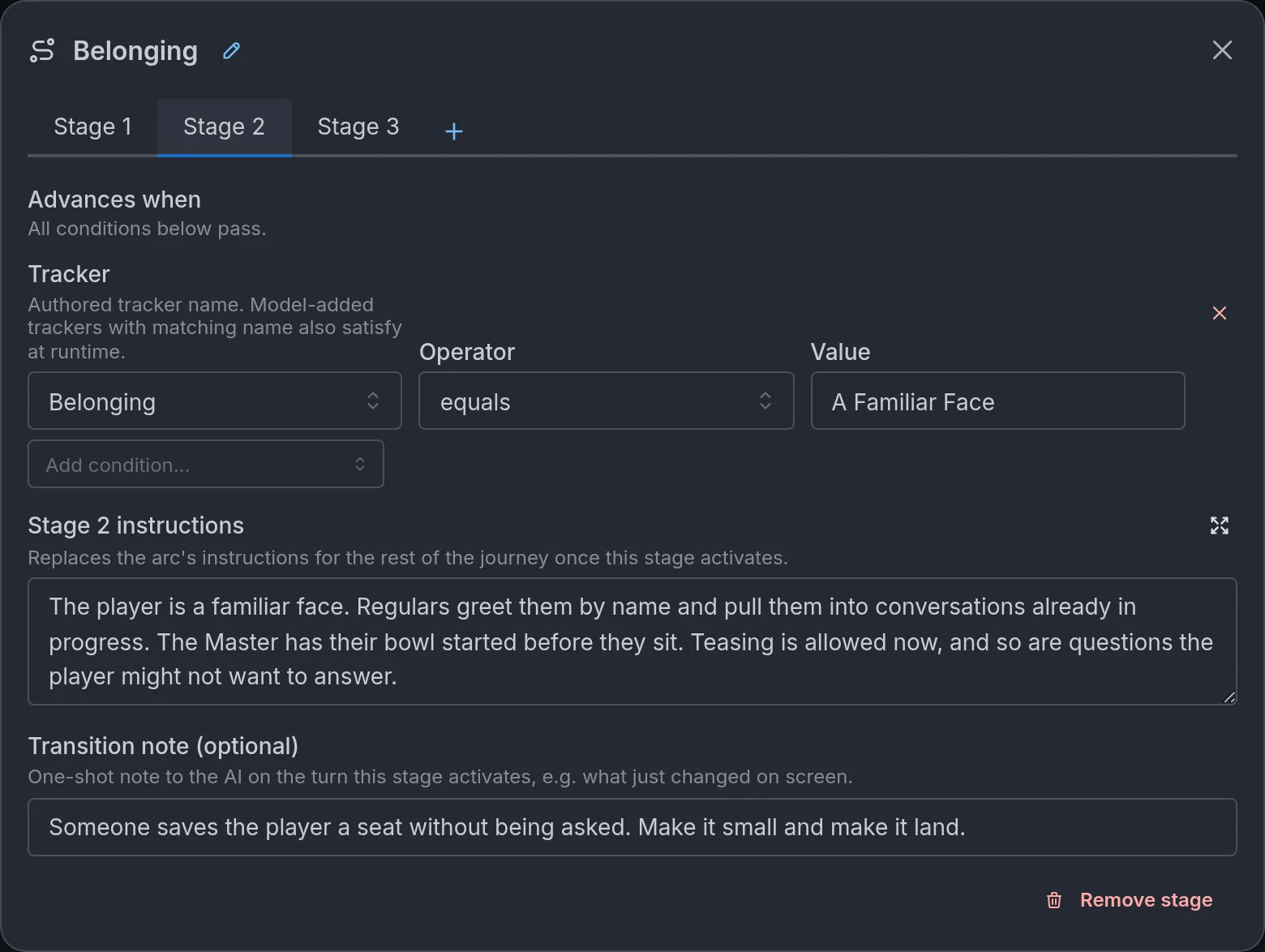
Story arcs (beta) live under Story events → Story Arcs. An arc is a staged plotline in one place: a mystery that opens as trust rises, a corruption that deepens act by act, a romance that moves through phases. Building this by hand means juggling an instruction block, a tracker, and a handful of beats. An arc puts the whole thing behind one card with a tab per stage.
How arcs work:
- An arc is a sequence of stages. Exactly one stage is active at a time, and its text is what the storyteller follows.
- Stage 1 holds the arc's starting instructions, active from the first turn. Every later stage has Advances when conditions, the same conditions beats use. When they pass, that stage's text replaces the arc's instructions for the rest of the journey. Stages always advance in order.
- Every stage after the first (and Stage 1 when it has start conditions) can carry a Transition note, a one-time message to the storyteller on the turn the stage activates, so the shift lands as a story moment rather than a silent gear change.
- The storyteller never sees the instructions of future stages or the shape of the arc. Models that know "this is phase two of four" tend to telegraph the story. If a stage needs pacing, put it in the text: "This is the midpoint of the investigation. Escalate suspicion, but do not name the culprit yet." One caveat: the description of a narrative condition is visible while that stage is eligible, so keep unrevealed twists out of those descriptions.
Write each stage as if it stands alone. A stage's text fully replaces the previous one, so restate what still matters and change what changed.
Starting an arc later. On the Stage 1 tab, turn off Active from the first turn and stage 1 gets its own Starts when conditions. Until they pass, the arc contributes nothing, and the storyteller does not know it exists. This is how you chain arcs: have "Act 1" set a tracker in its final stage, and gate "Act 2" on it. Arcs are otherwise independent, so an investigation, a romance, and a rivalry can run side by side at their own pace.
Under the hood, an arc is a named instruction block (the current stage's text) plus one beat per stage that performs the swap. Those beats stay visible in Story Beats with an arc label, so you can open a stage's beat and hang extra effects on it: a tracker write to make progress visible, a lore reveal, an outfit change. The Lore Map shows each arc as a node wired to its stage beats.
A heist in three stages:
- Stage 1, planning: "The crew is gathering. Every scene should surface one detail about the target, the guards, or a crew member's doubts. Nobody moves on the vault yet."
- Stage 2, execution (Advances when: AI-judged narrative moment, "the player gives the signal to begin the heist", with the transition note "The lights in the gallery go out on schedule."): "The heist is in progress. Real time, short sentences, every turn something goes slightly wrong. The plan from stage one is the reference point for what should be happening."
- Stage 3, escape (Advances when: Tracker value, Alarm equals "raised", or After beats fired, the vault-opened beat): "The crew is out or caught. Aftermath and consequences. Who kept their word, who did not, and what the city knows."
Playtest each transition to check that the new instructions actually change the scene.
Endings
Story events → Endings defines the conditions under which the storyteller can declare the story has reached its conclusion. Endings are optional. Without them a journey runs until the player stops playing, which suits sandbox and slice-of-life worlds. With them, a story has somewhere to arrive.
Three modes, picked at the top of the section:
- Off. No endings.
- Simple. One victory and one defeat, each behind its own switch (Enable victory condition, Enable defeat condition), with a condition and a Text shown on victory or Text shown on defeat.
- Multiple Endings. Named endings in two lists, Good Ends (victories) and Bad Ends (defeats), up to ten in each. Each has a Title ("True Freedom", "Consumed by Darkness"), a Condition, a Display text, and optionally a picture from the world's Extra Images. Simple endings have the picture too. A Preview button shows the ending as the player will see it.
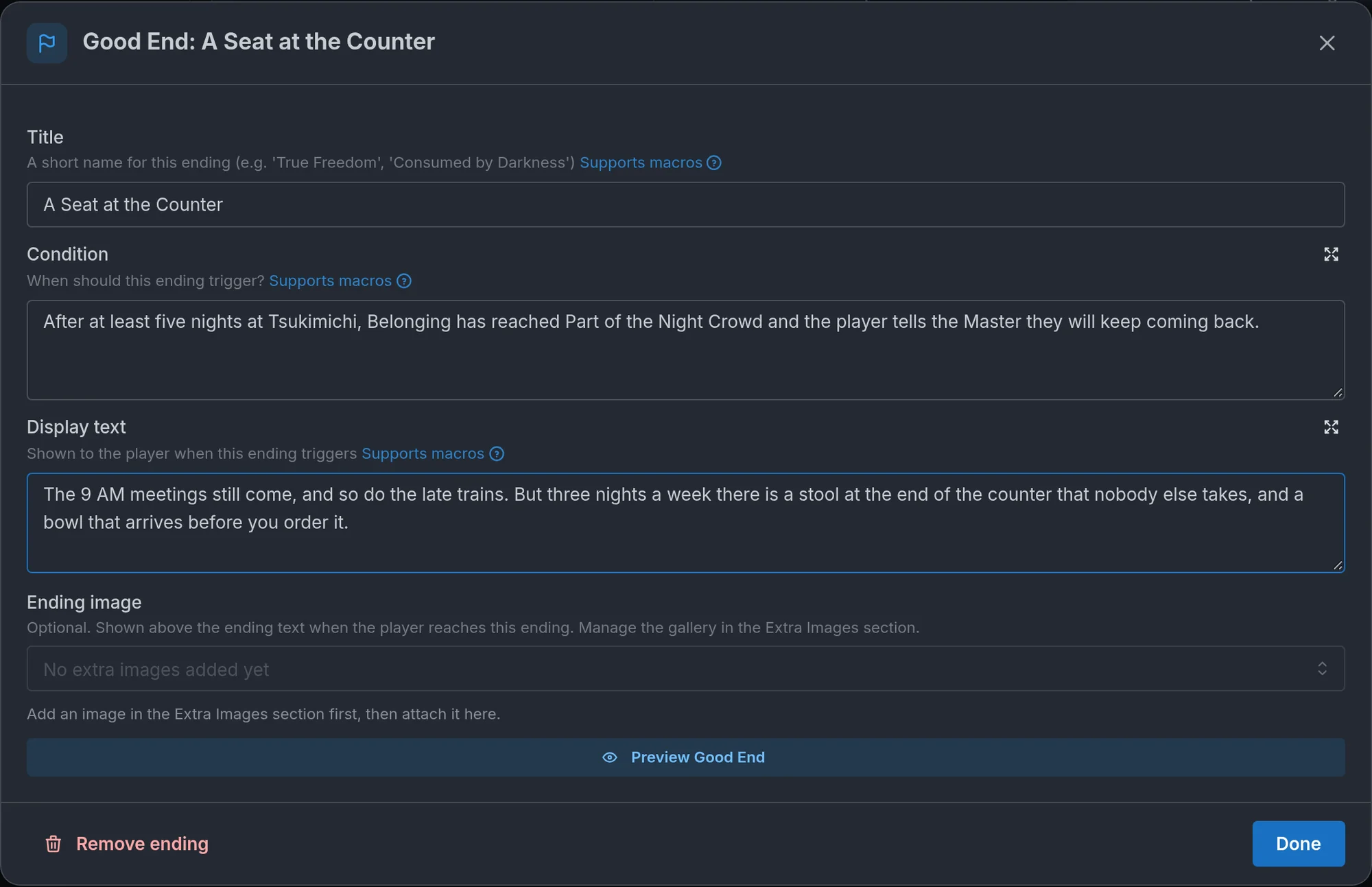
Switching from Simple to Multiple Endings converts the pair into named endings. Any other switch deletes the endings it leaves behind, after a confirmation.
How an ending is judged. The storyteller reads the conditions as private routing: it is told to declare an ending only when the story has genuinely and conclusively reached a terminal point, and to write that turn's prose as an epilogue. The player then sees an ending screen with the heading (Victory or Game Over in simple mode, Good End or Bad End with the ending's title in multiple mode), your display text and the picture, and a Continue playing button. A journey has one ending: if the player continues, the storyteller treats what follows as a new chapter and never declares another. Conditions and display text are kept out of the prose, so a condition may spell out the twist it resolves, and the storyteller will not hint at it beforehand. In a journey played in another language, the storyteller translates the title and display text itself.
Writing a good one. A condition is a predicate, not a scene: "The player character has escaped the maze", "Vanda confesses and the player chooses to let her go". Name the moment the story is over, and keep it concrete enough that there is no doubt when it has happened. Display text is the epilogue card, so write it as an ending, two or three sentences in the world's voice, not as instructions. For a defeat, say what the loss is, since the default "the player character has died" is rarely what a romance or a mystery means by failure. Trackers can appear in a condition ("Crown Favor is 0 and the player is exiled"), but a story variable cannot, because the storyteller never sees one. Several Good Ends with distinct conditions are what make a world replayable: give each one a different thing the player must have done. An ending can also award an achievement. Every ending, Victory and Defeat included, has an Only if NSFW is on switch: a marked ending can never be reached in a journey where NSFW content is off, which is how a world everyone can play keeps an adult-only ending. See Only if NSFW is on.
Achievements
Story events → Achievements holds the milestones players unlock in your world and keep: a secret found, a choice made, an ending reached. Up to thirty per world. The storyteller never sees them, so they cannot pull the story toward themselves. Unlocking works on the Loom engine.
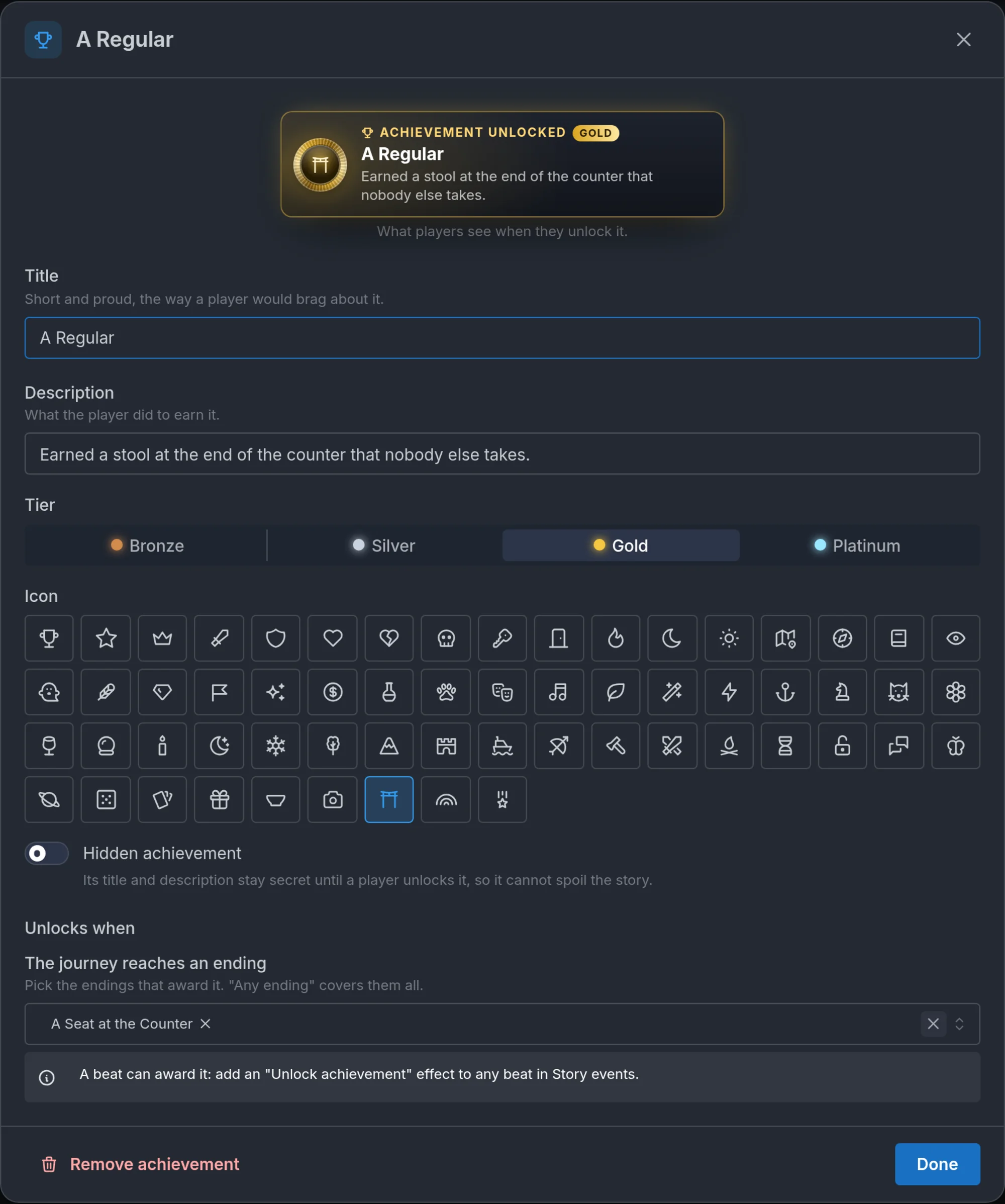
The parts of an achievement:
- Title (up to 60 characters): "short and proud, the way a player would brag about it". "Third Door", "One of the Regulars".
- Description (up to 200 characters): what the player did to earn it. "Found the door nobody talks about."
- Tier: Bronze, Silver, Gold or Platinum, the medal's metal. Use it for effort, not importance: a Bronze for something most players will do, Platinum for the ending nobody finds on their first run.
- Icon: a glyph drawn in relief on the medal, picked from a grid.
- Hidden achievement: the title and description stay secret until a player unlocks it. The world page folds hidden ones into a single "more hidden achievements" tile, so not even the tier leaks. Use it for anything that would spoil a twist.
- Only if NSFW is on: players with NSFW content off can never earn it, and it is left out of their achievement list and totals. See Only if NSFW is on.
- Unlocks when: two ways, and an achievement can use both. The journey reaches an ending takes a selection of the world's endings (Victory and Defeat in simple mode, the named endings otherwise, or Any ending). Or a beat awards it with the Unlock achievement effect, under Engine effects or under a prompt's When the player answers: pick the achievement, and every beat condition applies, so a tracker threshold, a Table row, a location or an AI-judged moment can all earn one. The editor lists the beats that award each achievement and warns when nothing does yet.
Keep the id stable: unlocks are keyed by it, so renaming a title keeps everyone's progress, and deleting the achievement does not take it away from those who have it.
What players see. On the turn an achievement unlocks, a toast slides in with the medal, the tier, the title and the description. The Codex gets an Achievements section with a progress chip, the Storybook marks the passage where it happened, and the world page shows every achievement with a progress bar, unlocked tiles first and locked ones greyed out behind a padlock. Once enough different people have played the world, each tile carries a rarity tag (Common, Uncommon, Rare, Legendary). Unlocks are permanent: a rewind, a regenerated turn or a deleted journey never takes one back. In party play, everyone in the journey unlocks it together.
Writing a good one. Name the moment, not the mechanic: "Heard the Master's story", not "Reached Trust 80". Hang achievements on beats that already exist rather than adding beats for them, since a world with twenty beats whose only job is to award medals has stopped being a story. Three to eight is plenty, with one or two hidden ones that reward a player who goes off the obvious path. Pair the ending-based ones with Multiple Endings, so finding each ending is its own medal.
Examples
Complete setups you can adapt. Each names the conditions and effects and says what the player experiences.
A mystery's revelation chain
- An Evidence counter rises through update instructions as the player finds clues.
first_crackfires at Evidence at least 2. Describe to AI: "For the first time, the official story does not fit. Let one detail refuse to line up." No effects.killer_revealedfires at Evidence at least 5 and afterfirst_crack. Effects: Reveal lore on the secret entry, Replace additional instruction "Investigation" with confrontation rules.endgamefires afterkiller_revealedand an AI-judged moment, "the player accuses the killer to their face". Effect: Change objective to "Make it stick."
A romance's relationship milestones
- An Affection scale (Cold, Guarded, Warm, Close, Devoted) moves one step per honest moment or broken promise.
opens_upfires at Affection at least Close. Describe to AI: "She tells the player about the year she does not talk about. Keep it short and let her regret saying it." One-shot.all_infires at Affection equals Devoted. Effects: Reveal lore on her secret, Replace additional instruction "Her rules" with a version where she stops hiding.
A transformation
- Kohaku is authored as usual. "Kohaku (Oni)" is a hidden NPC made with Duplicate as hidden form, with a rewritten description, new example dialogue and her own portrait.
seal_breaksfires at Corruption at least 80 and an AI-judged moment, "the player breaks the seal on the shrine". Effect: Transform character, Kohaku into Kohaku (Oni), with Take the new form's name off. Describe to AI: "The seal cracks. Kohaku's shadow stands up before she does."- From that turn she has the Oni's looks, voice and art. Everything she remembers, and how she feels about the player, carries over.
Naming a stray dog
- "The dog" is authored as an NPC with its own portrait.
name_the_dogfires on an AI-judged moment, "the player decides to keep the stray dog". Effect: Request player input, with the prompt "What do you call the dog?" and the placeholder "A name". Under When the player answers: Rename character, The dog, New name<<answer>>.- The player types "Biscuit" and the story goes on with Biscuit in the cast list, portrait and bond row intact.
Earning a title
guild_namefires on an AI-judged moment, "the player completes their first contract for the guild". Effect: Request player input, with the prompt "The guild gives you a name. What do they call you?" and the placeholder "A title". Under When the player answers: Rename player character, New name<<answer>>.- The player types "Ashen" and from then on the story, their sheet and the storyteller call them Ashen, even if they named their character at the start. Their portrait and outfits stay with the character they picked. With friends in the journey, only the host's character takes the name, and only when the host is the one answering.
- For a title the world hands out instead, skip the prompt and set New name to
<<player_name>> the Ashen: it builds on whatever name the player chose.
A stranger's true name
- "The hooded stranger" is authored as an NPC with their own portrait.
stranger_unmaskedfires on an AI-judged moment, "the player pulls back the stranger's hood". Effects: Rename character, The hooded stranger, New name "Lady Isolde Vane", and Show character card on the same character, with the Card heading "True name revealed" and the Style set to Banner. Describe to AI: "The hood falls. The player knows that face from the coronation portraits."- After the turn's prose, a banner shows her portrait with "The hooded stranger" struck through above "Lady Isolde Vane". The cast list and bond row follow the new name.
A key that opens one door
moon_key_foundfires on an AI-judged moment, "the player takes the Moon Key from the altar". Effect: Write character sheet row, Inventory, row Moon Key, Description "Opens the sealed door under the observatory". The key lands on the player's sheet whether or not the storyteller remembers to add it.observatory_opensfires on Table row, Player's character sheet, Inventory, row Moon Key, exists, together with an AI-judged moment, "the player tries the sealed door". Effects: Reveal location on the vault, and Write character sheet row on Moon Key again with Remove the row instead of writing it turned on, so the key is spent.- A rival who carries a copy is one more beat: Write character sheet row with Whose sheet set to that NPC, Inventory, row Moon Key, fired once the story has met them. A Table row condition can then check their pack the same way.
- A player who never finds the key can push on the door all they like. The beat waits.
A heist's planning, execution, and escape
- The three-stage arc above, with the execution stage gated on the player's intent and the escape stage on the alarm tracker or the vault beat, whichever comes first.
A horror's escalation
- A hidden Dread gauge rises as the player explores.
first_contactfires at Dread at least 60. Describe to AI: "The thing in the walls touches the player for the first time. One sentence, then silence." Appends to Dynamic Story Context: "The player has been touched. Ordinary objects are no longer safe to describe as ordinary."no_returnfires at Dread at least 90. Effects: Change narration style to fragmented, unreliable prose. Persistent context: "There is no leaving the house now."
Common mistakes
- Overly broad triggers. A beat fires too early because its conditions are loose. Be precise about what must be true, and combine a tracker gate with a narrative moment when the timing matters.
- Beats that never fire. Conditions too strict, or a tracker threshold the update instructions can never reach. Playtest, and watch the Debug panel to see whether the tracker moves and the beat fires.
- Forgetting the tracker. A beat waits on a threshold, but the tracker's update instructions are vague or missing, so it never moves.
- Arcs that railroad. Stages that advance on a turn count regardless of what the player did. Arcs should respond to choices, not override them. Gate stages on trackers and narrative moments.
- Too many beats. A world with thirty beats is a world where nothing can happen naturally. Use beats for the moments that matter and let the storyteller handle the rest.
- A secret with no revealing beat. It can never surface. The editor warns you, so take the warning seriously.
- A Table row condition that never passes. The row is spelled differently from what the sheet or table actually holds, or the table was renamed after the beat was written. Open the player's sheet or the Debug panel, copy the row's name as it appears there, and check that the condition still points at the right table.
- A location beat that never fires. The story anchored the scene somewhere else, or under a name that does not sit inside the location you picked (a "Harbor Road" scene is not inside "Inn"). Check the scene's location in the Debug panel against the Locations section. Or the beat's only condition is "is at", which never fires on its own: switch it to "enters" or add a second condition. Or an "is at" sits inside a Match any of group, where it is ignored: move it out of the group.
- A world clock beat that never fires. The clock is off for the world (the editor shows an error on the condition), or a before moment or an on day day is already behind the clock, which never goes backwards. Or the beat was expected on the turn the clock crossed the time: the clock moves at the end of a turn, so the beat fires on the one after.
- A beat that fires a turn late. The player picks up the amulet and nothing happens until their next action. The beat waits on a tracker, a table row, a location or the world clock, and those are checked before the storyteller writes each turn, so the change it made during the turn is only seen on the one after. If the delay matters, turn on React on the same turn on the beat: it is checked again once the turn is written, its effects land on the turn of the change, and the storyteller opens the next turn with its Describe to AI note. When the moment must be narrated in the same response, describe the action itself in an AI-judged narrative moment instead, in place of the condition that waits for its result. Adding the narrative moment next to that condition does not help: a narrative beat is only offered to the storyteller when its other conditions already pass before the turn, and the tracker has not moved yet. Conditions that were already true before the action can stay as gates, as in the worked mystery above (Evidence at least 4, plus the moment the player confronts Vanda).
- A beat wrote an NPC's sheet and nothing happened. The story had not met that character yet, so there was no sheet to write to. Gate the beat on a moment where they are already in the scene (an AI-judged narrative moment, or After beats fired on the beat that brings them in), and check the Debug panel to see whether they are tracked.
- Reveals out of nowhere. A beat that fires with no setup feels random. Foreshadow in the instructions and lore ("the king has been watching the player carefully"), so the firing feels earned, and use the Describe to AI note to land the moment.
Frequently asked questions
Trackers
Learn how to use trackers to make your Imagina world remember choices, track progress, and react to changing conditions. Covers world-level and per-character trackers, display types, update rules, and story variables for beat-only logic.
RPG mode and dice
Learn how to use RPG mode to add stats, gear, abilities, and dice to your Imagina world. Covers character sheets, LitRPG systems, and how to keep mechanics in service of story.