Shops and money
Learn how to give your Imagina world shops and a currency. Covers the Money tracker, item prices, vendors and their offers, haggling rules, shop looks and pictures, under the counter goods, improvised stalls priced by rarity, and what players see when they buy.
Beta
The RPG system is in beta and only accounts with the RPG beta can set it up. It may still change.
Shops and money gives your world vendors: named lists of goods priced in a currency, optionally kept by an NPC and tied to a place. When the player stands at one, the storyteller opens a shop card and the player buys from it between turns. The game sets every price, checks the money and moves money and goods together, so the storyteller never does the arithmetic.
Turn it on
Open the RPG game system section of the editor and switch on Enable the RPG game system (see the RPG system overview). On the Features page, in step 3, turn on the Shops and money card: a new world starts with it off, and Living world and Classic RPG turn it on for you. It stays silent in play until the world has a currency and something to buy: a named vendor with priced offers, or price ranges for improvised stalls.
With the card on, the Shops entry of the same group opens a page headed Shops. Its card holds the Currency picker, Prices by rarity and the list of shops.
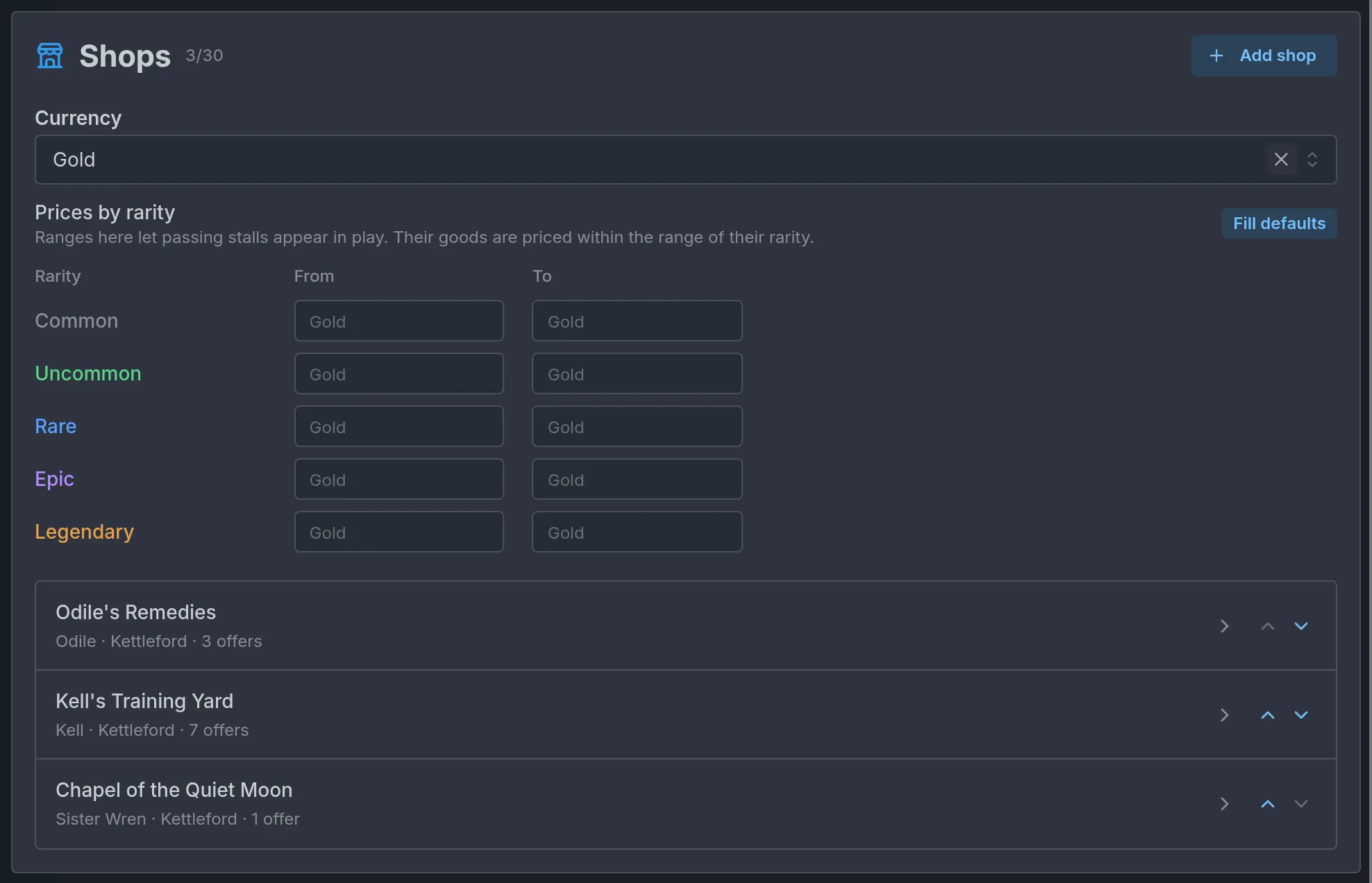
Players need no beta of their own to shop in your world. Turning Shops and money off keeps your vendors, prices and ranges, and the shops simply stop. It also turns off lessons and upgrades, which are sold through vendors: see Trainers.
The currency
Money is a counter tracker, such as Gold in The Tollroad Wardens. Two controls set the same value:
- Currency, at the top of the Shops card. Pick the tracker players pay with. With no numeric tracker in the world, the field is disabled and a hint says "Add a counter tracker such as Gold to use as the currency."
- The Money row of the Linked fields page. Its options are Built-in, A tracker and None. Built-in creates a world counter named Gold when the world has none and uses it. A tracker lets you pick one of your own counters. None leaves the world without a currency, and the row notes Shops cannot sell. The Standard RPG button on that page sets Money to Built-in along with every other role that has a built-in.
The Currency picker lists every numeric tracker, while the Money row accepts only counters and flags anything else with No such tracker. Pick a counter.
When vendors or rarity ranges exist and no currency is set, the card warns: "Without a currency, nothing can be bought."
Starting money
There is no separate starting money setting. The player starts with the tracker's starting value. Set it in one of two places:
- In World Trackers, on the currency tracker (display type Counter (number)): the Current field is the starting value. An optional Unit such as gp is how the shop writes prices, "45 gp".
- On a player character, under Starting Trackers, when each character should start with a purse of their own.
Built-in Gold starts at 0
The Gold tracker that Built-in creates has a starting value of 0. Raise Current on it, or the player arrives at the first shop with nothing to spend.
More on counters in Trackers.
Item prices
Each item has a Price box in its editor, with one number field. Left empty it reads Not for sale. The price is for one copy, in your currency, a whole number from 0 to 1,000,000,000.
An item with no price can still be sold when an offer gives it a price of its own. An offer's price always wins over the item's. Items themselves are covered in Items and inventory.
Vendors
Add shop creates a vendor and opens its editor. A world holds up to 30. Each row of the list shows the vendor's name, its keeper, its place and how many offers it has. The second line turns red when the vendor has nothing to sell, one of its offers has no price, or something in it does nothing in play (no name, an offer that picks nothing, a keeper or place the world no longer has).
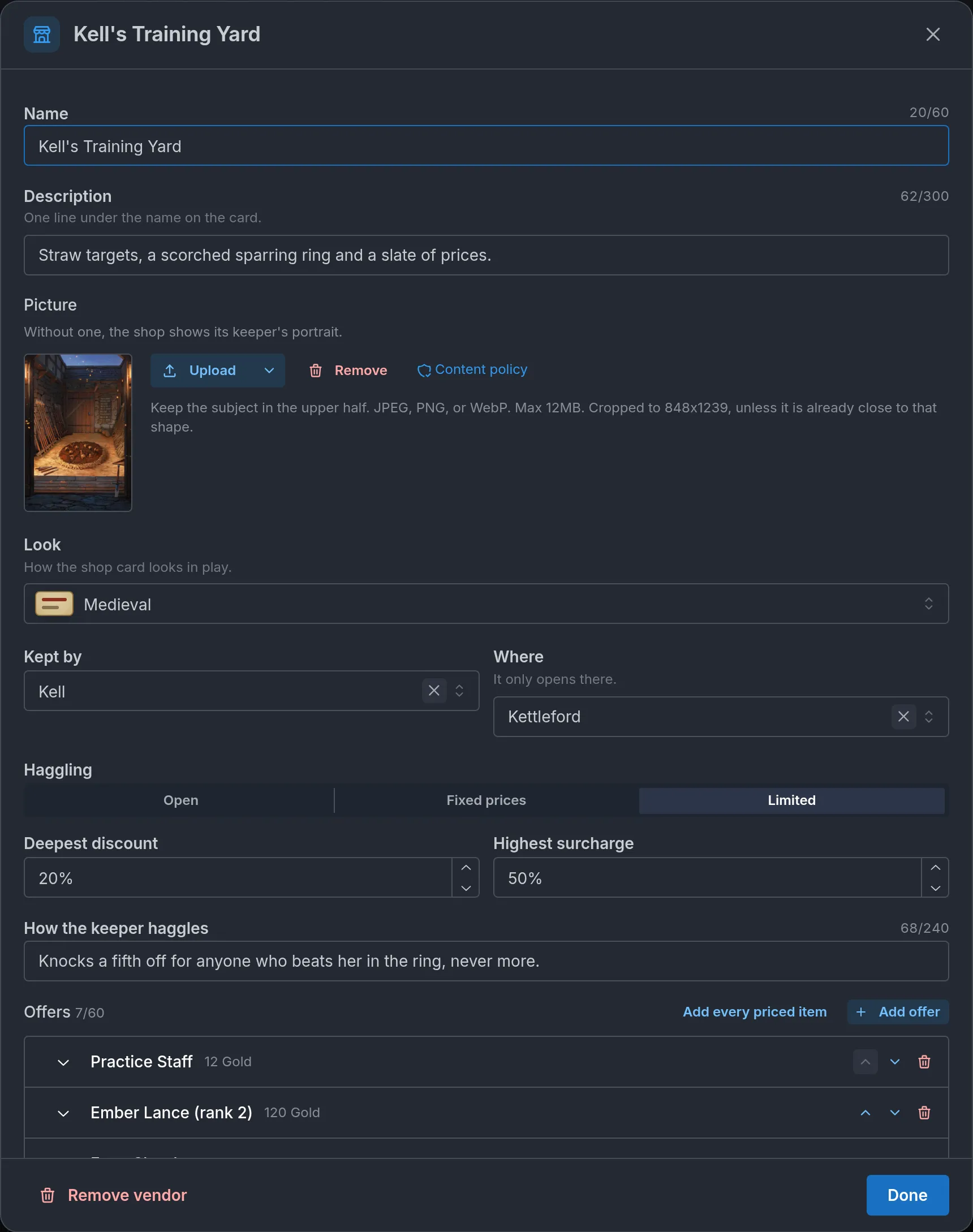
The fields, in order:
- Name: up to 60 characters. A vendor without a name shows as Unnamed shop in the list and never appears in play, and the field reads Without a name, the shop never opens. in red.
- Description: one line under the name on the shop card, up to 300 characters. It is written for the player. The storyteller never reads it.
- Picture: optional. See Shop and keeper pictures.
- Look: how the shop card looks in play. See Shop looks.
- Kept by: one of your NPCs. Leave it empty for a stall or a machine. A name the world no longer has is marked No character has this name.
- Where: one of your locations. The shop only opens there, and a place inside it counts: a vendor tied to the Tollroad also opens at Hask's Camp. Left empty, it reads Anywhere. A place the world no longer has is marked No location has this name.
- Haggling and How the keeper haggles: see Haggling.
- Offers: what the vendor sells, up to 60.
- Author notes: up to 1,000 characters that only you see.
Offers
Add offer adds one row. Add every priced item adds every item with a price that the vendor does not offer yet. A vendor with no offers shows Nothing to sell yet. in red.
Each offer opens into these fields:
- Item: one of the world's items. Left empty it reads Pick what it sells., and an item deleted since reads No longer in the world.
- Price: leave it empty to use the item's price, or type the price this vendor asks. A price of 0 is valid and the card shows Free. With no price on the offer or the item, the row is marked No price and the editor says Without a price it is not listed.
- Sale or markup: a permanent change from -100% to +200%, shown on the card beside the price. The card strikes the list price and shows the new one. Players read a discount as Sale and a markup as Extra charge. Once you pick a step, a Sale reason field appears: "Festival sale" becomes "Sale -25% · Festival sale" on the card.
- Never for sale: the offer is listed with a status instead of a price and cannot be bought. It still needs a price, its own or the item's, or it is not listed, so set the price before you switch this on. Write the Status yourself, "Sold out" for instance, or leave it empty and players read Not for sale. The storyteller cannot put it back on sale.
- Under the counter: see below.
- Requirements: up to four conditions, and the player needs all of them to buy. Add requirement offers Level, Stat or counter, Skill, Holds an item and Class or race, plus Knows an ability once the world has an ability. On a world with two or more progression tracks, a Level requirement also has a Level of picker for the level it reads. A player who falls short sees the row locked with the reason, such as "Requires level 3". Levels are covered in Levels and points.
Your vendors have no stock. Every offer can be bought as many times as the player can pay for.
Some offers never reach the card: one whose item was deleted (the editor shows Missing item), one with no price, and an "only if NSFW is on" item in a journey without NSFW. A secret item on the card shows its name, and its picture stays hidden until the player holds one.
Under the counter
An offer with Under the counter on is hidden from the shop until the storyteller brings it out. The storyteller is told which offers a vendor keeps back and chooses the moment. Until then the player has no sign the offer exists.
Haggling
Haggling sets how far the storyteller may move this vendor's prices. Your own Sale or markup on an offer always stands, whatever the setting.
- Open: the default. For a story reason, the storyteller may move prices by any whole percentage, from -100% (free) to +1000%, for the whole visit or for one offer.
- Fixed prices: the storyteller changes nothing. No discount, no surcharge, no special price agreed in the story, and the keeper never gives goods away.
- Limited: two fields appear, Deepest discount (0 to 100) and Highest surcharge (0 to 1000), both in percent. Leave one empty and it reads No limit on that side. With both empty, the vendor behaves like Open.
How the keeper haggles is a note of up to 240 characters for the storyteller, such as "Gives ten percent to anyone polite, never more." The storyteller reads it only while this vendor's shop is open.
The storyteller also sets a price mood for each visit: Good prices (25% off), Fair prices or Steep prices (50% more). On a Limited vendor, the mood and any percentage count together against your limit. A deepest discount of 10 therefore rules out Good prices altogether. When the storyteller asks for more than a vendor allows, the shop opens at fair prices with no change, and the storyteller is told the rule so the keeper can refuse in the story.
A price agreed in the story follows the same limits. Say a tonic at Odile's Remedies costs 45 Gold and the shop is Limited to 25% each way: a deal between 33 and 57 Gold goes through, and 32 or 58 is refused. One exception: a player who offers more than the asking price can always pay it, even at a Fixed prices shop.
A discounted price rounds down, a raised one rounds up, and a price never falls below 1 unless it is free. A storyteller discount on an offer you already put on sale replaces your sale only when it is deeper. The two never add up.
Players cannot type a price on the card. Haggling happens in the story and the result shows on the card. No dice check is tied to it.
Shop looks
Look offers Same as the world and eight looks: Neutral, Fantasy, Futuristic, Blue Box, Medieval, Tavern, Modern and Holographic. Each option shows a swatch of its colors.
Same as the world follows the Look chosen on the System pop-ups entry, with the LitRPG System pop-ups switch on (see RPG mode and dice). The first four looks are the same ones System pop-ups use. The last four exist only for shops.
The look covers the shop button, the shop card and the receipt. A shop shown in an old turn keeps the look it had then.
Shop and keeper pictures
Picture takes an image for the shop with Upload, and Remove once one is set. It accepts JPEG, PNG or WebP up to 12MB. The image is cropped to a portrait of 848x1239 unless it is already close to that shape, in which case Keep the whole image leaves it whole. Keep the subject in the upper half. On a world that was never saved, the field reads Save the world first to enable image upload.
A shop without a picture borrows from its keeper. The player sees, in this order:
- The shop's own picture.
- The portrait of the NPC in Kept by, once the player has met that character.
- The keeper's sprite, when the keeper has no portrait.
- A storefront icon.
On a computer the picture fills a tall panel on the left of the shop card. On a phone it is a banner at the top. The storyteller never sees it.
Preview
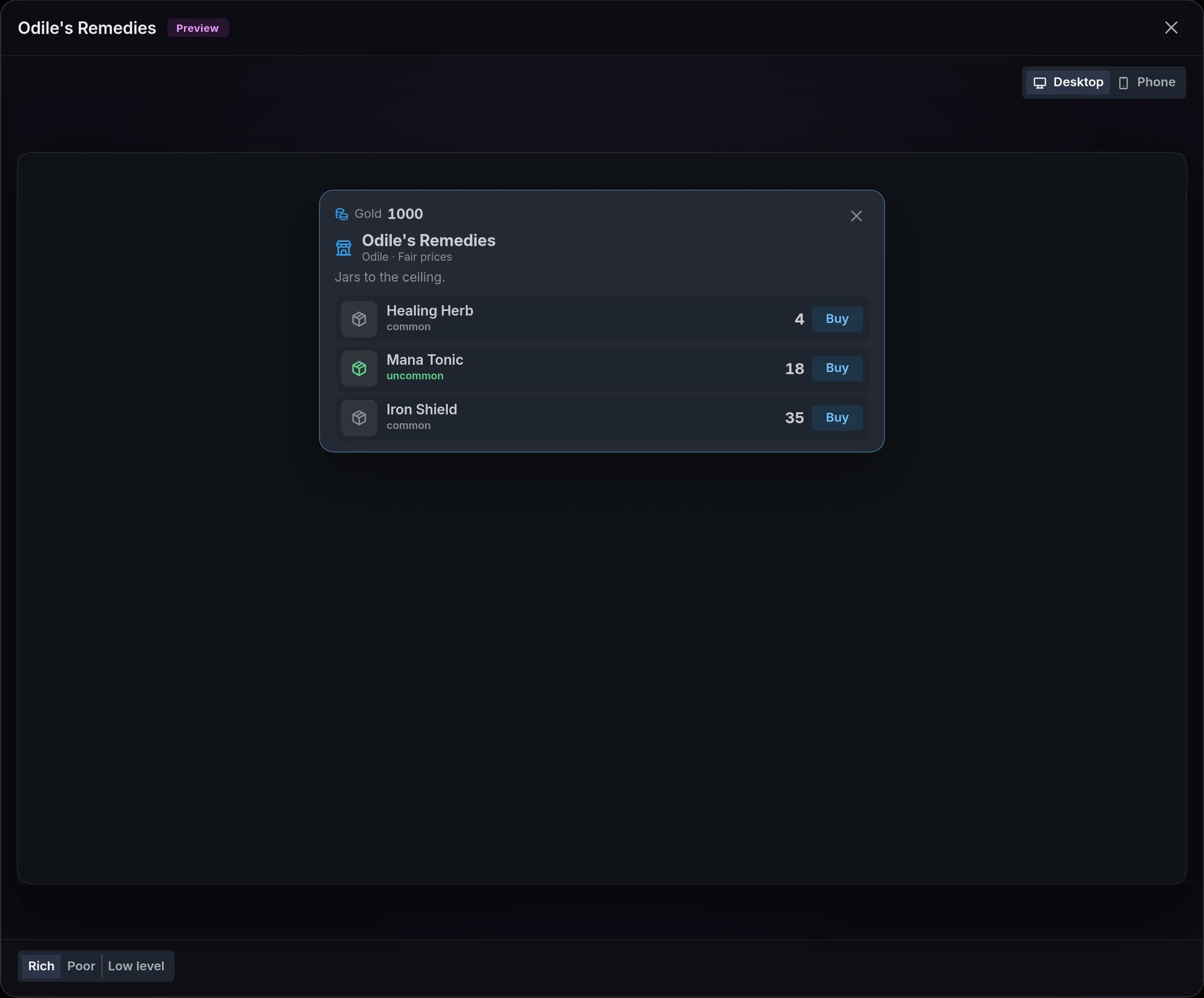
The Preview button at the top right of a vendor's window opens the shop card as a player opens it, in the shop's look and at fair prices. Desktop shows the window with the shop's picture or the keeper's portrait, Phone the sheet from the bottom. Hidden offers stay hidden.
Three buttons under the screen change who is shopping:
- Rich has money for anything and meets every requirement. Odile's Remedies shows 1000 Gold and three offers with Buy.
- Poor meets the requirements but is short of money, so rows read "Not enough Gold".
- Low level has the money but is a level 1 starting character, so offers with requirements are refused.
Buy works here. The money leaves the made-up purse and a "Bought: ..." line shows. Nothing is saved, and closing the preview starts it over.
Improvised stalls and prices by rarity
The storyteller can make up a seller your world has no vendor for, such as a peddler met on the Tollroad. It names the stall, a keeper and up to 8 goods, each either one of your items or an invented one with a name, a one-line description and a rarity. It never names a price. The game prices every good from the ranges you set, so an invented sword cannot cost 3 Gold.
There is no switch for stalls. They are on when Shops and money is on, a currency is set and Prices by rarity has at least one usable range. Remove every range and stalls are gone. A world with ranges and no vendors of its own still has shops.
Prices by rarity is a table with the columns Rarity, From and To, and one row each for Common, Uncommon, Rare, Epic and Legendary. Fill defaults fills the empty rows: 1 to 10, 10 to 50, 50 to 250, 250 to 1,000 and 1,000 to 5,000. There is no row for quest, so a stall never invents quest goods.
- Typing one end of an empty row sets both ends to that number. Clearing one end keeps the row, priced at the other end. Clearing both removes it.
- A row whose From is above its To turns red and is not used.
- An invented good gets a base price inside its rarity's range, the same every time for that good at that stall in a journey. The visit's price mood and any storyteller change then apply to it like at any other shop.
- One of your items keeps its own price at a stall. Without one, it takes a price from its rarity's range.
- Rarity names follow your world's Rarity colors, so a world with its own tier names is priced on the right row.
A stall can give a good a stock of 1 to 20, which sells down ("3 left", then Sold out). A journey remembers its last 12 stalls, and a stall met again keeps its goods, prices and stock. Invented goods are a name, a description and a rarity: no picture and no mechanics. Stalls have no haggling rules of their own, so they always behave like Open. A stall named like one of your vendors opens that vendor instead.
What players see
The shop button
When the storyteller opens a shop, a bar appears above the suggested choices: the shop's icon or picture, its name, a quiet line (the storyteller's note for the visit, or the keeper and the price mood), the player's money and an Open shop button. In visual novel mode, Open shop sits in the middle of the scene.

The shop card
The card opens as a window on a computer and as a sheet from the bottom on a phone. At the top are the player's money, the shop's name, the keeper and the price mood, then your Description and any note the storyteller wrote for the visit. A change that covers the whole visit has its own line, such as "Sale -10% on everything" with the reason.
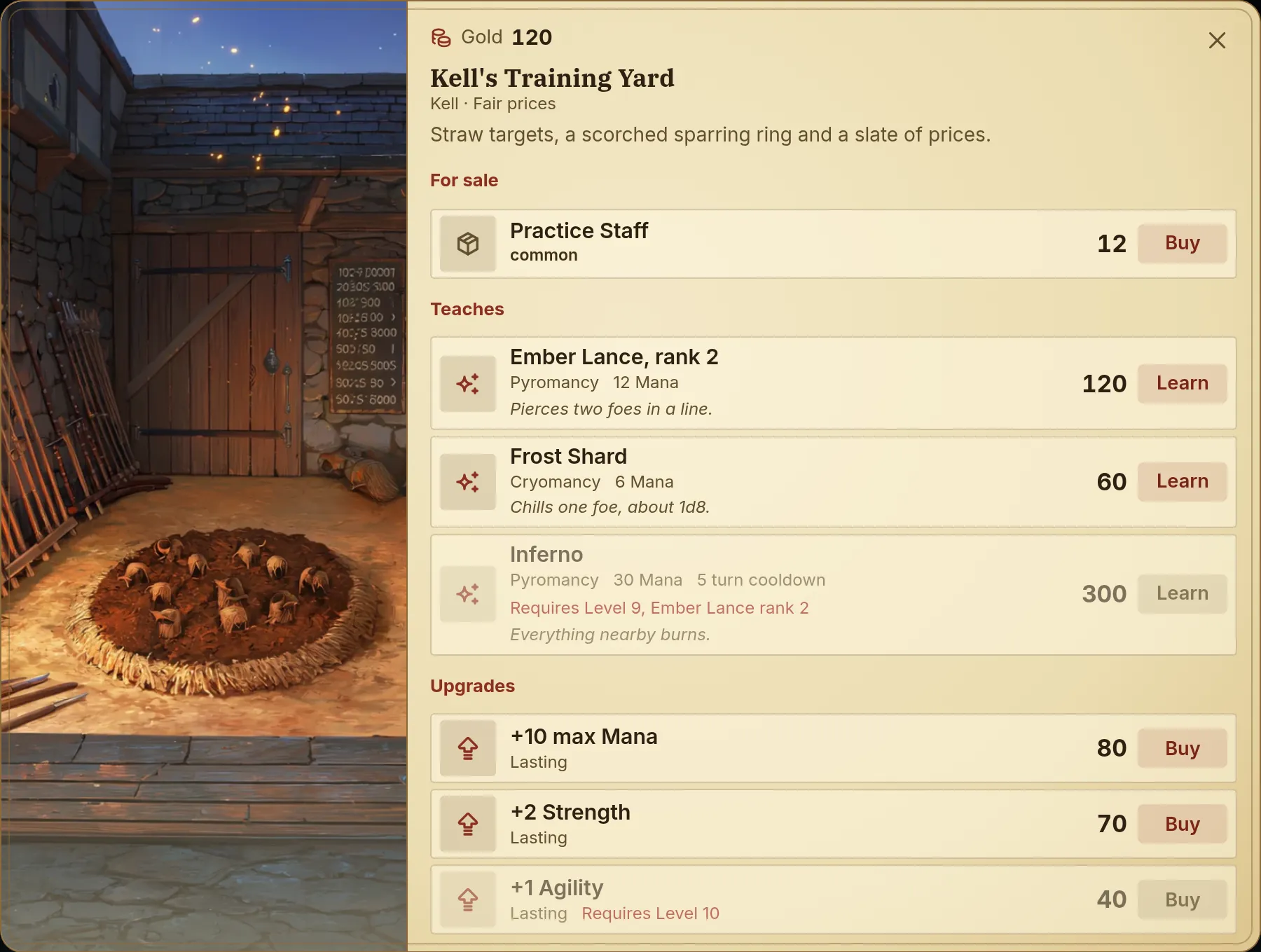
Each row shows the item's picture, name and rarity, how many the player owns, the price and a Buy button.
- Buy on a row buys one copy at once. Nothing asks for confirmation. On a free item the button reads Take.
- Tapping the row opens its description, a How many field (up to 99) and a button that buys that many for the total. At a total of 0 the button reads Take it.
- A row the player cannot buy says why: "Not enough Gold", "No Gold to pay with" when the journey has no Gold tracker at all, "Requires level 3", Sold out at a stall.
- A card with more than 10 offers gains a search box, and for the player who can buy, an All / Can buy filter.
The card stays open after a purchase. The money drops, the owned count rises, and a Bought: line under the list keeps the tally. Buying takes no turn and costs the player no credits.
In party play, a guest buys for their own character, with a money row of their own or, when the currency is a world tracker, the party's shared purse. What they buy goes into the party's one bag, and the Bought: line and the receipt name the buyer. A guest with neither kind of money sees the shop with its prices, the line Only Mara carries money here. (with the name of the host's character) and no working buttons.
When the shop closes
The shop stays open until the next turn starts. The player cannot reopen it. The storyteller opens it again on a later turn, and its price mood and discounts do not carry over: they last one visit. Your own sales and Never for sale offers are permanent.
There is no refund and no selling to a vendor. Undoing the turn that opened the shop takes back its purchases along with the narration.
In the history
An older turn shows a quiet record under the story: the shop's name and, when something was bought, a Bought: line that opens a receipt. The receipt lists each purchase with the amount paid (Free, or A gift when the keeper gave it away), the reason for any price agreed in the story, Your offer when the player paid above the price, and a Total.
When the game refuses a sale that the storyteller tried to make in the story, a line under the turn says so, with the reason: "The sale of Practice Staff did not go through. This shop keeps fixed prices."
What the storyteller decides and what the game settles
The storyteller decides:
- Whether and when a shop opens. You cannot force it. No shop opens in a scene the storyteller does not treat as a visit.
- The price mood of the visit, and any discount or surcharge with its reason, inside your haggling rules. It gives a percentage, never a number.
- Which offers are off sale for now ("reserved", "taken"), which under the counter offers come out, and a one-line note on the card.
- A deal struck in the story, including a keeper's gift.
- Everything about an improvised stall except its prices.
The game settles the rest:
- The price on the card is exactly what is charged.
- A purchase needs enough money, every requirement met and room in the inventory. Money and goods move together or not at all, and the currency never drops below 0.
- A vendor tied to a place is dropped without a message when the turn ends in a known place outside it. If the storyteller opens the shop without moving the scene, the scene moves to the vendor's place.
- A discount, surcharge, deal or gift that breaks a vendor's haggling rule is refused.
- After a refused sale, the storyteller cannot hand the item over or take the money by itself on that turn.
The storyteller knows each vendor by its name, keeper, place and number of offers. It reads the prices only once the shop is open. After a purchase it is told what was bought and for how much, and narrates the hand-over on the next turn.
The storyteller writes its prose alongside the sale, so it can describe a sale that the game then refuses. The line under the turn tells the player the truth, and the storyteller is told to set the story right on the next turn.
Limits
- 30 vendors per world, 60 offers per vendor, 4 requirements per offer.
- Name 60 characters, Description 300, How the keeper haggles 240, Author notes 1,000, Status and Sale reason 120.
- Prices and range ends are whole numbers from 0 to 1,000,000,000.
- Deepest discount 0 to 100, Highest surcharge 0 to 1000.
- Up to 99 copies per purchase.
- Stalls: 8 goods each, 12 remembered per journey, a stock of up to 20 per good.
Nothing is trimmed to fit. A save over a limit is refused.
Common mistakes
- A purse that starts empty. Built-in creates Gold at 0. Raise Current on the tracker or on the player character's Starting Trackers.
- A currency the player does not have. The currency must name a tracker the journey starts with. Without it every row shows "No Gold to pay with" and nothing can be bought.
- A vendor with no name. It shows as Unnamed vendor in the editor, its name field is marked in red (Without a name, the shop never opens.), and it does not exist in play.
- Offers without a price. An offer with no price of its own on an unpriced item is left off the card. Watch for the red No price.
- A discount limit under 25. It rules out Good prices, which is 25% off on its own. Set Deepest discount to 25 or more if the keeper should ever be in a good mood.
- Expecting the shop to stay open. It closes when the next turn starts, and the storyteller's discounts go with it. Put lasting sales on the offer with Sale or markup.
- Turning off Shops and money to hide a trainer. Lessons and upgrades stop with it, since they are sold through vendors.
Frequently asked questions
The party
Learn how the party works in an Imagina RPG world, from the Starts in the party switch to how the storyteller and the player add or remove companions, what the game does for a member, and the party screen players open in play.
Trainers
Learn how a vendor in your Imagina world can teach ability ranks and sell lasting stat upgrades, covering the Training switch, offers, prices, requirements, lessons taught in the story, and what players see on the shop card.