Quests
Learn how to give your Imagina world a quest journal. Covers turning Quests on, the Quest rules card, writing a quest with steps, checks, availability and rewards, quests the storyteller makes up, time limits, quest beats, party play, and what players see when a quest is offered, taken and paid.
Beta
The RPG system is in beta and only accounts with the RPG beta can set it up. It may still change.
Quests gives your world a quest journal. You write quests with a giver, steps and rewards, the storyteller offers them, and the game checks the steps and pays the rewards.
What quests are for
- A journal the player trusts. Every quest taken is listed with its steps, its rewards and the time left. What the journal says is what the game holds.
- Steps the game checks. A step can wait for enemies beaten, items in the bag, a place reached or a condition. The game ticks those off by itself. A step it cannot check is left to the storyteller.
- Rewards paid once. The game pays a quest when it completes, exactly once. The storyteller is stopped from paying the same reward again by hand.
- The storyteller's own jobs, sized by your rules. The storyteller can still make up a job on the spot. It picks a size, and the game rolls the reward from ranges you set.
With Quests off, the storyteller keeps quests as loose plot threads, as it always did, and there is no journal.
Turning it on
Quests needs the RPG game system on and nothing else (see the RPG system overview). It is off by default.
Open Features, the first page of the RPG game system group in the editor sidebar. The third step, World, holds a card named Quests with the line A quest journal with one-time rewards. Turn it on there. Once it is on, a Quests link on the card opens the section, and while Enemies is off the card adds the line Lets quest steps count defeated enemies. and a Turn on Enemies button.
Three of the sets turn Quests on for you: Classic RPG, Living world and Party adventure. Story with a sheet and Monster fights leave it off. Living world and Party adventure do not turn Enemies on, so the card shows the Enemies line there.
The Quests section sits in the RPG game system group, right after Enemies and before Statuses. Its sidebar entry shows the number of quests. While Quests is off, the entry stays in place with an Off tag, and opening it shows a single card, Quests are off, with a Turn on button. Quests you already wrote are not shown until it is on again.
Quests play once the piece is on and there is something to do: at least one quest with a name and a step, or made-up quests allowed, which is the default. A world with Quests on and an empty list therefore still has a journal.
In play, the beta is read from the account of the world's owner. Players need nothing on their side. A world whose owner lacks the beta plays with Quests off.
The Quest rules card
The Quest rules card governs the quests the storyteller makes up, plus one cap that covers every quest. Only what you change is stored. A blank field means the default, shown as its placeholder.
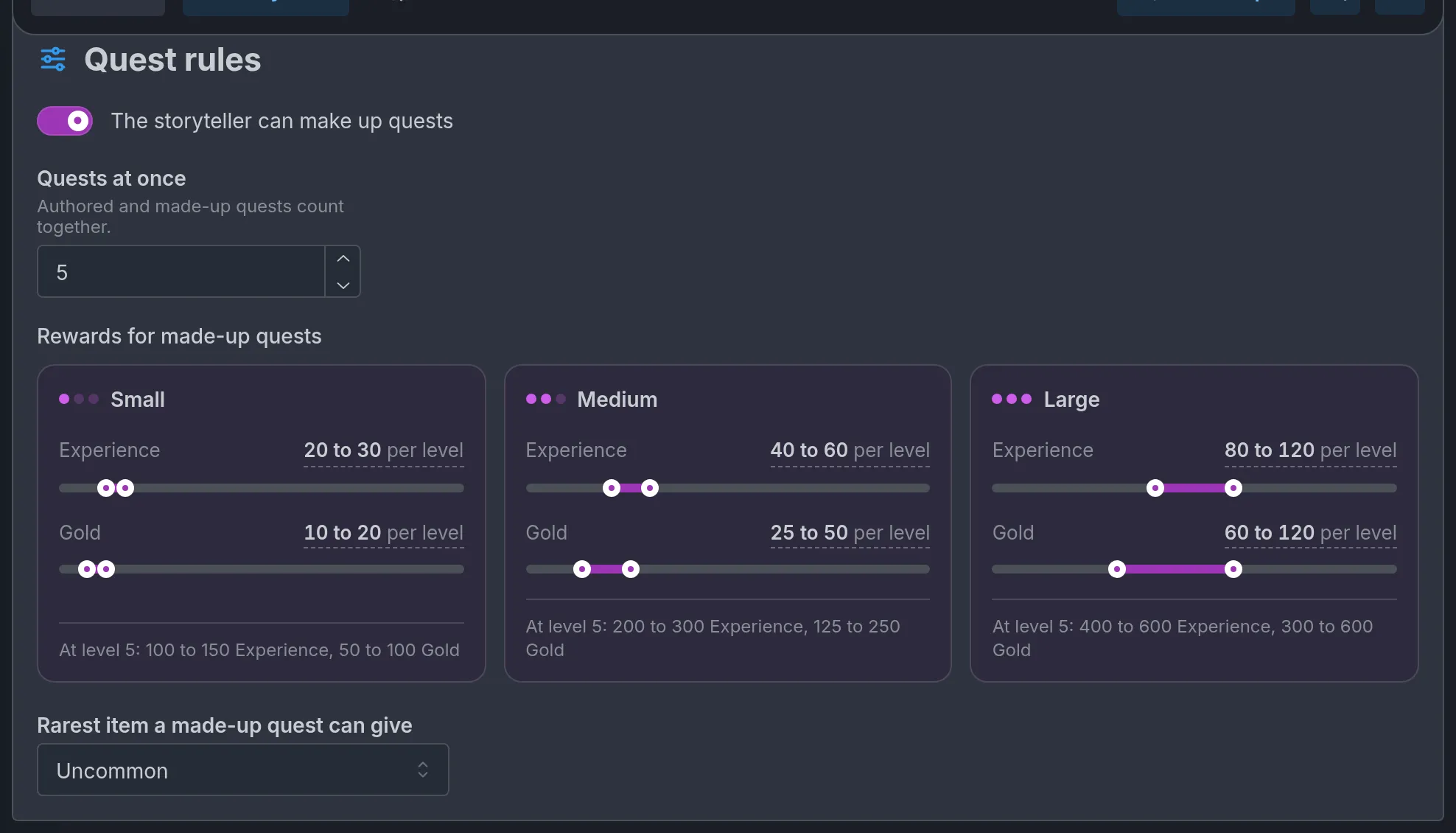
- The storyteller can make up quests: on by default. Off, only the quests you wrote exist. The reward ranges and the rarity select under it are disabled while it is off.
- Quests at once: how many quests a journey can hold taken and not finished, from 1 to 20. The default is 5. Authored and made-up quests count together. A quest waiting for its hand-in counts, and an offer the player has not answered does not. A player who accepts one quest too many reads "Your journal is full."
- Rewards for made-up quests: three cards, Small, Medium and Large. Each card has an Experience range and, when the world has a currency, a second range named after it, such as Gold, each read as "20 to 30 per level" over a slider with two handles. The three cards share one scale, so they compare at a glance. Each card ends with what a level 5 player would get, such as "At level 5: 100 to 150 Experience, 50 to 100 Gold".
- Rarest item a made-up quest can give: None by default, so made-up quests give no items.
The default ranges:
| Size | Experience | Money |
|---|---|---|
| Small | 20 to 30 | 10 to 20 |
| Medium | 40 to 60 | 25 to 50 |
| Large | 80 to 120 | 60 to 120 |
Drag a handle to change one end. To type an exact amount, click the range, such as "20 to 30 per level": From and To fields open, each a whole number from 0 to 1,000,000, and a changed range offers Back to its default, such as "Back to 20 to 30". Type a low end above the high end and the other end moves with it.
How the ranges become a reward is covered in Rewards and bands.
Authoring a quest
The quest list
The Quests card lists your quests with a counter out of 60 and an Add quest button. An empty list reads No quests yet. A new quest starts with an empty name and one empty step. Reorder rows with Move up and Move down, and click a row to open its window.
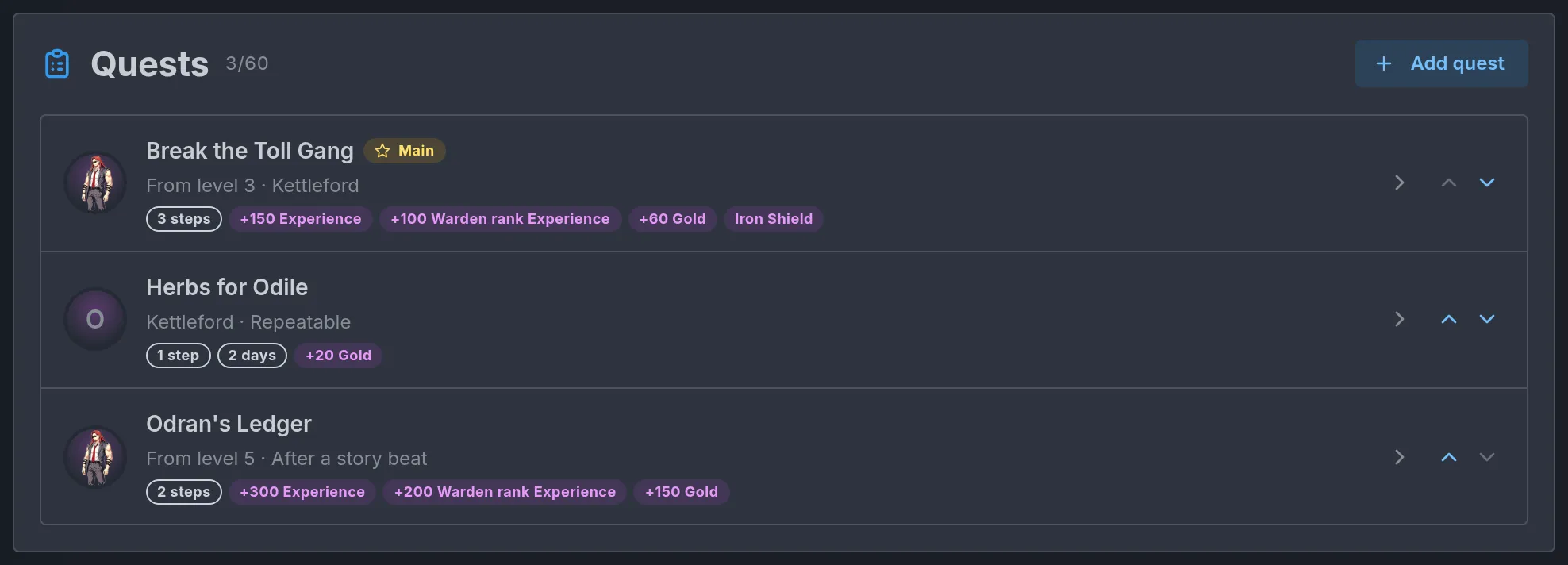
Each row shows:
- The quest's picture, as a rounded square, when you picked one (see the quest window). Without one, the giver's face: the portrait, or the first letter of the name when the character has none. A clipboard stands in for a quest with no giver, and a red question mark for a giver the world no longer has.
- The name. A quest with no name reads Unnamed quest. The name turns red when it is blank or when the quest is not finished (see the red lines below).
- A Main chip and an NSFW only chip, when they apply.
- A lock line that sums up when the quest opens: "Levels 3 to 7", "From level 5" or "Up to level 4", the place's name, After a story beat, "After Break the Toll Gang", Repeatable. A repeatable quest with a wait reads "Repeatable, back after 3 turns". A quest with none of these reads Open from the start.
- Chips: the number of steps ("1 step", "3 steps"), the time limit ("2 days"), then one chip per reward, such as "50 XP", "25 Warden rank XP", "120 Gold", an item by its name, an ability by its name, or "Reputation +3". A quest that gives more than two kinds of item shows them as one chip, "3 items".
- A chip "1 other ending" or "2 other endings", on a quest that has other endings.
The quest window
The window is titled with the quest's name, or New quest. It closes with Done and has a Remove quest button.
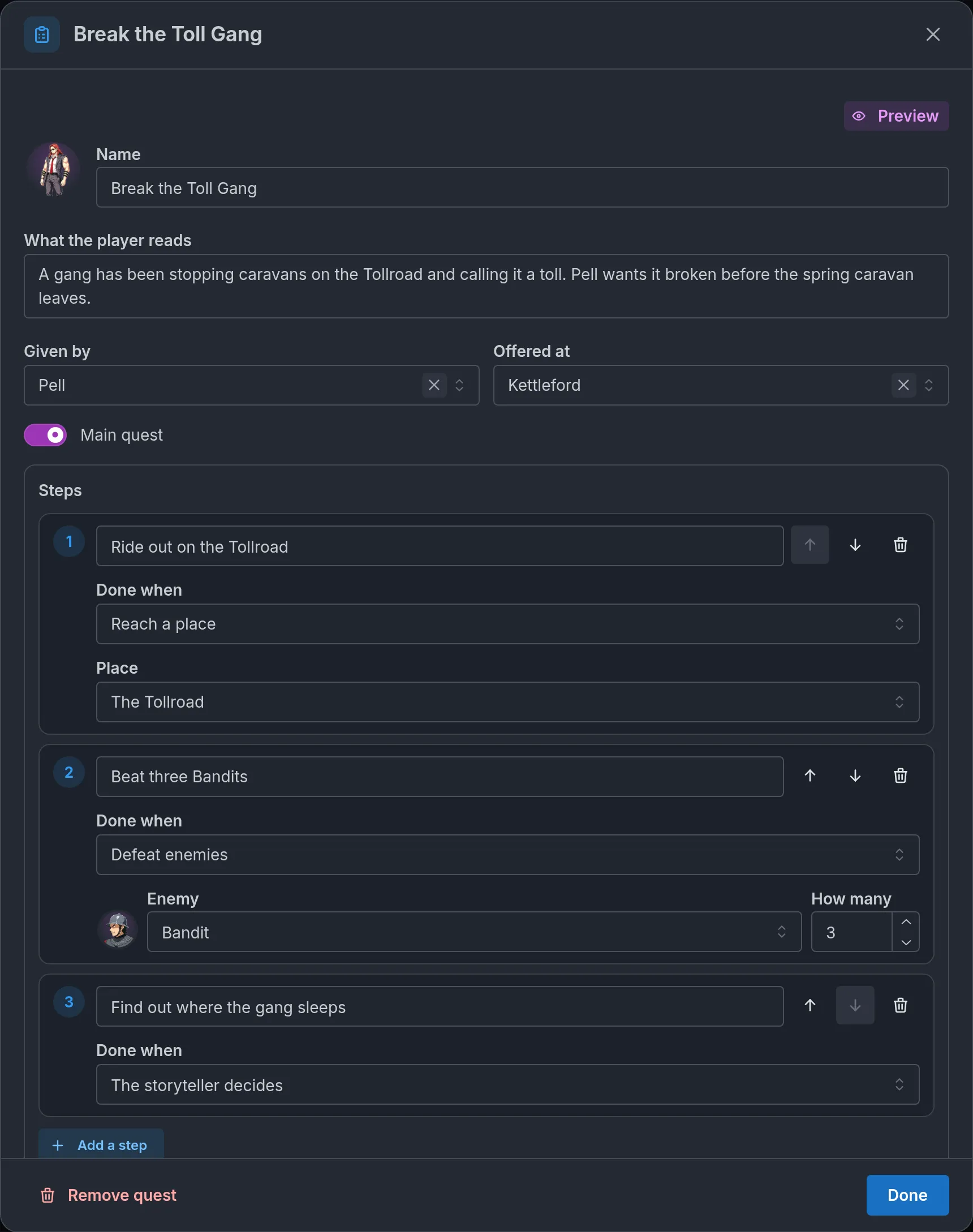
The fields at the top:
- Name: up to 80 characters. It is required.
- What the player reads: the pitch, up to 400 characters. Leave amounts out of it. The reward chips already show the real ones, and a number in the text can end up disagreeing with them.
- Given by: one of the world's characters, never an enemy. Left empty it reads Nobody in particular. A giver the world no longer has is marked Not one of the world's characters.
- Offered at: one of your locations. The storyteller may offer the quest there or anywhere inside it. Left empty it reads Anywhere. A place the world no longer has is marked Not one of the world's places.
- Main quest: marks the quest and lists it ahead of the other quests in progress.
The round tile left of Name is a button, Choose a picture, marked with a small photo badge. It opens the Quest picture window, where you pick a picture the world already has:
- Places: your locations that have a picture.
- Items: the catalogue items that have a picture.
- Scene pictures: your Extra Images, shown with their label. One marked NSFW is listed only when the quest has Only if NSFW is on.
A tab with nothing in it is greyed out. With nothing to pick at all, the window reads "Nothing to pick yet: add a picture to a place or an item, or add a scene picture." Clicking a picture picks it and closes the window. The picked one has a purple outline. No picture removes the pick. The line at the bottom says what shows without one, such as "Without a picture, the card shows Odile's face.", or "Without a picture, the card shows the quests' icon." for a quest with no giver. A picture suits a quest with no giver, such as a notice board or a found letter, and a main quest.
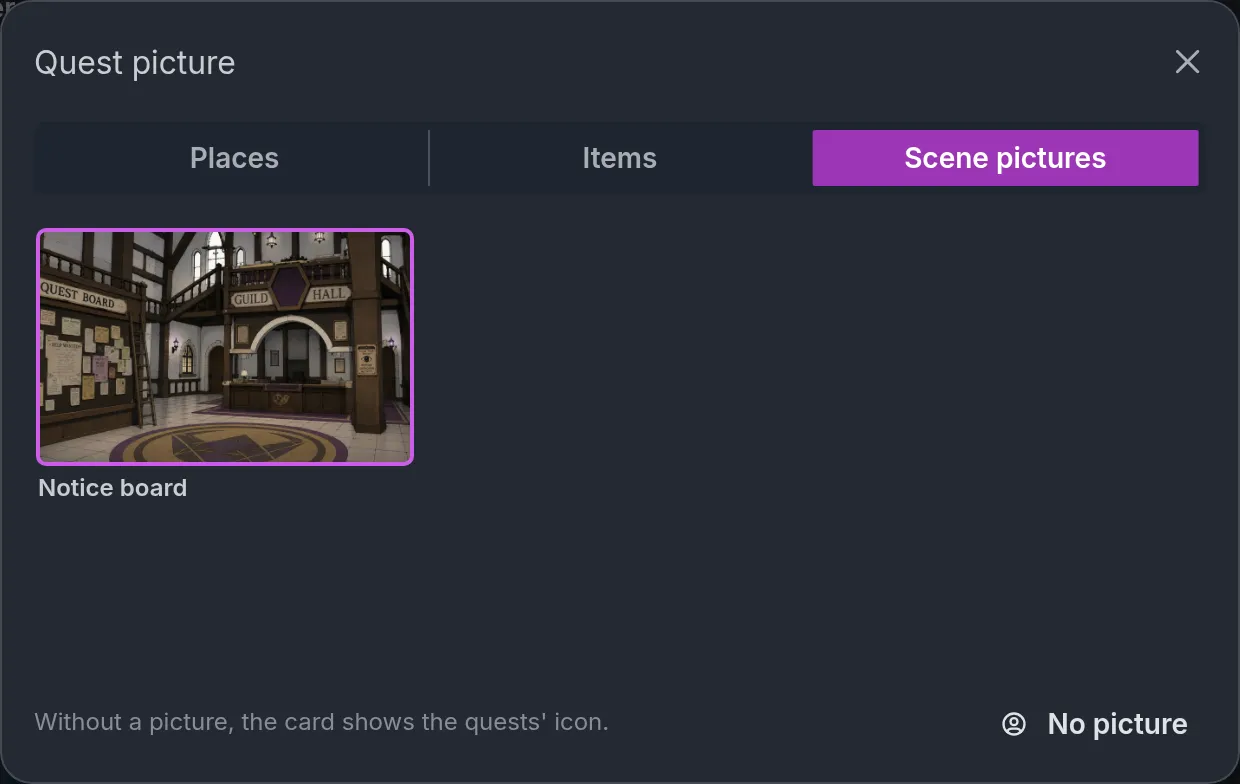
The picture is a pick, never a copy and never an upload. When it leaves the world (the place is deleted or renamed, the item loses its picture, the scene picture is deleted), the quest goes back to the giver's face, or to the quests' icon without a giver. The tile is then a dashed red square, and hovering it reads "This picture is no longer in the world".
In a world pack, the pick travels with the quest, as do the quest's other endings. An item's picture follows the item when the pack carries it, and a place's picture is the place by its name. A scene picture never travels in a pack. The receiving world's scene picture with the same label is used. Without one the quest shows the face, and the entry reads "Not in this world: the scene picture Notice board", with the label of the missing picture.
Four blocks follow, each covered in its own section of this page: Steps, Rewards, Hand-in and time and Availability. Last comes Note for the storyteller, up to 800 characters that only the storyteller reads. Use it for what the giver hides or how the job should feel.
In The Tollroad Wardens, Break the Toll Gang has Pell in Given by, Kettleford in Offered at and Main quest on.
A quest that is not finished shows red lines under the window, and its name turns red in the list:
- "Give the quest a name."
- "Add at least one step."
- "Every step needs its text."
- "A step's check needs its enemy, item or place."
- "Handing in to the giver needs a giver."
- "The highest level is below the lowest."
- "Something in this quest is not valid yet." This covers anything else, such as a tracker change of 0.
A quest that names something the world no longer has is a different case. The picker shows the old name with "(not found)" and a red error, and the quest's name in the list does not turn red. Open each quest after you delete or rename an enemy, an item, a place or a character.
Preview
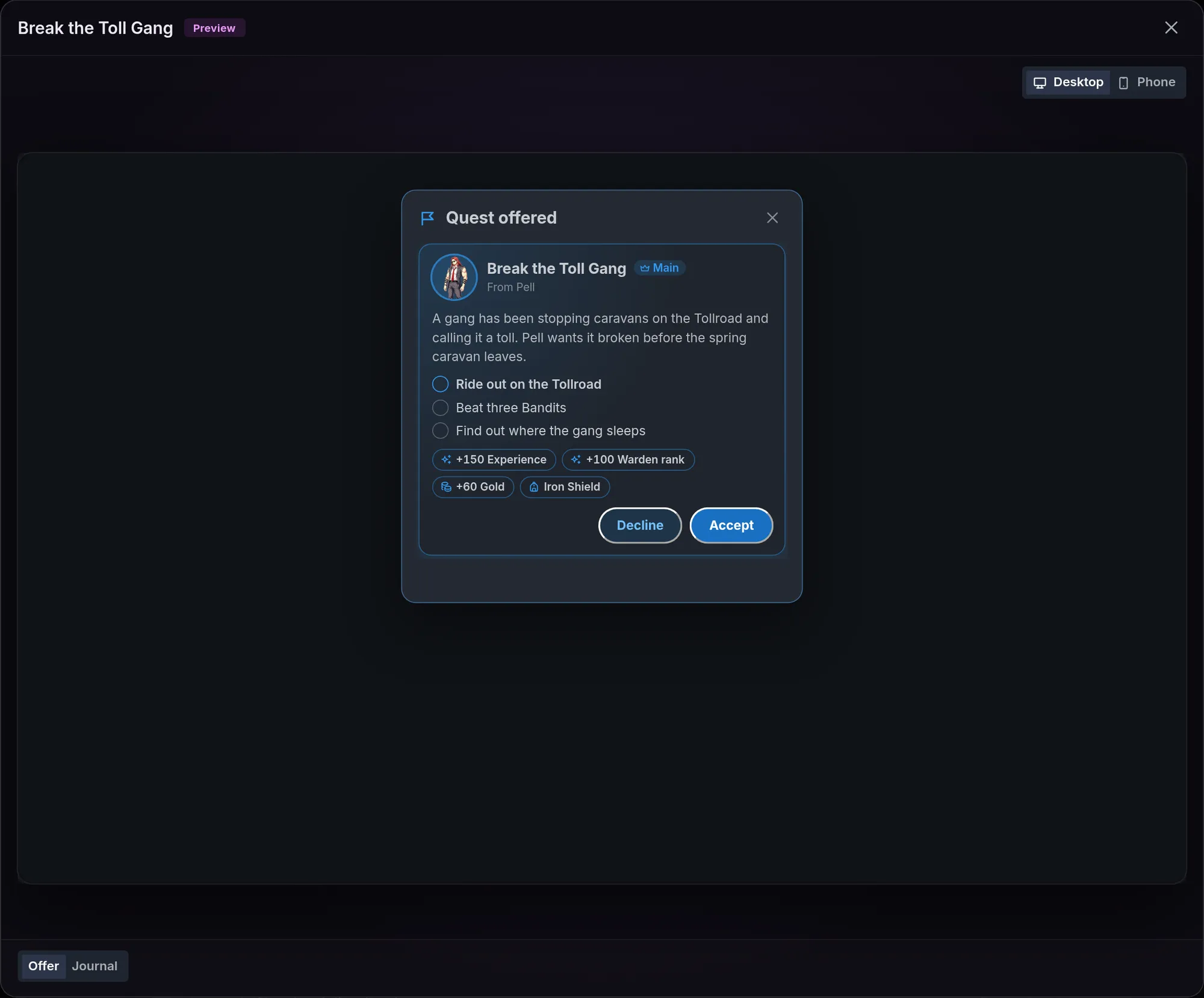
Once the quest has a name, a Preview button shows at the top right of its window. It opens the quest as a player meets it, in three views picked under the screen:
- Offer: the Quest offered window with the name, the Main mark, the giver, the pitch, the steps, the rewards and the time limit, then Decline and Accept. The giver's portrait shows when the giver is one of the world's characters and has one, and the quest's picture shows as it does in play.
- Journal: the Quests window with the quest taken, its pin and Abandon. A first step that counts something starts at 0.
- Ended: the quest under Done, as it would end. On a quest that has other endings, a picker beside the views chooses The usual ending or one of the others.
Break the Toll Gang previews with its Main mark and Pell as the giver. Accept, Decline and Abandon change only the preview. Nothing is saved, and closing it starts it over. Desktop and Phone change the screen's size.
Steps and checks
A quest has 1 to 8 steps. They play in order, with one step open at a time. Each step has a line of text, up to 160 characters, which is what the player reads in the journal. Buttons on the row move the step up or down or remove it, and Add a step adds one.
Done when sets how the step completes:
- The storyteller decides: the default. The step has no check. The storyteller marks it done on the turn it happens, never before. This page calls it a judgment step.
- Defeat enemies: pick an Enemy and How many, from 1 to 99. The game counts copies of that enemy beaten as a win since the step opened. Copies beaten before the step opened never count. Neither does one that fled, was let go or stood down. The player reads the count on the step, such as "2 / 3".
- Bring items: pick an Item and How many. The step completes as soon as the party's bag holds that many, and items the party already holds count. With Taken when the step completes on, the copies leave the bag at that moment.
- Reach a place: pick a Place. The step completes when the player is at that place or anywhere inside it.
- A condition: pick a Condition, then fill its fields as you would in a beat. The choices are World clock…, Tracker value…, Table row…, A character or enemy is defeated, The fight is won and A quest is…. A new one starts as Tracker value…. World clock… needs the world clock, and the two about fights need a world that keeps fights (see Fights).
A few rules hold for every checked step:
- The storyteller cannot tick it. Only the game completes a step that has a check.
- Checks run after every change and at the end of each turn. Several steps in a row complete together when all of them are already met.
- The enemy has to be in your Enemies list, and the item and the place have to be the world's own. A check that points at something the world no longer has never completes by itself.
- Changing the kind resets the check to the first enemy, item or place of the world, with a count of 1.
Break the Toll Gang starts with a Reach a place step on the Tollroad, then a Defeat enemies step on Bandit with How many at 3. Bandits beaten on the way, before the second step opens, do not count toward the three. Reporting back to Pell can be written two ways: as a last step left on The storyteller decides, or as a hand-in to the giver (see Rewards and bands).
Herbs for Odile is one Bring items step: Healing Herb, How many at 3, with Taken when the step completes on so the herbs are handed over.
Availability
The Availability block and the Offered at field decide when a quest can be offered. The game enforces all of it: a quest the rules do not allow cannot be offered or taken.
- Opens: From the start by default, or After a story beat. The second shows the hint A beat opens it with "Change a quest". Until a beat does, the storyteller does not know the quest exists.
- From level and Up to level: 0 to 999, and left empty each reads Any. They read the player's main level. On a world with more than one progression track, a Level of select picks which track is read. In The Tollroad Wardens a quest can ask for a Warden rank instead of a Level. On a world with no level, the player counts as level 1.
- After these quests are done: up to 8 other quests. The quest cannot be offered or taken until each of them is done. A quest that has other endings is listed once per choice, such as "Loaded dice: any ending", "Loaded dice: the usual ending" and "Loaded dice: Cut in on the game". Pick the last one and the lock line reads "After Loaded dice (Cut in on the game)".
- Offered at: the place where the storyteller may offer it, as set at the top of the window.
- Only if NSFW is on: with NSFW off in a journey, the quest is never offered, given or listed.
- Can be taken again once done: off, a finished quest is never offered again. On, it can be taken again once it is done, though never while one take is still running. Each new take is a new entry in the journal, and the old one stays under Done.
- Comes back after: the wait before a quest that can be taken again comes back, as a number from 1 to 999 and a unit: Hours, Days or Turns. Left empty it reads At once and there is no wait. The row is greyed out until Can be taken again once done is on, and turning that switch off clears the wait.
Odran's Ledger opens After a story beat and has 5 in From level. Herbs for Odile has Can be taken again once done on, so Odile can ask for herbs again. Put 1 and Days in Comes back after to have her wait a day before she asks again.
The wait runs from the turn the quest is done and paid. A take that failed, was abandoned or was withdrawn starts no wait. Until the wait is over, the quest cannot be offered or taken. The storyteller's offer or acceptance is refused, and it is told how long is left, such as "it can be taken again in 2 turns". A beat's A quest is… on Available to take does not pass during the wait. Change a quest with Give it to the player still gives the quest.
The units work as they do for a time limit. With the world clock on, Hours and Days are story time. Without it only Turns can be picked, and a wait that already uses the others counts an hour as one turn and a day as 8 turns. A new wait starts on Days with the world clock and on Turns without it.
To make a quest board, give several quests the same place in Offered at. The storyteller can then offer them together on one card, and the player answers each one. Level ranges sort the board into tiers.
Rewards and bands
The rewards of a quest you wrote
The Rewards block holds what the quest pays:
- Experience: a whole number from 0 to 1,000,000, paid on the main progression track.
- One more Experience field per extra track, named after it. The demo world shows "Warden rank Experience" next to Experience.
- A money field named after your currency, such as Gold. It appears when the world has a currency. See Shops and money for setting one.
- Add an item: adds a line with an Item and How many, from 1 to 99. A quest gives up to 6 kinds of item. See Items and inventory.
- Ability taught: one ability, on a world with Abilities on.
- Add a tracker change: adds a line with a Tracker and a Change, which starts at +1 and may be negative but not 0. Up to 4 per quest. Only numeric trackers the world starts with are listed.
Break the Toll Gang pays Experience, Warden rank Experience, Gold and an Iron Shield. Herbs for Odile pays Gold.
When it is paid
The Hand-in and time block has a two-way control:
- When the last step is done: the default. The quest pays at once.
- When handed in to the giver: available once the quest has a giver. When the last step is done, the quest turns ready and waits. The journal marks it with a ribbon, and the storyteller hands it in when the player meets the giver. Only then does it pay. The player has no hand-in button.
On a quest handed in to its giver, a Bring items step with Taken when the step completes takes the items at the hand-in, not when the step completes. The hand-in is refused while the bag no longer holds them.
Clearing Given by also sets the quest back to When the last step is done.
Who receives what
- Experience goes to the player character and to every companion who keeps their own Experience, the full amount each, like a won fight. On a world with progression tracks, each track a quest names is paid to those who hold progress on it.
- Money goes to the journey's currency. In a journey played together where the guests' characters carry their own money, it is split evenly between the player characters who carry money (see Party play).
- Items go to the party's one bag.
- The ability goes to whoever took the quest.
- Tracker changes land on the journey's trackers.
The card that announces the completed quest shows what was actually paid. When the money was split, the card shows the total, such as "+15 Gold", and under it who got what, such as "Tamsin Hale +8 Gold · Mara Vey +7 Gold". Money the game could not pay is listed there too, such as "50 money (no currency to pay in)".
Experience and money need somewhere to go
On a world with no Experience the game can raise, or no currency, the game skips that part of the reward. The amount you wrote is not applied, and the storyteller is left to give what the story promised. Items, abilities and tracker changes are always paid by the game. Set up levels in Levels and points and a currency if the game should pay.
Bands for made-up quests
A made-up quest has no amounts of its own. The storyteller gives it a size, and the game does the rest:
- It rolls a whole number inside the range of that size on the Quest rules card.
- It multiplies the number by the player's main level. The level counts as 1 at the lowest, and on a world with no level.
With the default ranges, a Medium quest for a level 5 Mara pays 200 to 300 Experience. The roll is tied to the quest, so retrying the turn gives the same amount.
Experience is paid only on a world that has Experience, and money only when the world has a currency the journey tracks. A made-up quest pays the main track only. In The Tollroad Wardens it never pays Warden rank Experience.
The rarity cap
Rarest item a made-up quest can give lists None, then your world's rarity words, rarest last. A world with no rarity words of its own gets Common, Uncommon, Rare, Epic and Legendary.
Once a rarity is set, the storyteller may add up to 3 of your items to a made-up quest, 1 to 9 copies each, none rarer than the cap. An item above the cap is dropped. The cap never touches the items on quests you wrote.
Other endings
A quest can end one or two other ways besides the quest as written. The quest as written, with its steps, its rewards and its hand-in, is the usual ending. In The Tollroad Wardens, Break the Toll Gang could get another ending for a Mara who strikes a deal with the gang instead of breaking it.
The Other endings block sits under Rewards in the quest window, with the line The story may end the quest one of these ways instead. Players never see them beforehand. Add another ending adds the first and Add one more ending the second. A quest has at most 2, and the button is greyed out at 2.
Each ending is a purple card with:
- Name: up to 80 characters. It is required. Without one, the quest shows the red line "Every other ending needs a name."
- What the journal says: up to 400 characters.
- Its own rewards, with the same fields as Rewards: Experience, money, items, an ability and tracker changes.
- When it fits, for the storyteller: up to 400 characters that only the storyteller reads.
- Remove.
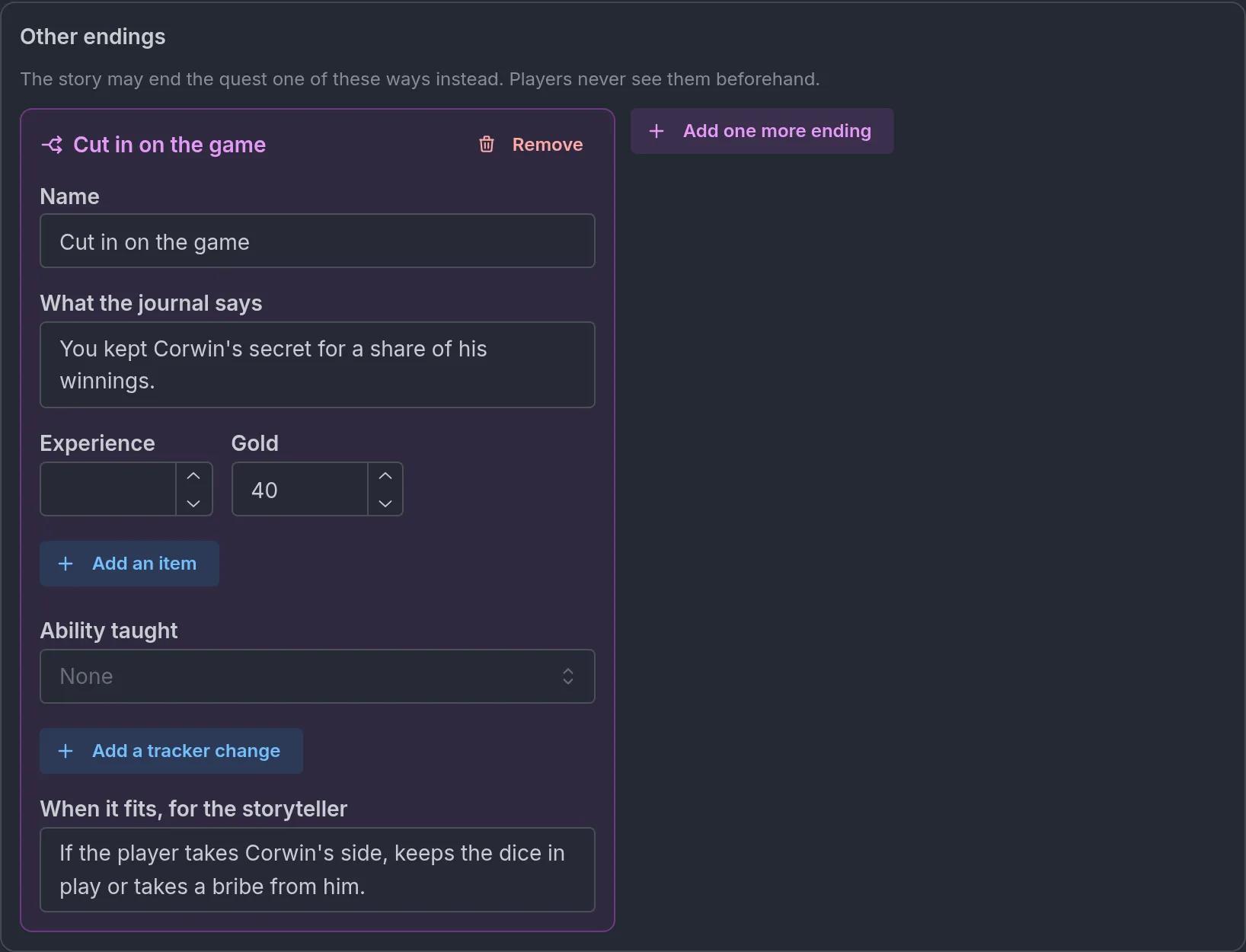
An ending's rewards replace the quest's own. The ending pays only what its card lists, and nothing when the card lists nothing. The quest's rewards are never paid on top.
Players never see an ending before it happens. The offer card and the journal show the quest's own rewards and one line, "Other endings are possible", with a split-arrows icon.
The storyteller decides. When the story reaches an ending, such as a player who spares the poacher or sides with the smugglers, it ends the quest that way. It can do so at any step, and the steps left stay unticked. The player has no ending buttons. The ending is paid once. A quest that ends as written, by its steps and its hand-in, pays its own rewards.
The Quest complete card under the turn then names the ending, shows its journal line in italics, and lists what it paid. Take a quest named Loaded dice that ended with Cut in on the game: the card reads "Ending: Cut in on the game", then "You kept Corwin's secret for a share of his winnings." and "+40 Gold". The quest shows the same under Done in the journal.

Every ending completes the quest. It goes under Done and counts as done for whatever comes after.
Made-up quests
With The storyteller can make up quests on, the storyteller can invent a job your world has no quest for. It writes a name, one or two sentences, a giver, 1 to 5 steps and a size. It may add a time limit, a hand-in to the giver when the quest has one, and items under the rarity cap. It never sets an amount.
A made-up quest is offered on a card like any other. It is taken at once only when the player took the job in their own words. It counts toward Quests at once, and a giver with a made-up job still on offer cannot offer a second one.
Its steps get a check only where the game can keep it:
- A step to defeat something is checked when it names an enemy of your world.
- A step to reach somewhere is checked when it names one of your places or a place the journey already knows.
- A step to bring something is always checked. When the item is not one of yours, the step may never complete by itself.
- Any other step is a judgment step.
The Quest rules card has one more switch, Made-up quests can end other ways. It is off by default, and greyed out while made-up quests are off. On, the storyteller may give a job it makes up one or two other endings. Each ending is sized small, medium or large like the quest's reward, or pays nothing.
Turn the switch off for a world where every quest should be one you wrote.
The offer and the journal
The offer
When the storyteller offers a quest, a row appears above the suggested choices: the quest's picture or, without one, the giver's face, the quest's name, a quiet line with the giver and the rewards, and a View quest button. Several quests offered together show as one row, such as "3 quests on offer", with View quests.
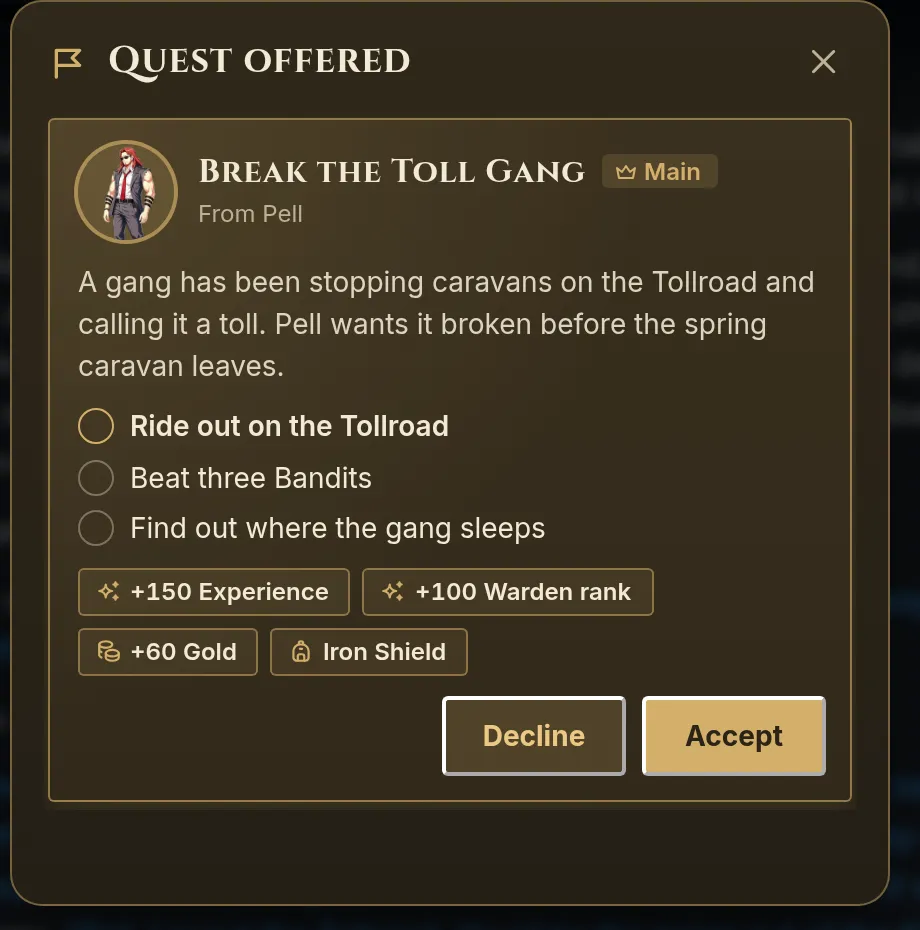
The window is titled Quest offered, or Quests on offer for several. Each quest is a card with:
- the giver's face, the name, a Main mark and a line such as "From Pell",
- the pitch from What the player reads,
- the steps, each with an empty circle in front,
- the reward chips, such as "+50 Experience", "+120 Gold" or "Healing Herb ×2",
- the time limit, such as "2 days to finish it" (in turns on a world without the world clock, such as "16 turns to finish it"),
- Decline and Accept.
A quest with a picture shows it on its card. A place or a scene picture spans the top of the card as a wide banner, and the round tile under it keeps the giver's face or the icon. An item's picture takes the tile itself, as a rounded square.
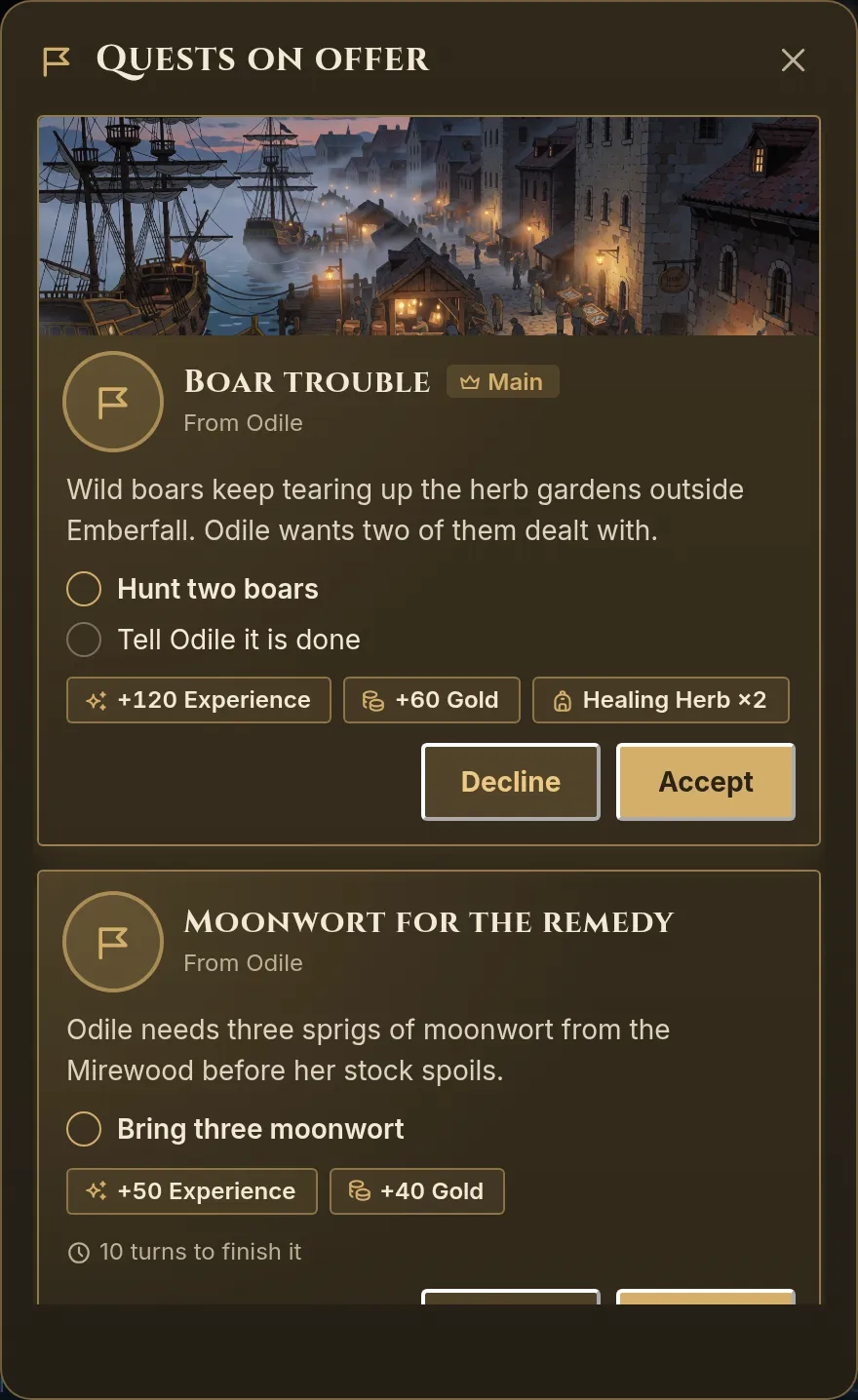
Answering takes no turn. It is settled at once, the row then reads Accepted, Declined or "1 of 3 accepted", and the storyteller is told on the next turn. A declined quest leaves no trace in the journal and can be offered again.
The card belongs to its turn. Once the story has moved on, it answers "This offer is closed."
The player can also take a job in their own words, and the storyteller then accepts it for them. The same cap applies. An offer nobody answers lapses after 3 turns.
The journal
Wherever quests play, the journey tools include one named Quests, at the top of the rail and as a row in the journey sheet. It opens as a window on a computer and as a sheet from the bottom on a phone.
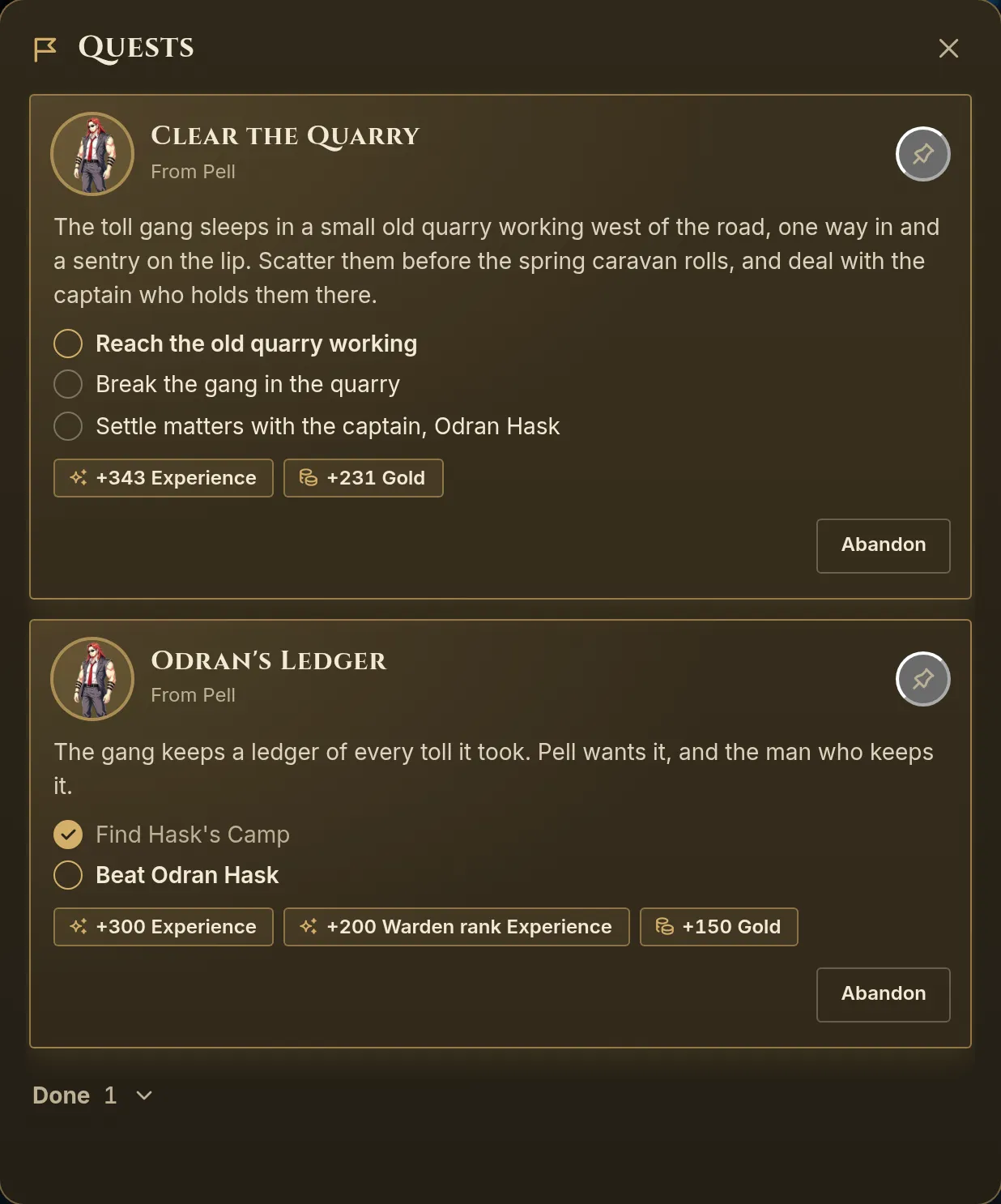
The journal lists, in order:
- Quests ready to hand in, with a ribbon such as "Hand in to Pell at Kettleford", "Hand in to Pell" or Ready to hand in.
- The tracked quest.
- The other quests in progress, main quests first.
Each card shows the steps with ticks, the count on an open counted step, the rewards promised and the time left, such as "2 days left", or a number of turns on a world without the world clock. The quest's picture shows as it does on the offer. Under the list, two folds hold the past: Done and Failed. They are closed by default and hidden when empty. Failed holds failed, abandoned and withdrawn quests, each with its reason.
Under Done, a quest that comes back after a wait shows the time left with a repeat icon, such as "Back in 2 turns" or "Back in 1 day", until it can be taken again. A done quest whose money was split keeps the line of who got what.
A pin button at the top right of each quest in progress tracks it, and a second click stops tracking. The tracked quest's open step shows on the Quests tool itself. The choice is kept per journey in that browser. A dot marks the tool after something happened to a quest, until the journal is opened.
The host's journal (the player's own in a solo journey) has an Abandon button on each quest that is in progress or ready. A guest sees it greyed, and hovering or tapping it reads "Only the host can abandon a quest.". It asks "Abandon this quest?" with Keep it and Abandon. The storyteller hears of it on the next turn.
The quest events card
Whatever happens to a quest during a turn is recorded on a card under that turn, and older turns keep theirs:
- Quest accepted and Quest declined, with the quest's name.
- Step done, with the step's text and the quest's name.
- Ready to hand in.
- Quest complete, with chips for what was actually paid, each companion's share such as "Brannoc +30 Experience", who got what of money that was split, and anything that was skipped. When the quest ended another way, the card names the ending, such as "Ending: Cut in on the game".
- Quest failed, with the reason, such as "Time ran out".
- Quest abandoned.
- Quest withdrawn, with the reason the storyteller gave.
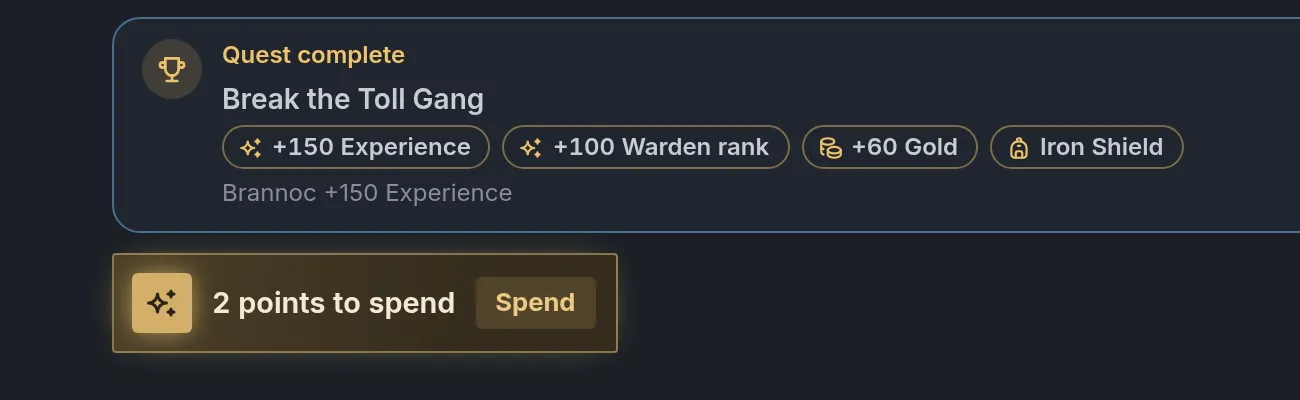
On a world with LitRPG System pop-ups, the storyteller cannot write its own quest box while Quests is on. The game draws these cards from the journal. See RPG mode and dice.
Time limits
Time limit, in the Hand-in and time block, takes a number from 1 to 999 and a unit: Hours, Days or Turns. Left empty it reads No limit, and clearing the number removes the limit. The unit starts on Turns.
- The time runs from the moment the quest is taken.
- With the world clock on, Hours and Days follow in-story time. Turns always counts turns.
- Without the world clock, Hours and Days cannot be picked, and a note reads Hours and days need the world clock. A quest that already uses them counts an hour as one turn and a day as 8 turns.
- When the time is up, a quest still in progress fails at the end of the turn with the reason "Time ran out".
- A quest that is ready for its hand-in never expires.
Herbs for Odile gives the player 2 Days. With the world clock that is two days of story time. Without it, 16 turns.
Quest beats
Beats can read and change quests through one condition and one effect. Both sit in the purple RPG game system group of the beat pickers, on a world with the RPG game system and Quests on. Beats themselves are covered in Beats and story arcs.
The A quest is… condition
Pick a Quest, then what it Is:
- Available to take: the quest could be offered now. It is not taken, not done unless it can be taken again, not waiting to come back, opened if it waits for a beat, its earlier quests are done and the level fits. The place in Offered at is ignored.
- In progress: the default. The latest take is running.
- Ready to hand in: every step is done and it waits for its giver.
- Done: it was completed at least once.
- Failed or given up: the latest take failed, was abandoned or was withdrawn.
- At a step: adds a Step number. True while the quest is in progress and that step is the open one.
On a quest that has other endings, Done adds a field, With the ending: Any ending, the default, The usual ending, or one of the others.
The Change a quest effect
Pick a Quest, then what to Do:
- Make it available: opens a quest set to After a story beat, so the storyteller can offer it.
- Give it to the player: the default. The quest is taken with no offer card. It skips the level range, the place, the earlier quests, the wait for a beat, the wait in Comes back after and Quests at once. It does nothing when the quest is already taken, or done and not repeatable.
- Complete its open step: completes the open step of a quest in progress.
- Complete it: finishes every step and pays the quest, even one that is handed in to its giver.
- Fail it: fails the quest, with an optional Reason shown to the player of up to 400 characters.
On a quest that has other endings, Complete it adds a field, Ending: The usual ending, the default, or one of the others. Picking one ends the quest that way, at any step. The beat's summary then reads such as "Loaded dice: Complete it (Cut in on the game)".
An action that does not apply, such as failing a quest nobody took, does nothing and says nothing.
While Quests is off, a quest condition or effect already on a beat shows one orange line in place of its fields, such as "Needs Quests in the RPG game system, which is off: this condition never passes."
Where each can sit
- A quest is… works in a beat's own conditions, inside a Match any of (OR group), and as the Condition of a quest step.
- Change a quest works in a beat's own effects, in the effects a player prompt runs on an answer (When the player answers, an answer case's Then and If no answer case matches), and inside an If / otherwise case.
- A quest is… works in an If / otherwise case too. It reads the journal as it is when the case runs.
A prompt can therefore hand out a job. A beat on entering The Copper Inn asks "The innkeeper asks you to keep the peace in the cellar pit tonight. Take the job?" with Yes and No, and the answer case for Yes runs Change a quest with Give it to the player. The quest is taken on the turn the player answers, before the story of that turn is written. The Quest accepted card sits under that turn, and the storyteller already reads the quest in the journal.
A beat points at a quest by a fixed reference made when the quest was first named, so renaming a quest never breaks a beat. A collapsed beat row shows that reference, which can differ from the quest's name. Open the row to see the name in the picker. A beat on a quest the world no longer has is marked Not one of the world's quests and gets a warning that the condition never passes or the effect does nothing.
Two ways to chain quests:
- Without a beat. Put the first quest in After these quests are done on the second. The storyteller can offer it once the first is done.
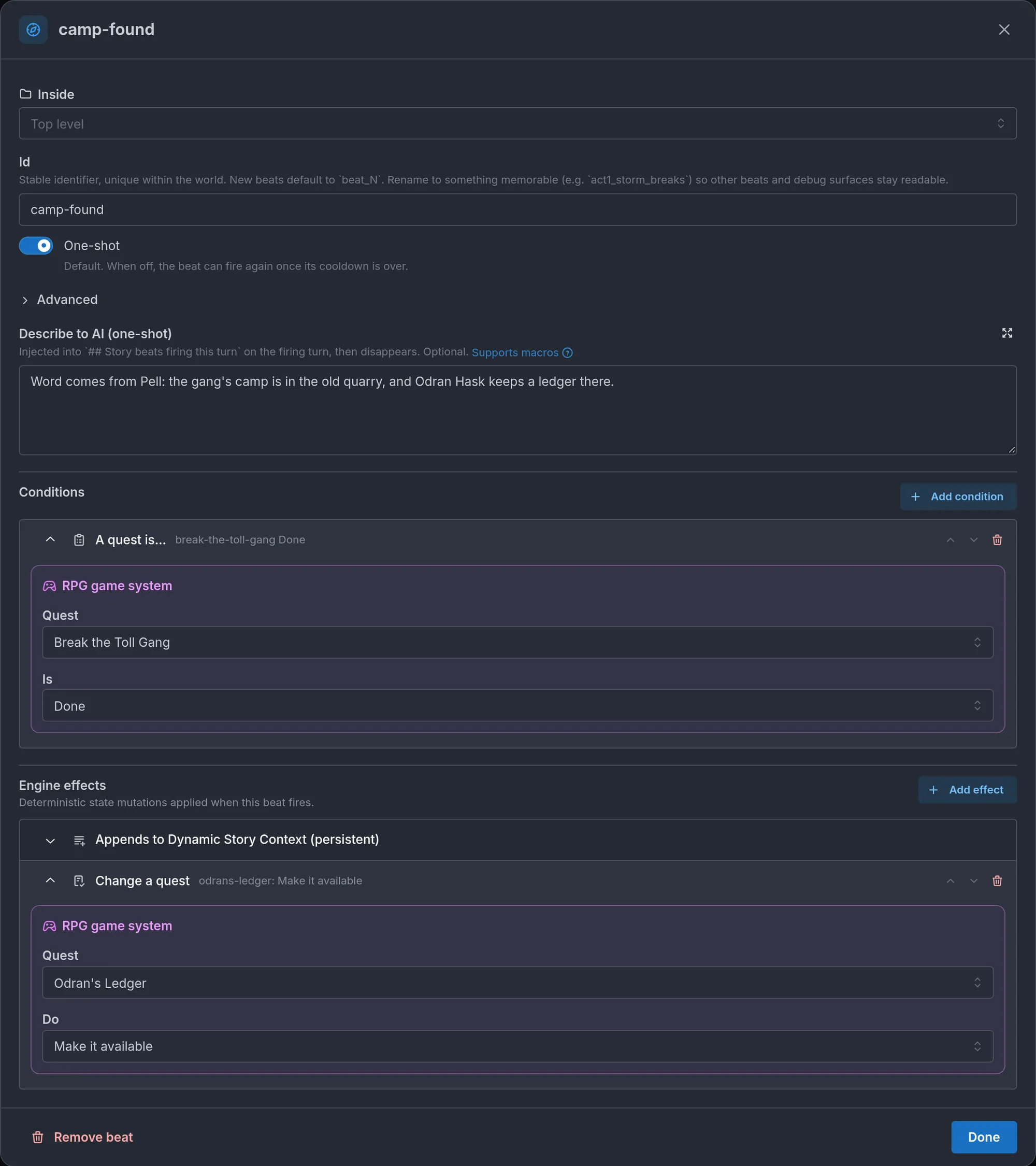
- With a beat. Set the second quest's Opens to After a story beat. Then write a beat with A quest is… on the first quest, Done, and Change a quest on the second, Make it available. Use this when the story should decide the moment. In The Tollroad Wardens, the beat
camp-foundmakes Odran's Ledger available once Break the Toll Gang is done.
Party play
A journey played together has one shared journal. See Playing together.
- Any member, host or guest, can answer an offer. The card then names who took it, with "by" and the character on the turn's card and "Taken by" on the quest.
- Only the host can abandon a quest. Guests see the button greyed.
- Experience goes in full to the player character and to each companion who keeps their own Experience. With the party system on, that is the party members and the guests' characters that have a sheet. Brannoc gets his share when Mara completes a quest. Experience is never split.
- Money is split evenly when the guests' characters carry their own money, in a row on their own sheet named like the currency (the first case of Whose money). The host's character and each guest's character take a share. Companions take none, since they carry no money of their own.
- Coins that do not divide evenly go one each, first to the character of the player whose turn it was when the quest paid, then to the host's, then to the guests'. Take 15 Gold between Mara, the host's character, and Tamsin, a guest's, paid on Tamsin's turn: Tamsin gets 8 and Mara 7.
- A shared purse, a shared tracker of the world, takes the whole amount. When the money is on the host's character alone, the host gets it all.
- Items go to the party's one bag. An ability goes to whoever took the quest.
What the storyteller decides and what the game settles
The storyteller decides:
- Whether and when to offer a quest, among those your rules allow. You cannot force an offer. A beat with Give it to the player is the way to hand a quest over at a set moment.
- When a judgment step is done.
- The hand-in, when the player meets the giver.
- Failing a quest the story has made impossible.
- Ending a quest one of its other ways, when the story gets there.
- Accepting for a player who took a job in their own words, and withdrawing an offer or a quest just taken, before any step is done, with a reason the player reads.
- Everything about a made-up quest except its amounts and which of its steps are checked.
The game settles the rest:
- Which quests can be offered. One that is already taken, done and not repeatable, still waiting to come back, still waiting for its beat, missing an earlier quest or outside its level range is refused, and the storyteller is told why.
- Where an offer holds. The card keeps only the quests offered at the place where the scene ends or began, or inside it. A quest with Offered at set that the story offers elsewhere is dropped from the card.
- Every checked step, the cap in Quests at once and the time limit.
- The rewards. They are paid once, and when the storyteller tries to hand out the same reward again on that turn, the game refuses its first attempt. On the turn right after, a payment by hand into the same Experience, money or tracker the quest raised is refused once, and the storyteller is reminded that the quest was already paid.
The storyteller reads one line per quest that is not waiting for a beat: its name, pitch, giver, place, levels, earlier quests, time limit, which steps are checked and your Note for the storyteller. Each turn it also reads the journal: the quests in progress with their open step, the offers not yet answered and the quests it may offer at the current place.
Limits
- 60 quests per world, 8 steps per quest.
- Name 80 characters, What the player reads 400, Note for the storyteller 800, step text 160, Reason shown to the player 400.
- How many 1 to 99, for steps and reward items.
- 6 reward items and 4 tracker changes per quest. A Change runs from -1,000,000 to 1,000,000 and cannot be 0.
- 8 quests in After these quests are done.
- 2 other endings per quest. An ending's Name 80 characters, What the journal says 400, When it fits, for the storyteller 400.
- Experience, money and range ends are whole numbers from 0 to 1,000,000.
- From level and Up to level 0 to 999. Time limit 1 to 999.
- Quests at once 1 to 20.
- A made-up quest has 1 to 5 steps and up to 3 reward items, 1 to 9 copies each.
- A journey keeps 80 journal entries. The oldest finished ones go first.
Nothing is trimmed to fit. A save over a limit is refused.
Common mistakes
- A quest set to After a story beat with no beat. It is never offered. Add a beat with Change a quest and Make it available or Give it to the player, or set Opens back to From the start.
- Expecting Offered at to offer the quest. It only says where the storyteller may offer it. The storyteller still chooses the moment.
- Amounts in the pitch. The chips show the real amounts. A number in What the player reads can disagree with them.
- Experience or money on a world that has neither. The game pays nothing for that part and the storyteller is left to give it. The editor does not warn you.
- A Defeat enemies step on something outside the Enemies list. The step never completes by itself. The enemy has to be one of the world's enemies.
- A Bring items step on something the party already holds. It completes at once, since the check counts what is in the bag now.
- Hours or Days without the world clock. They cannot be picked, and on a quest that already has them a day is 8 turns. Use Turns.
- Renaming what a quest names. A quest finds its giver, places, enemies, the items of its Bring items steps and its trackers by name. Rename one and the quest loses it, shown as "(not found)". Reward items, the ability and the quest's own name are safe to rename.
- Give it to the player on a gated quest. The effect skips the level range, the earlier quests and Quests at once. Add conditions to the beat when those should still hold.
- A second quest log. A quest table or a sheet list named Quests keeps working, but it is not the journal. With Quests on, keep one of them out so the player does not read two logs.
Frequently asked questions
Enemies
Learn how to author stock enemies for your Imagina world, from templates and the copies that enter a scene to levels, experience and loot, out rules, battle sprites, and bringing enemies in from a beat or by the storyteller.
Fights
Learn how the Fights switch lets the game roll every blow and work out damage before the story tells it, covering Strength, rewards for beaten enemies, out rules, the player's empty Health, defeat and respawn, boss phases, bars on stage, the fight card players see and narrative battles.