RPG mode and dice
Learn how to use RPG mode to add stats, gear, abilities, and dice to your Imagina world. Covers character sheets, LitRPG systems, and how to keep mechanics in service of story.
RPG mode is an optional gameplay layer that adds a character sheet to your world: attributes that change over time and mechanically affect what happens, plus inventory, skills, and bonds the story grows during play. Dice are a separate option that resolves genuinely uncertain actions with real rolls. Both are opt-in, and a story world can stay without them and still use trackers and beats.
RPG mode is not just for RPGs. It is for any story where attributes matter mechanically: the traits that shape an office drama, the athletic stats behind a match, the aptitudes that decide an exam, the influence that opens doors in a political story. If your story has numbers that change and those numbers affect outcomes, the sheet handles that for you, so you do not have to track it in prose.
What is RPG mode?
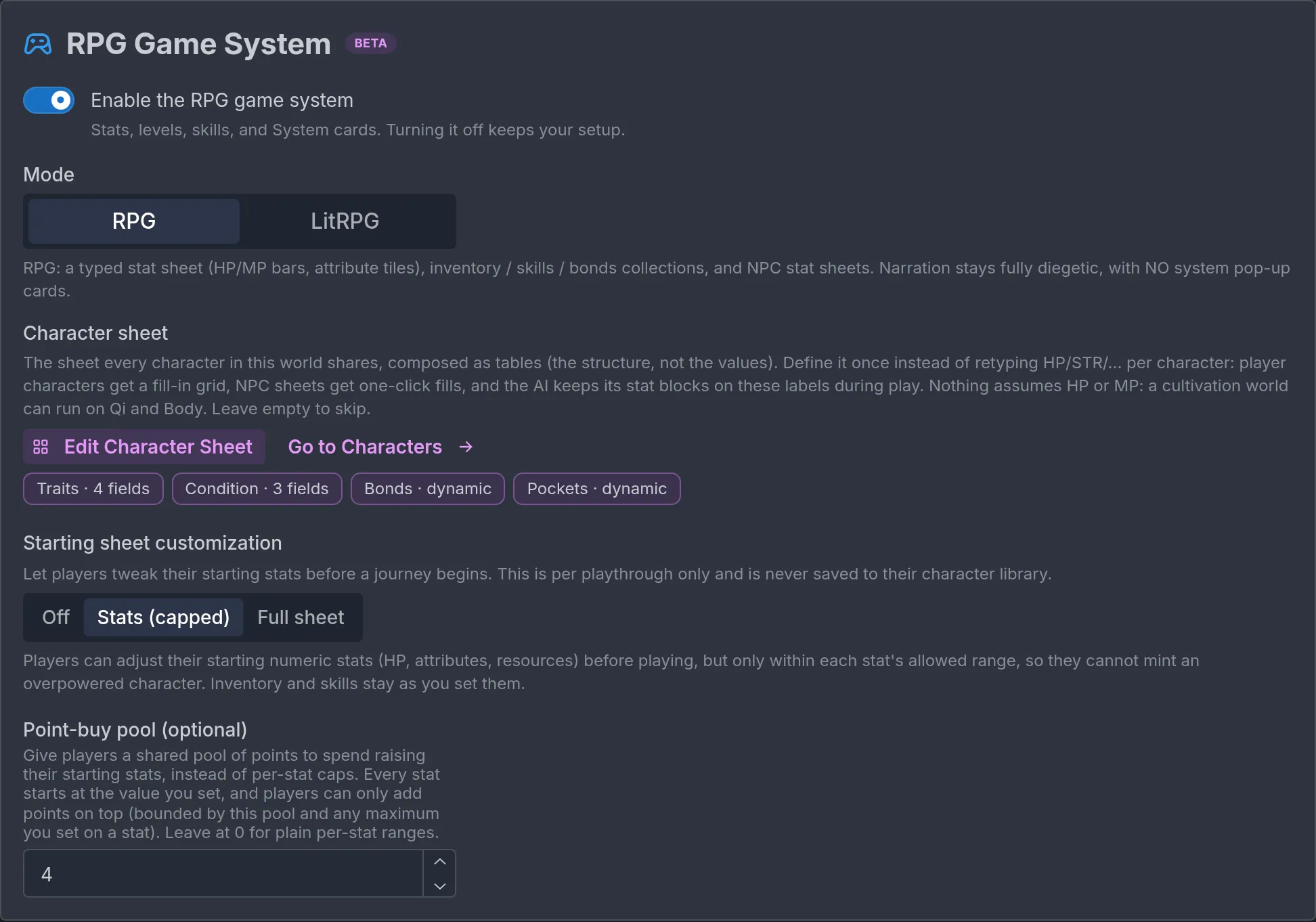
Turn it on under Game rules → RPG Game System with the Enable the RPG game system switch. The section then offers two modes:
- RPG: characters get a typed stat sheet (bars, attribute tiles), inventory, skills, and bonds, and NPCs get stat blocks. Narration stays fully immersive. Progression is woven into the prose ("you feel steadier on your feet now"), never announced with a pop-up.
- LitRPG: everything in RPG, plus the in-world System: styled notification cards for level-ups, new skills, quests, and loot that the character perceives as part of the world, the way they do in a LitRPG novel.
With the toggle off, the world is pure narrative. You can still use numeric trackers and bars, but there is no shared sheet, no inventory or skills the story grows, and no System. Most worlds stay here.
A concrete example: in RPG mode, a character tries to pick a lock. The storyteller describes success or failure shaped by their Dexterity and their Lockpicking skill, without printing a number. In LitRPG mode, the same success might be followed by a System card: "Lockpicking has reached level 3."
When should you use RPG mode?
Turn on RPG mode when you want changing character attributes to influence outcomes. If your story's tension lives elsewhere, leave it off.
Scenarios that benefit, across genres:
- Traditional RPG and adventure: combat stats, gear, abilities, leveling. The classic case.
- LitRPG, progression fantasy, isekai: the character literally sees the game layer.
- Sports: athletic stats that decide matches, training that raises them over a season.
- School and academic: aptitudes that affect exam results, skills that improve with study, clubs that open story branches.
- Office and workplace: traits that shape social outcomes, skills that decide whether a project lands, reputation that opens or closes doors.
- Political and social influence: standing with factions that decides which options exist.
- Survival: resource pools, physical condition, skills that determine whether the character makes it.
- Romance: bond tiers that gate story branches, though the built-in relationship record often suffices. See Worldbuilding and characters.
When you do not need it:
- Characters are defined by personality, voice, and relationships that evolve naturally. The built-in relationship record and a few trackers handle this.
- The tension comes from dialogue, mystery, or exploration rather than mechanical outcomes.
- You are not ready to maintain a sheet and its rules. Start with trackers and graduate later.
RPG mode versus trackers. Trackers are the lighter option. If you need a few named values that change (reputation, trust, time pressure), trackers are enough, and they work in any world. If you need a full sheet with several attributes, gear, abilities, and skills that interact, and you want the story to grow inventory and skills for you, RPG mode is the right tool. See Trackers.
RPG mode basics
The character sheet
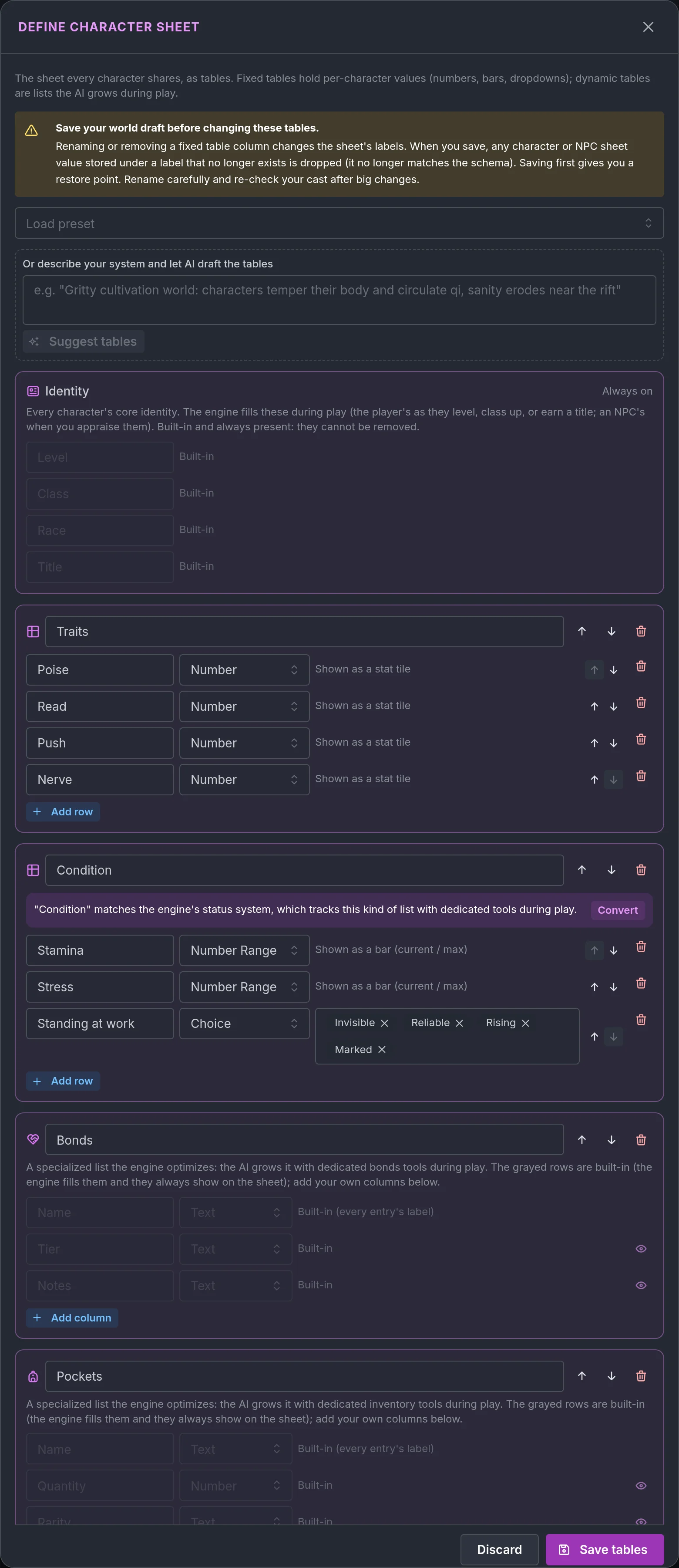
The sheet is defined once for the whole world and shared by the player characters and the NPCs. Open it with Define Character Sheet in the RPG Game System section. It is laid out as a list of tables:
- Fixed tables hold rows you define yourself: attributes (Strength, Charm), resource meters (Health, Qi), a Class or Realm line. Each row has a type: Text, Number (shown as a stat tile), Number Range (shown as a bar with a current and a max), or Choice (a pick from options you supply). Up and down arrows on each row set the order players see.
- Dynamic tables are lists the story grows during play: Inventory, Skills, Bonds, Status (buffs and debuffs), and Affinities (resistances and weaknesses). Each has built-in columns, and you can add your own. A built-in column you do not want on the sheet can be hidden with its eye toggle (the story still tracks it, players just do not see it), and your own columns reorder with the same arrows. You can rename them freely: a world can call its skills "Techniques" and its bonds "Ties".
- List is your own named list for anything the built-ins do not cover: Quests, Spells Known, Contracts.
- An always-on Identity table (Level, Class, Race, Title) is filled by the engine as the story progresses.
Presets give you a starting point: a default sheet, a dungeon crawler, a cultivation world, and a modern survival setup. You can also describe your system in a sentence and let the editor suggest tables. Nothing assumes HP or MP: a cultivation world can run on Qi and Body.
Two practical warnings. Save your draft before restructuring the sheet, because renaming or removing a fixed row changes the label every stored value is keyed to, and values under the old label are dropped from every character. And restructure in the sheet editor rather than by hand elsewhere.
Filling it in per character
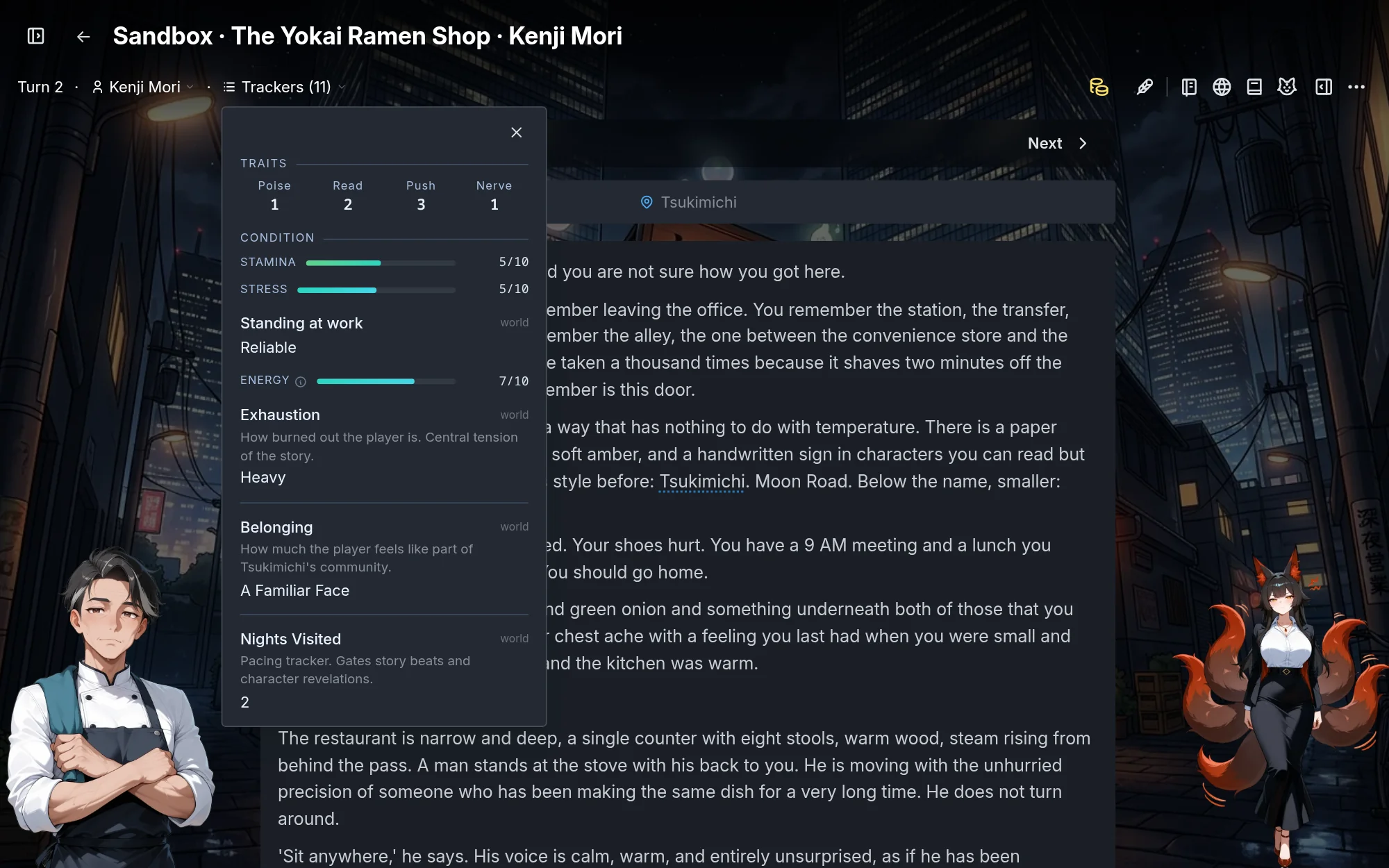
Each player character and NPC gets a fill-in grid for the world's sheet: the purple RPG GAME SYSTEM SHEET band near the end of each character's page. Click its header to collapse it when you are not editing stats; the folded state is remembered on that device and applies to every character's sheet. Filling a box creates the matching typed tracker on that character, so a Number Range row becomes a bar and a Number row a tile. Give player characters build-defining stats so they feel distinct from turn one. An NPC's block becomes their canon in play: live from turn one if they are present at start, otherwise revealed the first time they appear. Boxes you leave blank on an NPC are invented by the story and kept consistent afterward.
Stats, gear, and abilities in the prose
- Stats shape outcomes. A high-Strength character hits harder, a high-Wits character sees the trap.
- Gear is what the character carries. It can change what they can attempt and how well.
- Abilities (skills, techniques, spells) are what the character can do, and the story levels them as they are used.
The storyteller describes outcomes influenced by these without printing numbers. "Your sword catches the seam in the knight's armor and he staggers", not "you rolled 17 plus 4 against 15". The stats shape the story, they do not replace it.
The player-facing sheet
Players see a live status panel during play, grouped under your table titles, with bars, tiles, scales, and lists that update as the story progresses. NPC sheets are revealed as a skippable card the first time the character appears and can be inspected afterward. Beats can read these lists and write any row of the sheet, lists, fixed rows like HP and the Identity rows (Level, Class, Race, Title), so a key item, a quest, a hit to HP or a new title lands on the sheet without relying on the storyteller: see Write character sheet row.
Letting players customize their starting sheet
Starting sheet customization in the RPG Game System section has three options:
- Off: players start with exactly the stats you set.
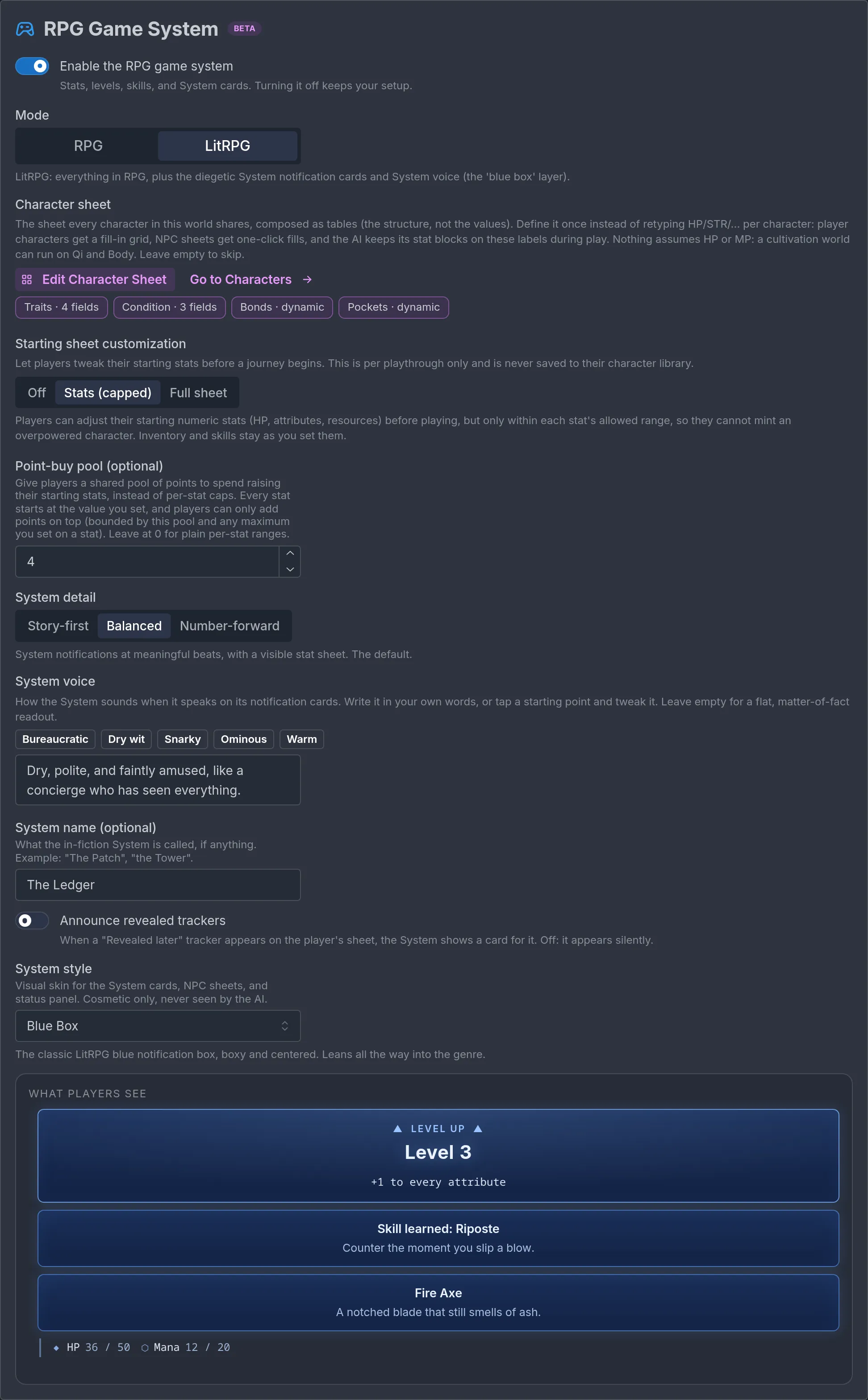
- Stats (capped): players adjust numeric stats before playing, within each stat's allowed range. A stat needs a maximum to have room to rise. An optional point-buy pool gives players a shared budget to spend instead of per-stat ranges.
- Full sheet: players edit the whole starting sheet with no caps, including text fields and the starting lists. Best for sandbox and build-your-own-character worlds.
Changes apply to that playthrough only and are never saved to the player's character library.
LitRPG and the System
LitRPG mode adds the in-world System: notifications the character sees as part of the story, rendered as styled cards mid-scene. Level-ups, skill gains, quest updates, loot drops. It is diegetic, not a user-interface overlay, and the character reacts to it.
- System detail: how talkative the System is. Story-first gives few, earned notifications with numbers in the background. Balanced (the default) notifies at meaningful beats with a visible sheet. Number-forward gives dense, frequent updates with full accounting.
- System voice: how the cards read. Write it in your own words or start from a preset such as bureaucratic, dry wit, snarky, ominous, or warm. Leave it empty for a flat, matter-of-fact readout.
- System name: what the System is called in the fiction, if anything ("The Patch", "the Tower").
- Announce revealed trackers: when a tracker set to Revealed later appears on the player's sheet, the System shows a card for it ("New on your sheet: Curse", with its value) on that turn. Off by default, and the tracker appears silently. See Trackers that appear later.
- System style: a visual skin for the cards, NPC sheets, and status panel. Neutral, Fantasy, Futuristic, or the classic Blue Box. Cosmetic only, and never seen by the storyteller. A live preview shows what players see.
When to use it. Ask one question: would this character actually see blue-box notifications? If the game layer is part of the world's premise (isekai, progression fantasy, VRMMO, dungeon core), pick LitRPG. If you want stats under the hood with novel-like prose, pick RPG. The comparison is also in What's the difference between RPG and LitRPG mode?.
Dice
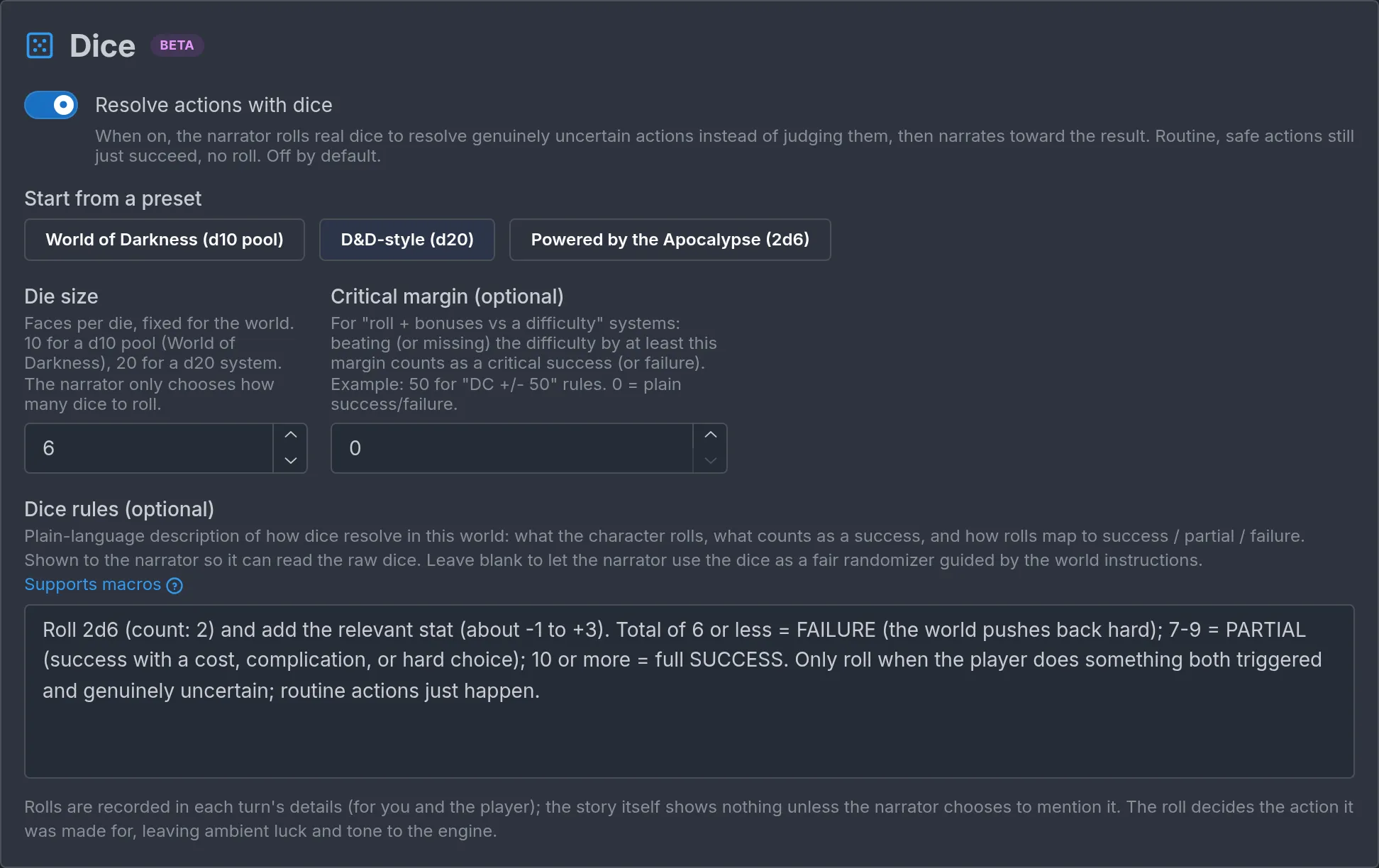
Turn dice on under Game rules → Dice with the Resolve actions with dice switch. With dice on, the narrator rolls real dice to resolve genuinely uncertain actions instead of judging them, then narrates toward the result. Routine, safe actions still just succeed, with no roll.
You set:
- Die size: faces per die, fixed for the world. 10 for a d10 pool, 20 for a d20 system, 6 for 2d6. The narrator only chooses how many dice to roll.
- Critical margin: optional, for roll-plus-bonus-versus-difficulty systems. Beating or missing the difficulty by at least this margin counts as a critical success or failure. Leave it at zero for plain success and failure.
- Dice rules: plain language for what the character rolls, what counts as a success, and how results map to success, partial success, and failure. The narrator reads the raw dice against these rules. Leave it blank to let the dice act as a fair randomizer guided by the world instructions.
Presets fill the size and rules for a World of Darkness d10 pool, a D&D-style d20, and a Powered by the Apocalypse 2d6. Edit them afterward.
How rolls are built. The narrator names the attempt, adds bonuses from named sheet attributes and skills, and rolls against a difficulty when your rules call for one. "Lockpicking: 1d20 plus Dexterity plus the Lockpicking skill, difficulty 15."
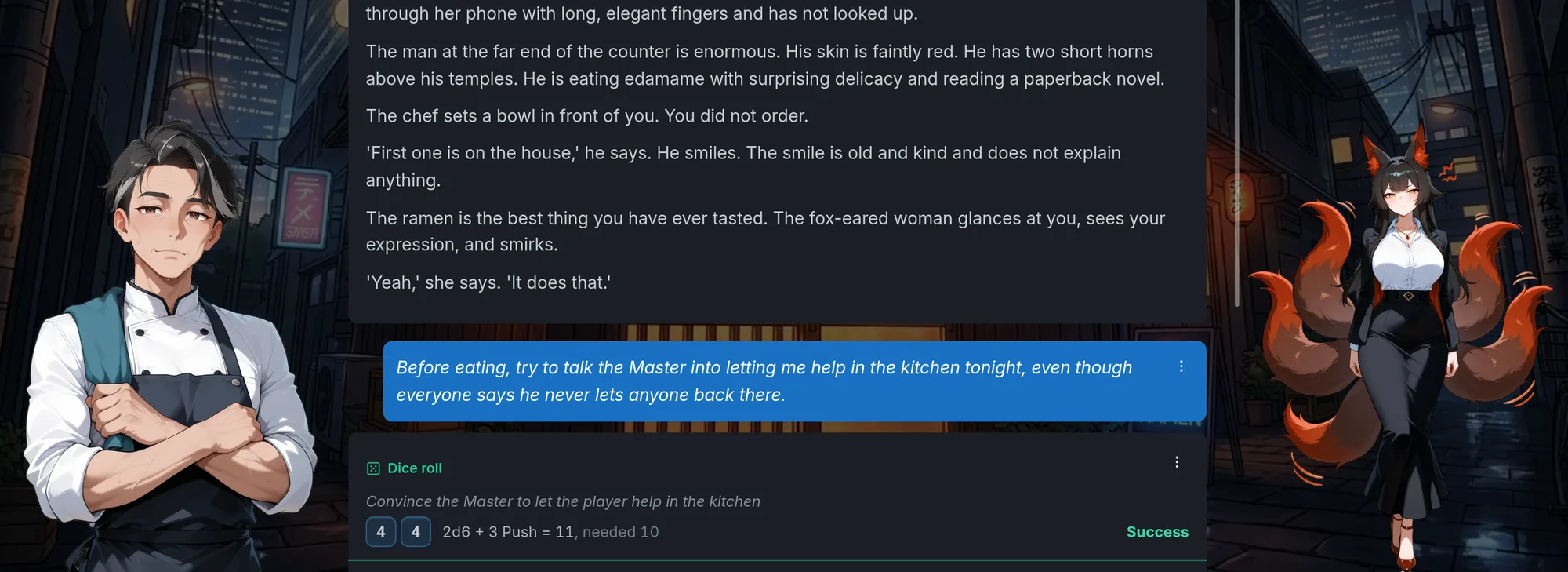
How rolls reach the player. Rolls tumble in a dice tray above the prose, with the reason, the faces, the math, and the result, and players can hide the tray in their settings. Rolls are also recorded in each turn's details. The story itself mentions a roll only if the narrator chooses to, so the prose stays clean.
Opposed attempts. When the player pushes against another character (persuasion against a stubborn guard, stealth past a sentry), the narrator rolls the player's attempt against a difficulty that reflects the opposition. There is no second roll for the other side. Put the opposition's strength in your dice rules or the NPC's sheet so the difficulty is consistent.
RPG outcomes
Skill checks. Without dice, the narrator judges each declared action against the character's relevant stat and skill. With dice, the roll decides, and the narrator reads it through your rules.
Combat. Attacks, damage, and defense are resolved through the sheet: attributes, gear, and skills shape what happens, meters take the damage, and status effects land on the sheet. With dice on, each uncertain strike is a roll.
Degrees of success. Every turn's action is recorded as a success, a partial (yes-but or no-but), a failure, or neutral when nothing was at stake. Trivial actions succeed automatically. Failure is the narrator's veto when the scene requires it: restrained characters, stubborn NPCs, impossible acts. When dice are on and you set a critical margin, individual rolls can also land as a critical success or a critical failure, which the narrator plays up in the prose. The Outcome System section under Game rules runs always, and takes an optional line of custom guidance: "Lean forgiving, this is a cozy story", or "Consequences are harsh and permanent."
Outcome bias is a hidden luck value the narrator receives now and then that tints uncertain moments, low leaning unfavorable and high leaning favorable. It is on by default, and switched off automatically on worlds that use dice, because the dice already decide.
Nudges are unrelated to luck: a random creative suggestion the narrator gets about one turn in ten, which it may follow or ignore. They keep scenes from looping the same move. Turn them off under Story events → Nudges (the Enable nudges switch) if the world must stay tightly on rails.
Balancing your RPG
Keeping stats meaningful without letting them run the story.
- Story comes first. Mechanics serve the narrative. If the stats drive the story more than the characters do, something is off.
- Every stat should matter. If an attribute never influences an outcome, cut it. Six well-designed stats beat thirty the narrator cannot keep straight.
- Numbers steer, never print. Never instruct the narrator to print stat values or thresholds in the prose. No "STRENGTH: 14", no "you need a 15 to hit". Stats surface through what the character experiences. In LitRPG mode, the System's own cards are the one exception, and that is what they are for.
- Tune System verbosity. A System that comments on every action becomes noise. Story-first or Balanced suits most worlds.
- Use the built-in lists. Prefer Inventory, Skills, Bonds, Status, and Affinities over inventing parallel mechanics in prose. The story has dedicated ways to maintain them.
- One label set for the whole world. The same attribute names and the same resource names for player characters and NPCs alike.
Before: "Track the player's Strength, Agility, Vitality, Intelligence, Wisdom, Charisma, Luck, Perception, Willpower, Endurance, Dexterity, and Faith. Print their current values at the end of every turn."
After: a sheet with Might, Agility, Wits, Nerve, and Charm, plus Health and Stress bars. Instructions: "Let Nerve decide whether the character keeps their head under pressure. Show it in what they notice and how steady their voice is, never as a number."
Examples
A fantasy combat scene. The sheet has Might, Agility, and Wits, a Health bar, and Skills. Dice are on, d20 with a critical margin of 5. The player attacks a bandit. The narrator rolls 1d20 plus Might plus the Swordplay skill against a difficulty from the bandit's stat block, gets a success, and writes the hit as the blade catching the bandit's guard and turning it. The bandit's Health drops on his sheet. No numbers in the prose.
A LitRPG level-up. The same world in LitRPG mode with a Balanced System. After the fight, a System card announces the level-up and a new skill, Riposte. The Identity table shows the new level, Skills gains a row, and the character reads the card and reacts to it in the story.
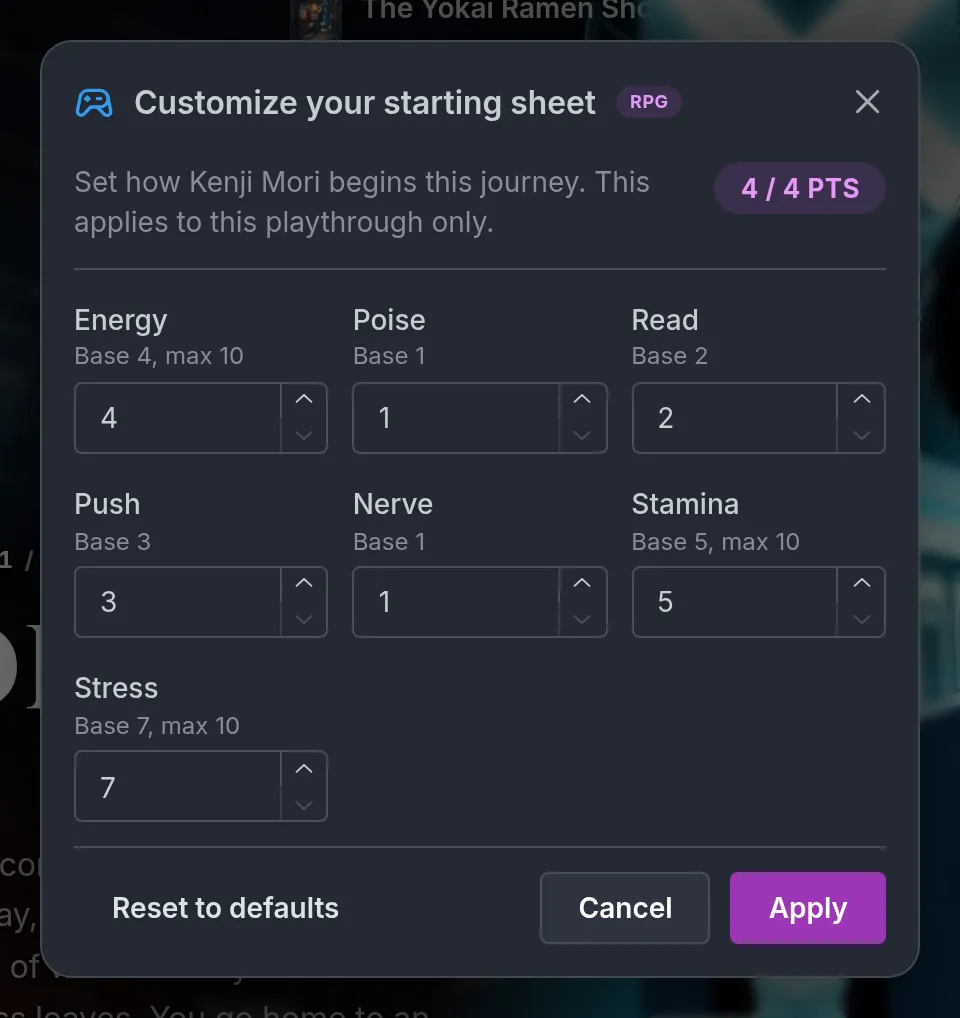
A school story with academic mechanics. Mode RPG, no dice. The sheet has Focus, Memory, Charm, and Nerve, a Stress bar, and Skills such as Chemistry and Debate. Before the midterm the player crams, and Chemistry rises. The exam is a skill check: the narrator describes the paper going smoothly until the last question, shaped by Chemistry and Stress, and the result lands as a partial success. A Bonds row with the study partner deepens a tier.
An office drama with social traits. Mode RPG, dice on with the 2d6 rules: 6 or less fails, 7 to 9 succeeds with a complication, 10 or more succeeds fully. The sheet has Poise, Read, and Push, plus a Reputation bar and Bonds with coworkers. The player tries to talk a skeptical director into backing their project. The narrator rolls 2d6 plus Push, lands on 8, and writes the director agreeing on a condition the player will regret.
Common mistakes
- Too many stats. The number one mistake. Start with the attributes that matter most to your story.
- Printing numbers. Instructing the narrator to write values into the prose breaks immersion. Steer, never print.
- A System that narrates everything. Tune System detail down.
- Mechanics with no narrative purpose. A stat that never changes an outcome does not need to exist.
- A sheet where trackers would do. A few named values are a tracker job. Do not build a sheet for what three trackers can handle.
- Renaming rows carelessly. Stored values under the old label are dropped from every character. Save first and re-check your cast.
- Forgetting the story comes first. When the stats drive the story more than the characters do, the balance is wrong.
Frequently asked questions
Beats and story arcs
Learn how to use story beats and story arcs to structure your Imagina world. Control when events fire, reveal information in the right order, and keep cause and effect intact across a long journey.
Presentation and media
Learn how to add cover images, turn illustrations, character sprites, text effects, texting threads, emails and letters, and immersive mode to your Imagina world. Covers the built-in generators and Image Lab.