The party
Learn how the party works in an Imagina RPG world, from the Starts in the party switch to how the storyteller and the player add or remove companions, what the game does for a member, and the party screen players open in play.
Beta
The RPG system is in beta and only accounts with the RPG beta can set it up. It may still change.
The party is the list of characters who travel and act with the player character. Members are the companions the RPG rules act on: they earn points on a level-up, keep Experience, pay for their own abilities and stand on the player's side in a fight. Everyone else keeps a loose stat block the storyteller writes freely.
This page is about the party inside the story. Playing a journey with friends is a different feature, covered in Playing together. In such a journey, each guest's character is a party member by definition, and nobody can remove them. They fight on the player's side and, with a sheet of their own, use abilities like a companion. They earn Experience and points of their own only with Party system on.
Starting companions
A character joins the party in one of three ways: you mark them as a starting companion, the storyteller adds them during the story, or the player adds them by hand. Only the first is yours to set. It takes the world's party switch, then one switch per character.
- Turn on the world's RPG game system.
- On the Features page, in step 2, Party, turn on the Party system card. Its line reads "Companions can join the player's party." It starts on in a new game system made with the beta. An existing world keeps it off until you turn it on.
- Open the character in the NPCs section and scroll to the purple RPG game system group near the end of their page. Starts in the party now shows there.
- Turn on Starts in the party, the first control of the group. Its helper reads "Travels with the player from the opening, on scene too. The story and the player can change it later."

In the Tollroad Wardens, Brannoc has the switch on. Every new journey opens with him beside Mara Vey, already met, with the stat block you wrote for him.
What the switch does and does not do:
- It puts the character on scene. A starting companion opens the story with the player, whatever Present at start says on their page.
- It is only a starting point. The mark lives on the journey, not on the world. The story and the player can take the companion out or bring others in, and changing the switch later affects new journeys only.
- It waits on a hidden character. While Hidden until unlocked is on, the switch applies only when a world setting option unlocks the character at the start, and its helper says so. A character a beat unlocks later arrives outside the party.
- It is not offered on an enemy template. A template never plays as itself. A creature that should travel with the player is written as a regular character. See Enemies.
- It is not copied. Duplicate leaves Starts in the party off on the copy.
The editor has no party section and no party size setting. You mark each companion on their own page, and nothing limits how many you mark. On an older world, Upgrade with Ima proposes who starts in the party.
With the party system off
The party plays for every player of a world with Party system on. With it off there is no party: no party screen, no In your party switch in Memory, no Remove from party and no Bring back. A starting companion still opens the story on scene, as an ordinary character.
A companion is then read by stance. An NPC with a stat block whose Threat / disposition reads friendly, such as "Allied" or "Friend", gets points of their own on a level-up, on a world that pays points per level. With Fights on, the same companion fights on the player's side and earns Experience from beaten enemies. A starting companion without a friendly stance does neither until the storyteller gives them one.
Marks are not lost. Those you or the storyteller made earlier stay stored and come back when the switch is turned on.
What plays also depends on Per-character sheets:
| Party system | Per-character sheets | What plays |
|---|---|---|
| Off | Off | No party. Companions are read by stance and keep a loose stat block. |
| On | Off | The party and its screen. A companion's points go on their loose stat block. Guests earn Experience and points of their own. |
| Off | On | The player's stats sit on their sheet and the roles are read. Guests' characters and enemy copies hold real values. Companions keep a loose block and level by stance. No party screen. |
| On | On | Everything. Members and former members hold real values with caps, and their points are spent on their own rows. |
How members join and leave
The storyteller
The storyteller is told that the party is who travels and acts with the player character: companions who follow them from scene to scene and share their fights and plans. Being friendly, helpful or in the same room is not enough. An ally met in passing, a host or a love interest who stays home is not a member.
When someone joins in the story, the storyteller marks them. When someone parts ways, is left behind, is captured or turns on the player, it takes them out and must give a short reason, up to 160 characters. Players read that reason as written on the party screen.
The storyteller adds nobody any other way. The game never reads a join out of the prose. If the player writes "she agrees and joins us" and the story has her bargain instead, she is not in the party.
The player
The player who started the journey can correct the party between turns, in two places:
- A character's record in Memory has an In your party switch, with the hint Travels and fights beside you. Turning it off for a current member shows a Why they left field (optional, up to 160 characters). Like the other corrections there, it applies with Save corrections.
- On the party screen, Remove from party on a companion asks for an optional reason, then Keep or Remove. Bring back on a former member returns them. Both apply at once.
The storyteller is told about the change once, on the next turn, and is told not to undo it. If the player regenerates or undoes that turn, the change goes with it.
What the game does by itself
- Death takes a member out. When the story records a member's death, they leave the party with that reason and sit among the former members with a skull. Their page reads Fell in battle. The party screen offers no Bring back for the fallen. A revival does not return them either: the story has to bring them back in, or the player can set their Status to Active and turn on In your party in Memory.
- Members are protected. A journey keeps about 20 characters at once. When that list is full, a party member is never the one dropped, and the storyteller cannot quietly remove a member without recording a leave or a death.
- A recruited enemy becomes a character. If the storyteller brings a Bandit from a fight into the party, that Bandit stops being an enemy and becomes an ordinary tracked character who keeps the template's art and sheet. Players cannot do this by hand, since enemies in a fight are not listed in Memory.
What a member gets
A sheet of their own. On a world with Per-character sheets on, a member has the same kind of sheet as the player: real values with caps, read against their variant. Someone who joins mid-story gets theirs on the spot. Numbers come from the stat block the storyteller had written for them ("88/100", "22") where they read as numbers, and a row with no number takes the sheet's default. A member who leaves keeps that sheet. Without that option, a member's sheet stays a loose block, and the party screen still shows it. See Character sheets.
Points on a level-up. A companion's level stays the storyteller's to raise or lower, unless it sits on a progression track that rises by itself at an amount of Experience. When it rises on a world that pays points per level, the game puts those points in the companion's own pools, and the player spends them. A level regained after a drop pays nothing a second time. A former member cannot spend points while they are out. See Levels and points.
The level has to read as a number for this to work. "Lv. 3" and "Rank II" do. "Master" and "C-rank" do not. When a starting companion's level does not, on a world that pays points per level, the editor shows a yellow line under the Level row of Linked fields, such as Brannoc gets no points on a level-up: "Master" is not a number. Write it with one, like Lv. 3.
Experience. With the built-in trackers and NPC sheets on, a member keeps an Experience count of their own that the storyteller moves. It raises their level only on a progression track set to At an amount of Experience. With fights on, a beaten enemy pays its Experience to the player and the same amount to each companion, not a share of it: a Bandit worth 30 gives Mara 30 and Brannoc 30.
Their own Energy. With abilities on, a member who has a sheet of their own uses the world's abilities and pays from their own rows. The same ability costs Mana for Mara, a Mage, and Stamina for Brannoc, a Knight. Cooldowns are kept per member. Items an ability consumes come from the player's inventory, the party's one bag.
The player's side in a fight. A member is never an opponent and never appears among the enemies.
A character outside the party has none of this, however close they are to the player: no points, no Experience count, no abilities paid from a sheet of their own. That holds while Party system is on. With it off, a companion whose stance reads friendly still gets points on a level-up and Experience from fights, with no party screen and no sheet with real values.
Two things a member does not get or change:
- Training. Lessons and upgrades from a trainer are for the player character only. Kell's Training Yard teaches Mara, not Brannoc.
- Enemy levels. Only players' characters count toward the level a dangerous place reads. A strong companion does not make the Tollroad's enemies stronger. See Encounters.
The party screen
Players open the party screen from the Party row on the character sheet, which shows the members' faces and a count such as 1 member. In visual novel mode, the story menu has a Party item after Character sheet.
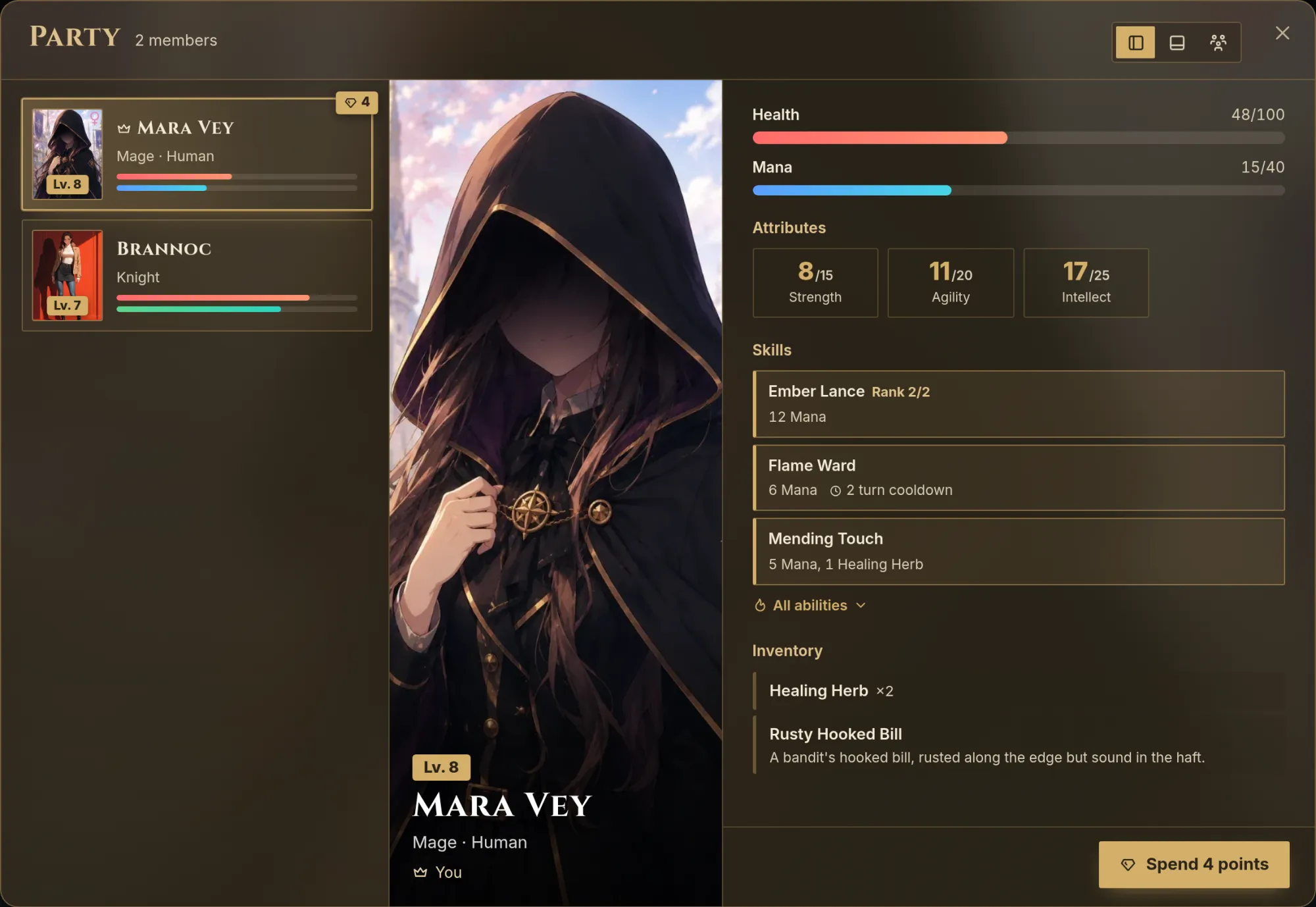
The player's character comes first, then the companions in the order they joined, then the former members with the most recent departure first.
On a computer, the header has a view switch:
- List. The default. A column of plates with each member's portrait, level, name, class line and first two bars (Health, then Energy), with the chosen member's portrait and sheet beside it. Past members sit below under Former members, each with their reason, and Bring back for those who left and did not fall.
- Character select. Tall portrait tiles along the bottom, like a fighting game roster, with the chosen member large above. Former members close the row, greyed out.
- Line-up. The party standing side by side as cut-outs. This button appears only when every member, the player included, has a visual novel cut-out.
On a phone there is one view: a strip of portrait tiles, the chosen member's portrait as a banner, and their sheet below.
Each member has a line under their name: You for the player's character, In the party from the start for a starting companion, or the turn they joined. An Away tag follows when that is their status.
A member's sheet shows the rows from your character sheet, then Skills (with the cost and cooldown of their abilities), Equipment for a companion or Inventory for the player, Bonds, Status, Affinities and your own lists. A Bond section follows with the bond tier and notes when there are any.
When a member has points waiting, a gem with the number sits on their plate and a button such as Spend 4 points opens the point spending window on them. A companion also has Remove from party. A former member's reason reads as it was written, or Left the party or Fell in battle when there is none.
Without progression tracks, the screen does not show a companion's Experience number, which appears in the point spending window. With tracks, a member's panel lists each track with its level and Experience. The screen has no equipment trading, formation or orders.
Outside the screen, members lead the cast list under the heading In your party.
Limits
- No limit on how many characters start in the party or join it.
- A journey keeps about 20 characters, members included. Members are never dropped, so a very large party crowds out the rest of the cast.
- Past eight members, the figures in Line-up narrow and lose their class line and health figure.
- A reason for leaving holds up to 160 characters.
Common mistakes
- Counting on friendliness. A loyal ally is not a member until someone marks them. If a companion must be there from the first line, turn on Starts in the party.
- Leaving Party system off. Starts in the party then puts nobody in a party. A character already marked keeps the switch, and its helper reads "Not used while the party system is off."
- A level that is not a number. "Master" or "S" pays a companion no points on a level-up. Write the level with a number in it.
- Expecting a hidden character to start in the party. While Hidden until unlocked is on, the switch applies only when a world setting option unlocks them at the start. A character unlocked by a beat arrives outside the party.
- Forgetting the switch on a copy. Duplicate does not carry it over.
- Making the companion an enemy template. A template cannot start in the party. Write the creature as a regular character.
- Testing a change on a running journey. The switch is read when a journey starts. Start a new one to see it.
Frequently asked questions
Progression tracks
Learn how to give your Imagina world more than one level, each with its own Experience. Covers the main track, adding a track, levels that rise at an amount of Experience, what each level adds, Experience from beaten enemies and quests, and what players see.
Shops and money
Learn how to give your Imagina world shops and a currency. Covers the Money tracker, item prices, vendors and their offers, haggling rules, shop looks and pictures, under the counter goods, improvised stalls priced by rarity, and what players see when they buy.