Codex
Learn how the Codex gives players of your Imagina world a reference book for its characters, places, items and ideas. Covers entries and pictures, Draft, Spoiler and Secret visibility, how secret entries are found, the automatic character and place pages, and what players see during play.
The Codex is a reference book for the player. It holds public entries about your world, each with a title, a summary, a body and an optional picture, and players open it during a journey to look things up. It is the one piece of world information written for the player rather than the storyteller.
The storyteller never reads the Codex. Nothing in it changes the story, so it is not the place for rules, instructions, or anything the narrator needs. Those belong in your instructions and lore.
It lives in the editor under World & lore, in the Codex section.
What to put in it
The Codex suits things players collect or look up: plants, ores, ingredients, creatures, factions, events. Give each a title, a line or two of summary, and a picture if you have one. Inventories and tables show that picture next to the item's name.
Two kinds of thing need no entry:
- Places. Every location in your Locations section is already a place in the Codex. See Places.
- Characters. Every NPC you author is already a character in the Codex, listed once the player has met them. See Characters.
Write an entry for one of these only when you want more than the automatic page: a longer write-up, or a picture of your own. A world does not need a Codex at all.
The Codex section
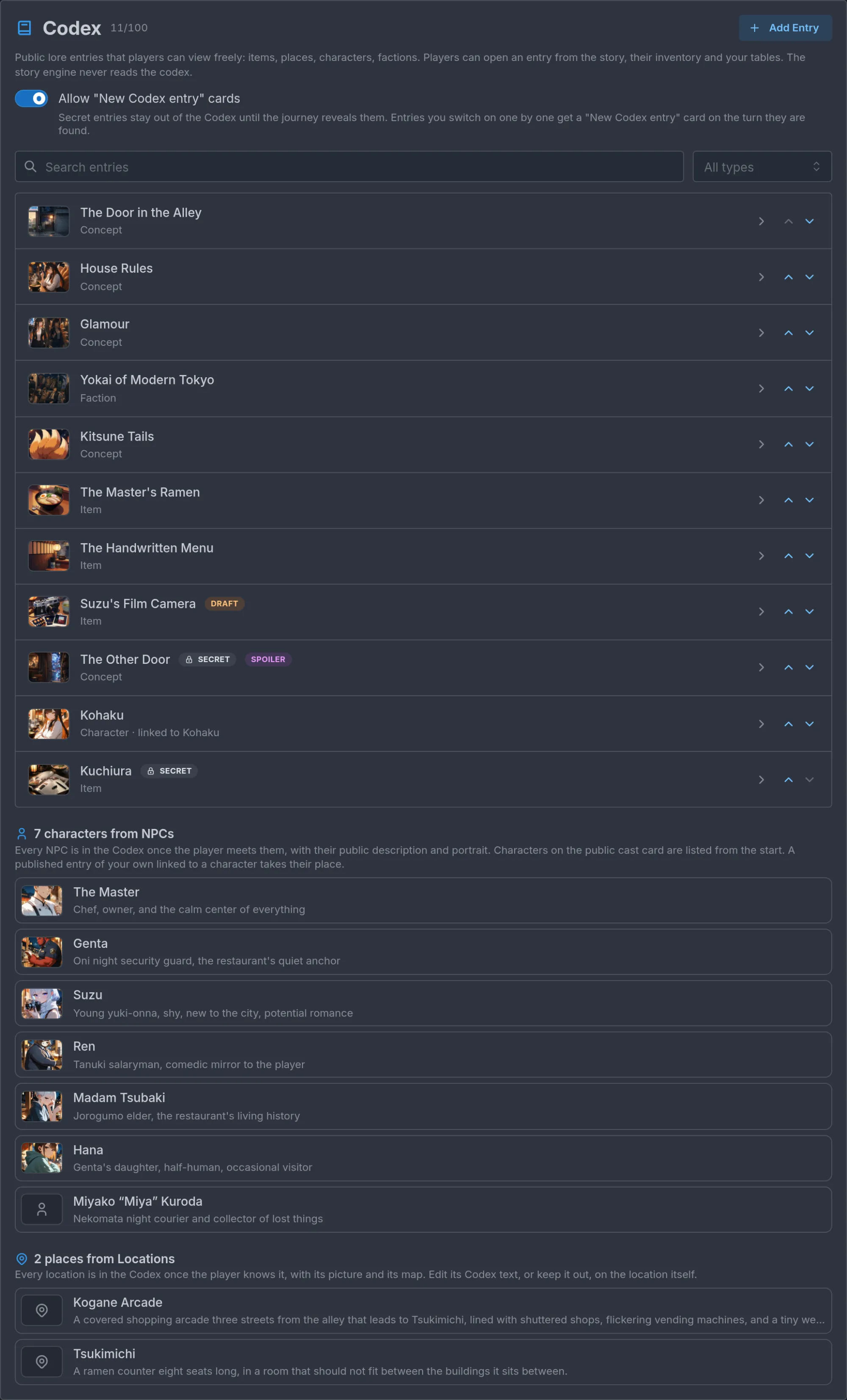
The header shows N/100 entries and an Add Entry button. Below the description sits one world-level switch, Allow "New Codex entry" cards, on by default and explained under Secret entries. Then come a search box and a type filter, useful once the list grows long, and the entries. Each row shows the picture, title and type, with chips for its state: DRAFT, SECRET, SPOILER, and linked to followed by the NPC's name on a Character entry tied to one.
Below the entries, two read-only lists show what the Codex contains without any entry from you: N characters from NPCs, each with their portrait and public description, and N places from Locations. Clicking one opens that NPC or location.
Anatomy of an entry
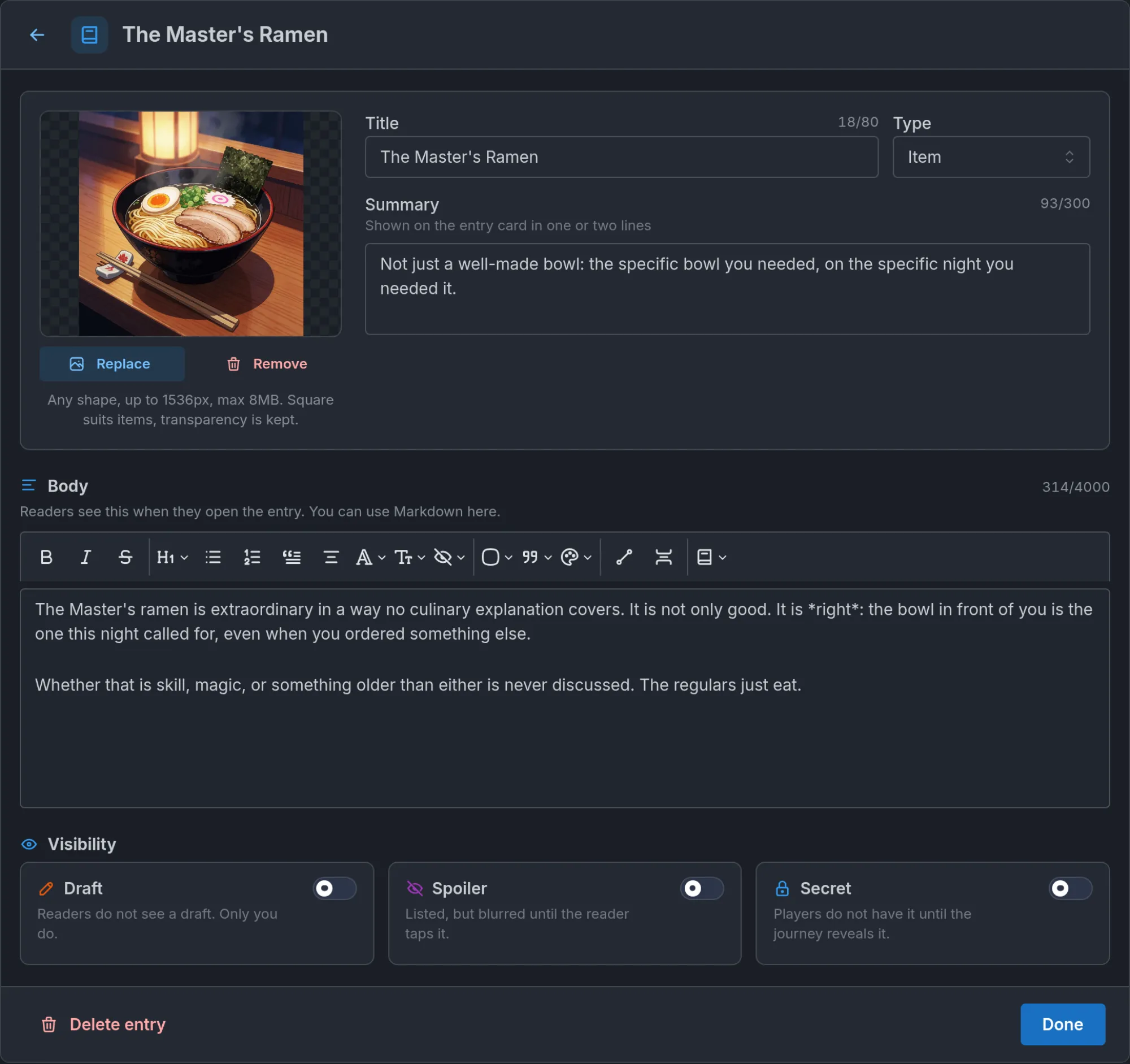
Opening an entry replaces the editor content with the entry's own page: a back arrow at the top, Done and Delete entry at the bottom. The fields, in order:
- Picture: optional, with Replace and Remove. Any shape, up to 1536px and 8 MB. Square suits items, landscape suits places, and a transparent cut-out keeps its transparency.
- Title: what players see and, in the story, tap on. Up to 80 characters.
- Type: Character, Place, Faction, Species, Item, Event, Concept or Other. A Place entry that duplicates a location is no longer needed.
- Summary: one or two lines, shown on the entry card. Up to 300 characters.
- Linked character: on a Character entry only. See Characters.
- Body: the full entry, in Markdown, up to 4,000 characters. The toolbar's link button inserts a link to another entry or a place, at the cursor or around the selected text. Written links also work in your world's opening text.
- Visibility: three switches, covered next.
Visibility: Draft, Spoiler, Secret
An entry can carry more than one of the three.
- Draft. Readers do not see a draft. Only you do. Turn it off when the entry is ready.
- Spoiler. Listed, but blurred until the reader taps it. The reader knows it exists and chooses when to read it.
- Secret. Players do not have it until the journey reveals it. Until then it is not in the Codex, not underlined in the story, and not linked from inventory or tables. A spoiler exists for the player. A secret does not, yet.
Players see the entries of the published version, so publish after adding or changing entries. Entries in a world with adult content are only shown to players who have mature content enabled.
Secret entries and how players find them
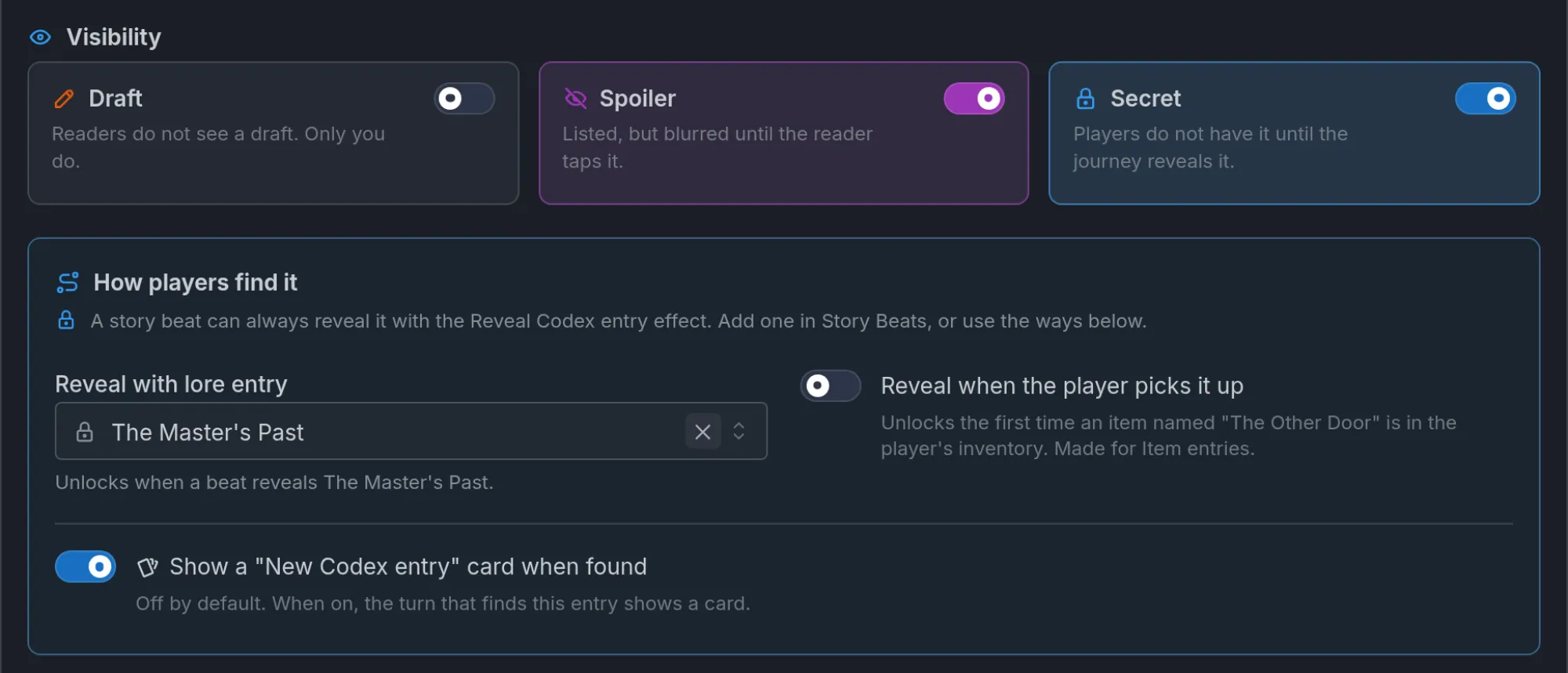
Turn on Secret and a How players find it box appears. A story beat can always reveal the entry with the Reveal Codex entry effect, added in Story Beats. The box offers two more ways:
- Reveal with lore entry: pick a lore book entry. If that lore entry is itself secret, the Codex entry is revealed when a beat reveals the lore. Otherwise it is revealed when one of the lore entry's keywords appears in the storyteller's narration. The player's own typed action never counts, so nobody unlocks an entry by typing its name. The keywords are the trigger words, so choose them with care.
- Reveal when the player picks it up: reveals the entry the first time an item with a matching name is in the player's inventory. Made for Item entries. This is how a field guide fills in as the player collects things.
A secret entry with no way to be found (no beat, no lore link, no pickup) is flagged in the editor.
An entry can also announce itself. Turn on Show a "New Codex entry" card when found and the turn that reveals it shows a card with its picture. Tapping the card opens the entry. The switch is off by default, since a card for every item picked up gets noisy. The world-level Allow "New Codex entry" cards switch turns every card off at once: with it off, no entry shows a card whatever its own switch says, and each entry's switch is greyed out until you turn it back on.
More on beats and what they reveal in Beats and story arcs.
Characters
Every NPC you author is a character in the Codex, so you never hand-write a cast list. A character appears in a player's Codex once the journey has met them, with their portrait and their Public description as the blurb, or their Role when the blurb is empty. Characters on the public cast card are listed from the start, since the world card has already introduced them. A character who is Hidden until unlocked stays out until the story brings them in, and so does anyone removed from the cast by a world setting option. Their Description, Hidden truth and example dialogue are never shown.
When you want more than the automatic page, write a Character entry and link it to the NPC under Linked character. The entry borrows the character's portrait when it has no picture of its own. The quickest start is the Add to Codex button in the bar at the top of the NPC's page. It creates a Draft entry already linked to them, carrying their name and their public cast description (or their role), and opens it. Their description, appearance and dialogue stay private, so you write the Body yourself. Once the entry exists, the button reads Open Codex entry. A character hidden until unlocked gets a secret entry, revealed with a Reveal Codex entry beat.
As long as the entry is a Draft, players still see the automatic page. Once published, the entry replaces it. Characters do not count toward the entry cap.
Places
Every location in the Locations section is a place in the Codex, with the location's image, its text and its map on its page. A place is in a player's Codex once the journey knows it, from the start or when the story reveals it. Places the storyteller invents during play are not added, and no "New Codex entry" card announces a place: the scene and the map already do.
The map shown depends on the place. A top-level place with its own Map of this place shows that map, a nested place shows its parent's map zoomed on its pin, and any other place shows the world map at its pin. A secret map stays hidden until the journey has found it, and tapping the small map opens the full one. A nested place says In its parent, as a link, and See also lists its parent and the places inside it.
The place's Codex settings live on the location itself: whether to show it, an optional summary and text in place of the description, and Spoiler. None of it is sent to the storyteller. See Locations. Places do not count toward the entry cap.
What players see
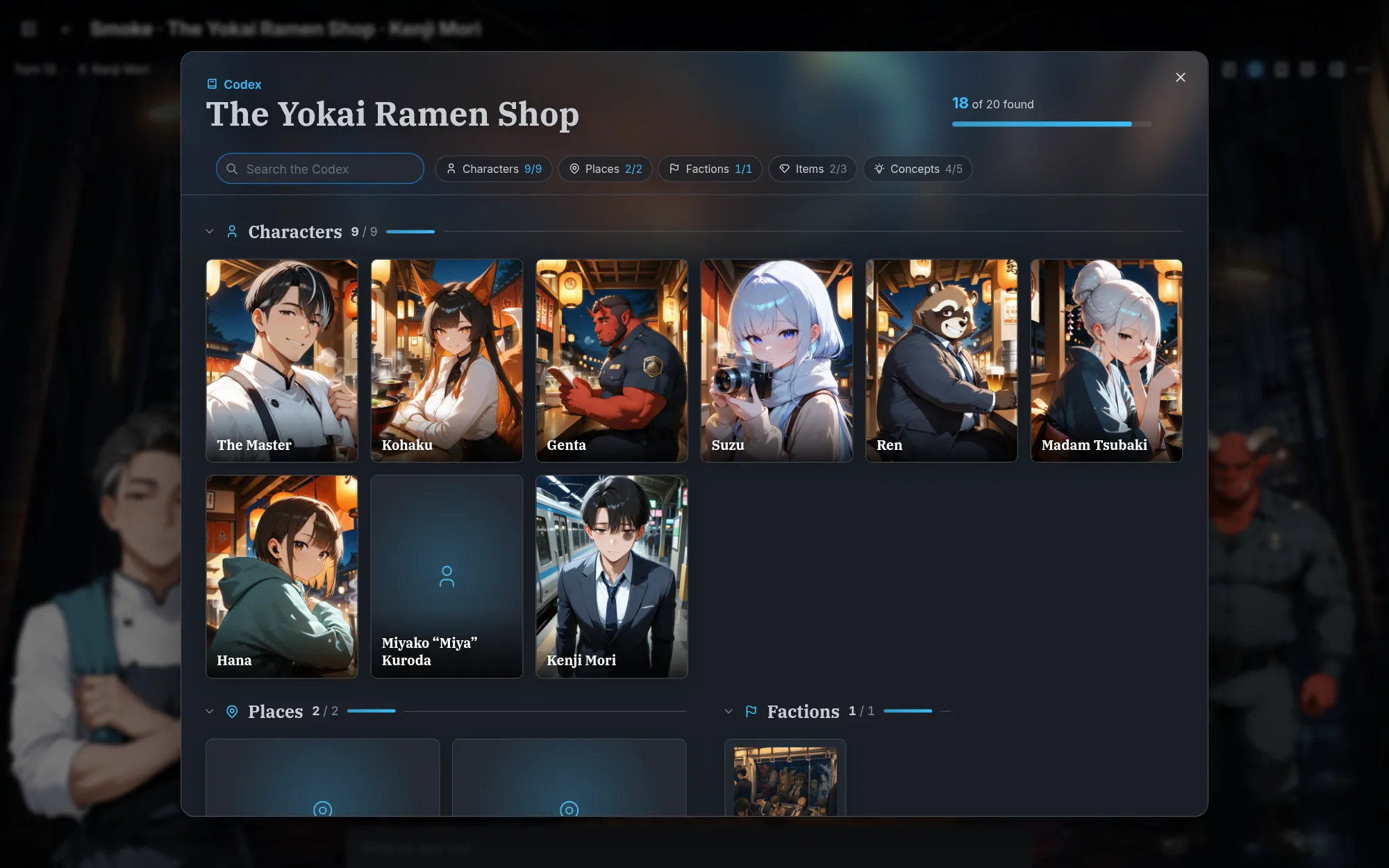
The Codex button in the journey toolbar opens a full-screen browser titled with the world's name: a search box, type chips with counts (Characters 9/9, Places 2/2, and so on) and a grid of cards per type. Characters show their portrait. A progress bar at the top right, "18 of 20 found", counts the secret entries still to discover. The Codex is read-only in play.
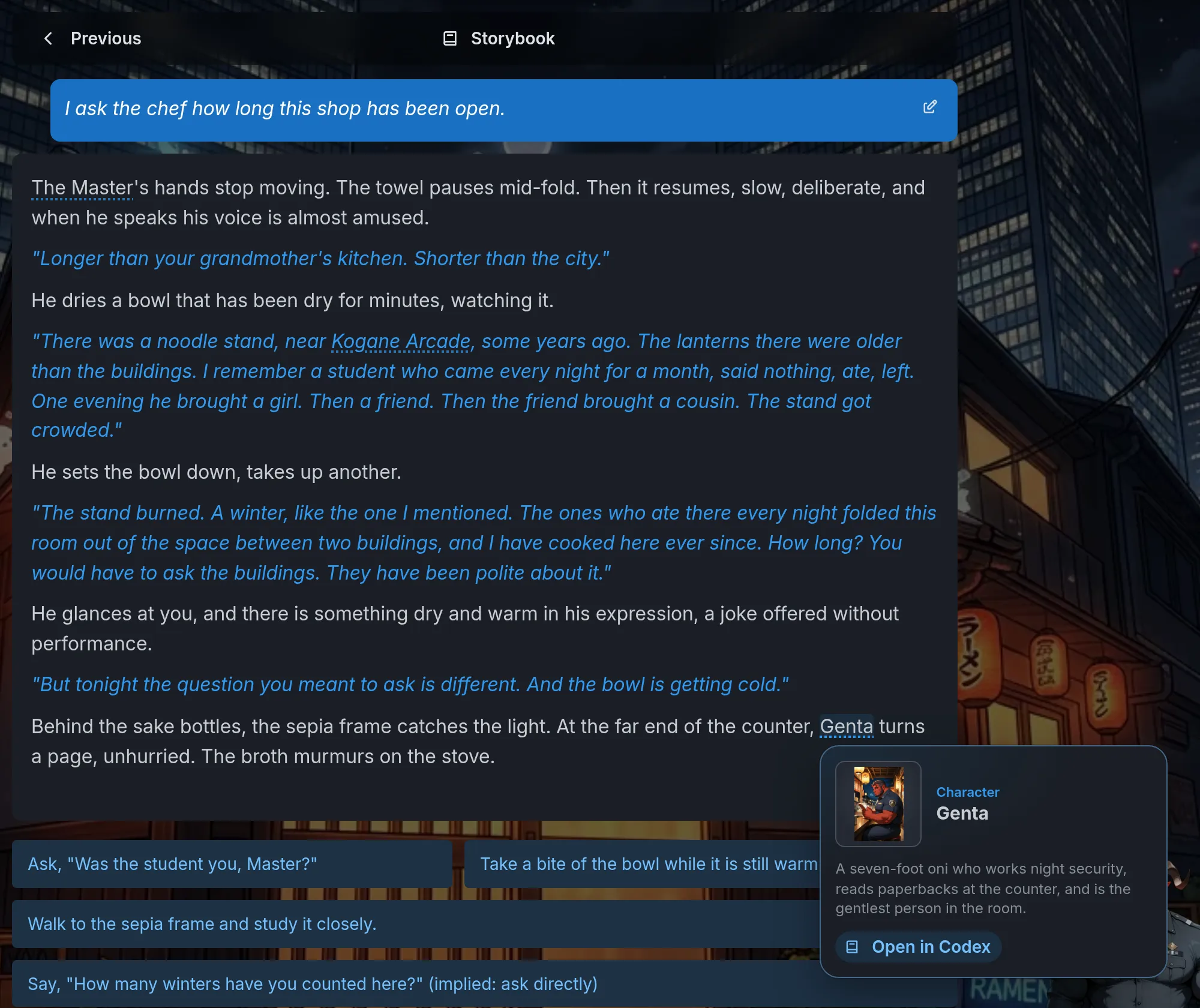
In the story text, the first mention of an entry's title in a turn gets a dotted underline. Tapping it opens a small card with the picture, type, title and summary, and an Open in Codex button. Matching is forgiving about case, simple plurals and a leading "The", but it needs whole words, and a place only when its full name appears. Spoiler entries are never matched automatically, because an underline would give away that a name matters.
The same matching reaches beyond the prose. An inventory item or a piece of equipment whose name matches an entry shows its picture and opens the same card, with any count such as "3x" ignored. In world tables, a matching row shows the picture, any entry title written in a cell becomes tappable, and a book icon on each row pins it to an entry or a place by hand when the names differ (see World tables).
Players who find the underlines distracting can turn off Link Codex entries in the story in Settings. That only affects the story text. The full matching rules, linking by hand and tips are in The Codex: pictures and notes for your world.
Codex or lore
Lore is for the storyteller, and the player never sees it. The Codex is for the player, and the storyteller never sees it. A fact both need lives in both: the lore entry steers the story, the Codex entry is what the player reads. A secret Codex entry can follow a secret lore entry through Reveal with lore entry, so the beat that reveals one reveals both.
Locations are the exception. A location's Description serves the storyteller and the player's Codex at once, unless you give the location its own Codex text.
Limits
A world holds up to 100 entries. Characters from NPCs and places from Locations do not count. The field limits (Title 80 characters, Summary 300, Body 4,000, picture inside 1536px and 8 MB) are listed under Anatomy of an entry.
Common mistakes
- Rules in the Codex. The storyteller never reads it, so a rule written there does nothing. Put it in your instructions.
- A Place entry for a location. The location is already a place in the Codex. Adjust its Codex block instead.
- A Character entry that repeats the automatic page. Every NPC already has one. Write an entry only for more to say, or a picture of your own.
- A secret with no way in. The editor flags it. Give it a beat, a lore link or a pickup rule.
- Inconsistent names. If the storyteller calls it "Glowcap" and your entry is "Glowcap", it links. "Glowing cap" does not.
- Forgetting to publish. Players see the published version. New entries stay invisible until then.
Frequently asked questions
Worldbuilding and characters
Learn how to create characters, lore, and locations for your Imagina world. Covers NPCs, player characters, world information, and how to organize what the narrator knows.
Trackers
Learn how to use trackers to make your Imagina world remember choices, track progress, and react to changing conditions. Covers world-level and per-character trackers, display types, update rules, and story variables for beat-only logic.