Enemies
Learn how to author stock enemies for your Imagina world, from templates and the copies that enter a scene to levels, experience and loot, out rules, battle sprites, and bringing enemies in from a beat or by the storyteller.
Beta
The RPG system is in beta and only accounts with the RPG beta can set it up. It may still change.
Enemies are stock foes you describe once, such as a Bandit or a Boar: a stat block, battle pictures and a Codex page. During a journey they arrive as numbered copies, several at once when the scene needs it, each with its own bars. The game clears them once the scene has moved on.
Turning it on
Enemies need the game system. On the Features page of the RPG game system group (Game rules → RPG game system while the system is off), turn on Enable the RPG game system. In step 3 of the page, the Enemies card is on unless you turn it off.
With both on, an Enemies entry sits in the RPG game system group, after Abilities and before Quests. On a world without the RPG beta it is a section of Game rules, right after Dice. It starts empty.
Turning the Enemies card off keeps your enemies. The Enemies entry stays in the group, greyed with the tag Off, and its page shows a dashed card reading "Enemies is off" with a Turn on button instead of the list. The enemies are not listed with the NPCs either. Nothing brings them into a journey while it is off. Turn it back on to reach them.
Templates and copies
What you write in the Enemies section is a template. It never plays as itself. When a Bandit is needed, the game makes a copy of the template with its pictures, its appearance and its own copy of the stat block, and the copy is what fights.
One copy keeps the bare name: "Boar". A group that arrives together is numbered: "Bandit 1", "Bandit 2", "Bandit 3". A later arrival continues after the highest number still in the journey.
Because a template is not a character, the cast settings of an NPC do not exist on it. An enemy page has no Hidden until unlocked, Present at start or Show in public cast switch, no Starts in the party, and no outfits. Beat effects that act on a character (unlocking, adding to the cast, renaming) leave templates out of their pickers.
The Enemies section
Add enemy creates a template and opens it as its own page. Past five enemies, the section gains a search box and a toggle between a portrait gallery and a list. Reorder in the list view.
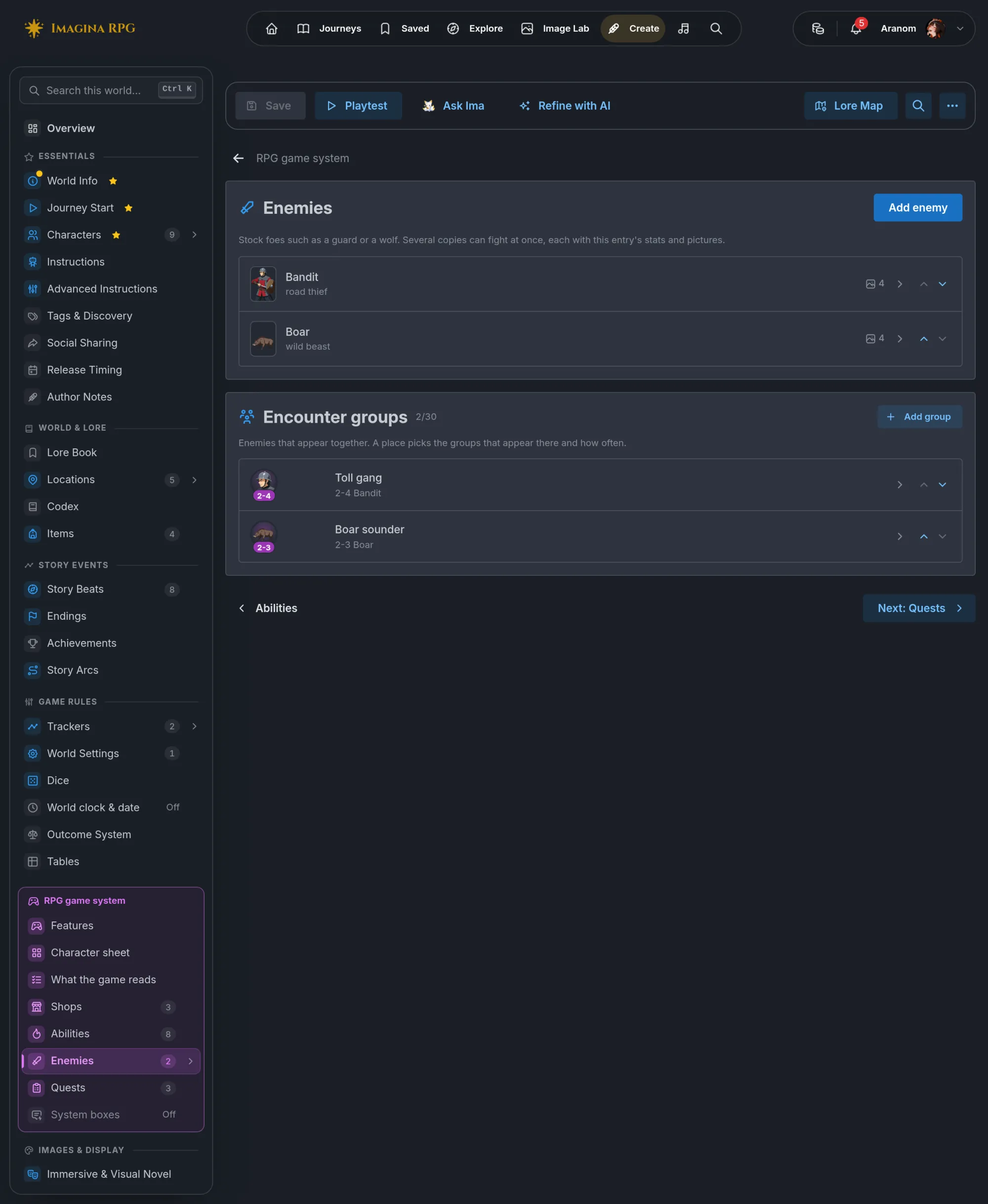
Enemies share one list with your NPCs, so the 200 entry limit counts both.
An open enemy has a Manage menu with two entries:
- Duplicate makes a copy of the template with the same stats and images, named "Bandit (copy)". Rename it.
- Make this a character moves it to NPCs as one unique character.
The move works the other way too. On an NPC page, Manage offers Make this an enemy. The entry moves to Enemies, and its Hidden until unlocked, Present at start and Show in public cast settings are cleared.
The enemy page
An enemy is written like an NPC (see Characters and worldbuilding), with a few differences.
- Name is the kind of foe, as the narration should call it: "Bandit", "Cave wolf". Copies are numbered after it.
- The first sentence of the Description matters most. It is what the storyteller reads when it chooses an enemy, and it becomes each copy's personality. The Physical Description gives the copies their appearance.
- Public/Codex description is optional and written for players. It is never sent to the storyteller.
Under Visibility, an enemy has two controls of its own:
- Codex page sets when players can read about the enemy: Listed from the start, Listed once met (the default), Secret until a beat reveals it or No Codex page. See The Codex page.
- The storyteller knows about it is on by default. Turned off, the storyteller cannot bring this enemy in, and only a beat does. Use it for a foe saved for one scripted moment.
Stats and fight settings
The purple RPG game system group on the page holds everything the fight uses.
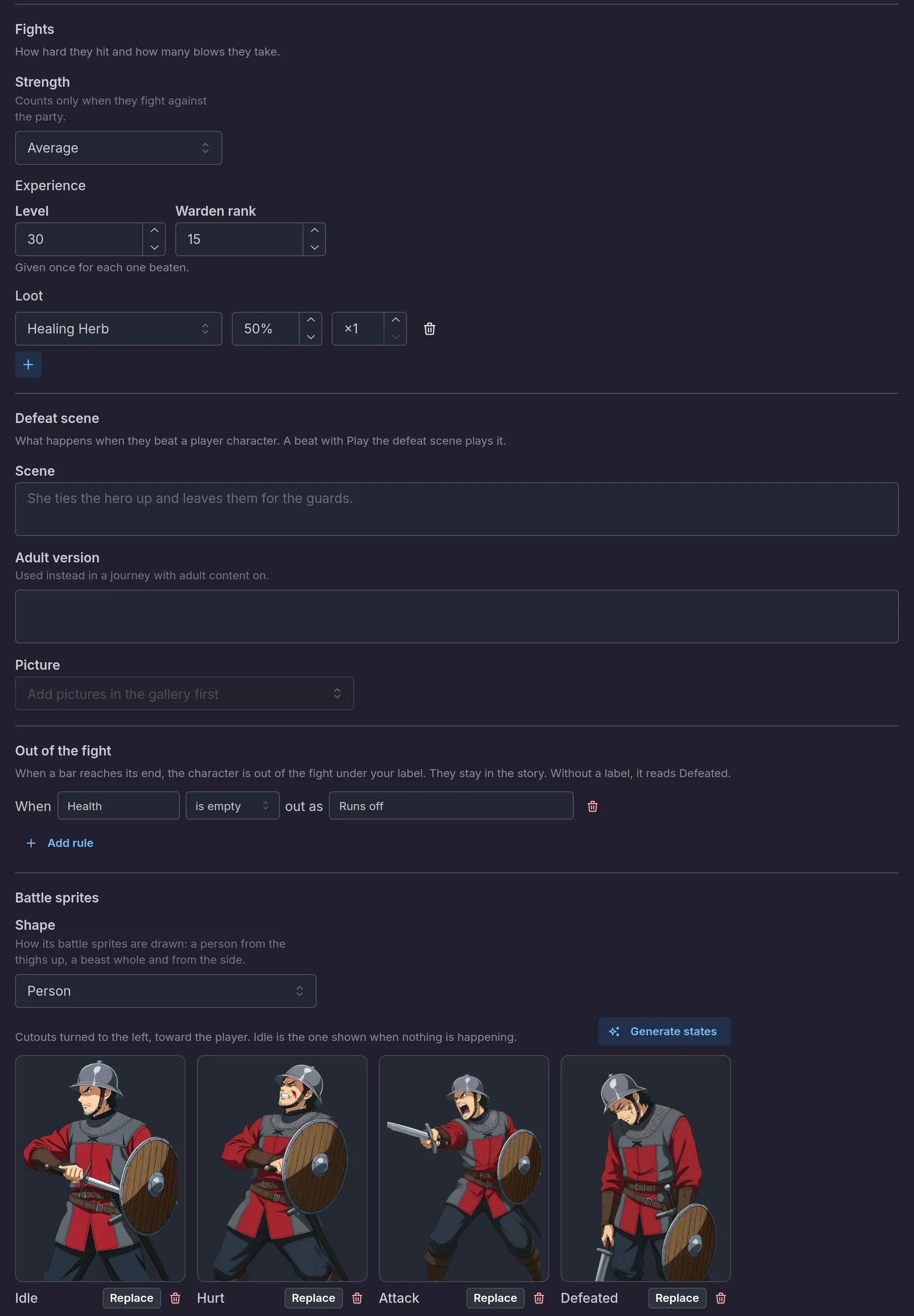
Sheet is the stat block, built like any NPC's (see Character sheets). Each copy gets its own copy of it, so three Bandits have three Health bars. An enemy without a stat block has no bars to fight down. The skills listed there are suggestions: the storyteller may use them or invent other moves. A skill named like one of the world's abilities counts as that ability when Per-character sheets is on. Otherwise it stays a suggestion.
Sheet and Out of the fight only show while the NPC sheets card is on. Battle sprites shows on every enemy. A Defeat scene part sits between Fights and Out of the fight, for the scene played when the enemy beats a player character. See Defeat scenes. With Statuses on, an On a hit part between Fights and Defeat scene lists up to 3 statuses the enemy's landed blows give in a fight, each with a Chance. Every copy uses it.
Fights shows when the world uses the fight rules. It holds four settings, all covered in Fights:
- Strength sets how hard the enemy hits and how many blows it takes: Trivial, Weak, Average (the default), Strong, Elite or Boss. It only counts when the enemy fights against the party.
- Their blows go at names the bar of its target that every blow of a copy goes at: Health (the default), Energy or one of the bars the player characters carry. A target without that bar takes the blow on Health. See A second bar.
- Experience is given once for each copy beaten, from 0 to 100,000. Left empty, it defaults to a value worked out from the enemy's level and Strength, shown as the placeholder. The Bandit gives 30. On a world with two or more progression tracks, this one box becomes one box per track, the main track first, each from 0 to 100,000.
- Loot takes up to 6 lines. Each one picks an item from the world's items, a chance from 1 to 100% (empty means always) and an amount from 1 to 99 (empty means 1). It is drawn once for each copy that goes out as a win for the player. The Bandit drops a Healing Herb half the time.
Preview
On an enemy page, a Preview button sits at the right of the RPG game system group's title. It puts the enemy in a fight on the visual novel's stage, unsaved changes included. The Bandit stands on the right under its plate, facing the party. A row of buttons plays the moments: Standing, Hit (Again replays it), Hurt and Runs off. Desktop and Phone change the screen's size. Nothing is saved.
An encounter group's window has the same button once the group has a member. The Toll gang arrives as the game rolls it, here three Bandits. Roll again shows another roll, and a select picks which Bandit the moments apply to.
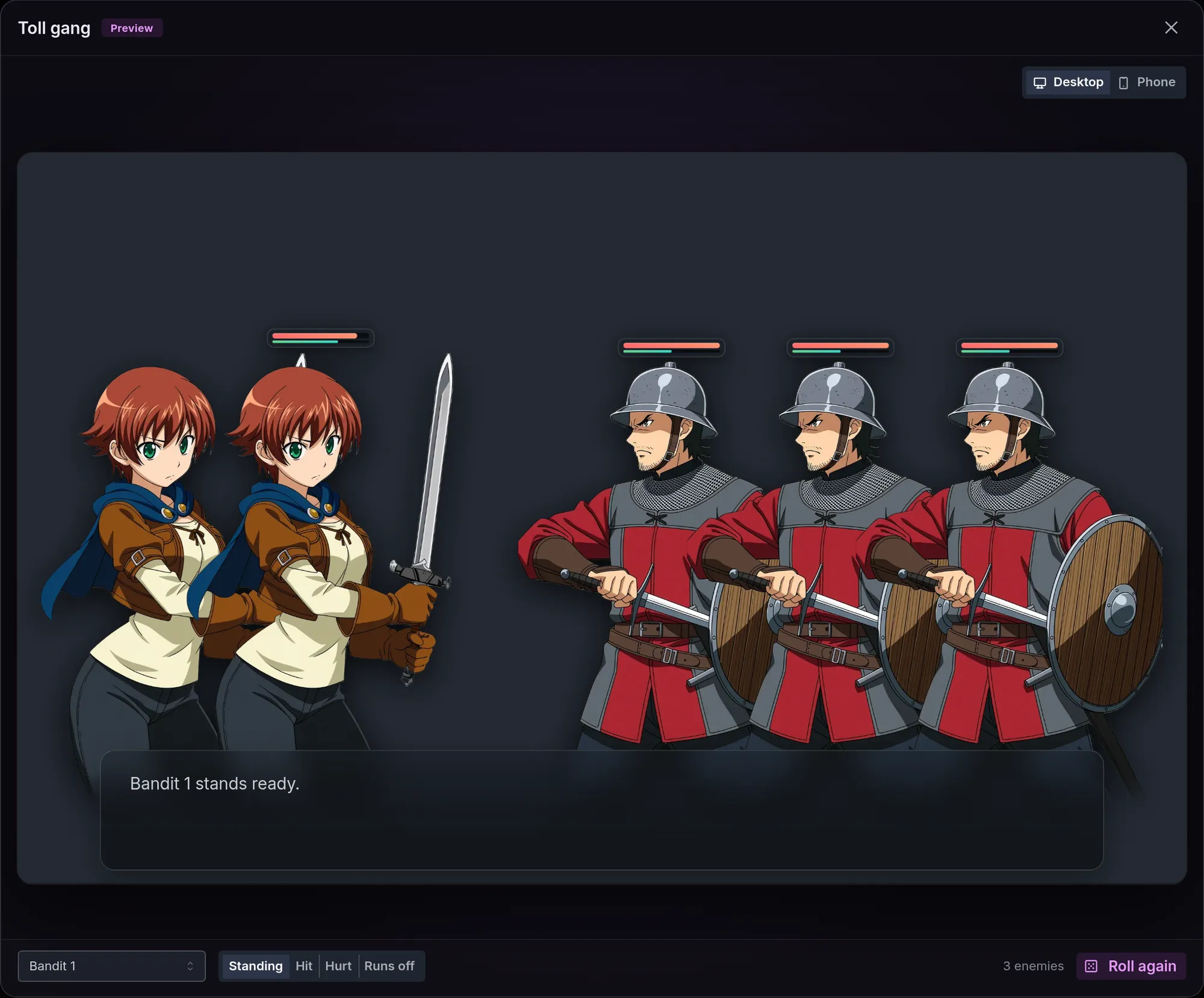
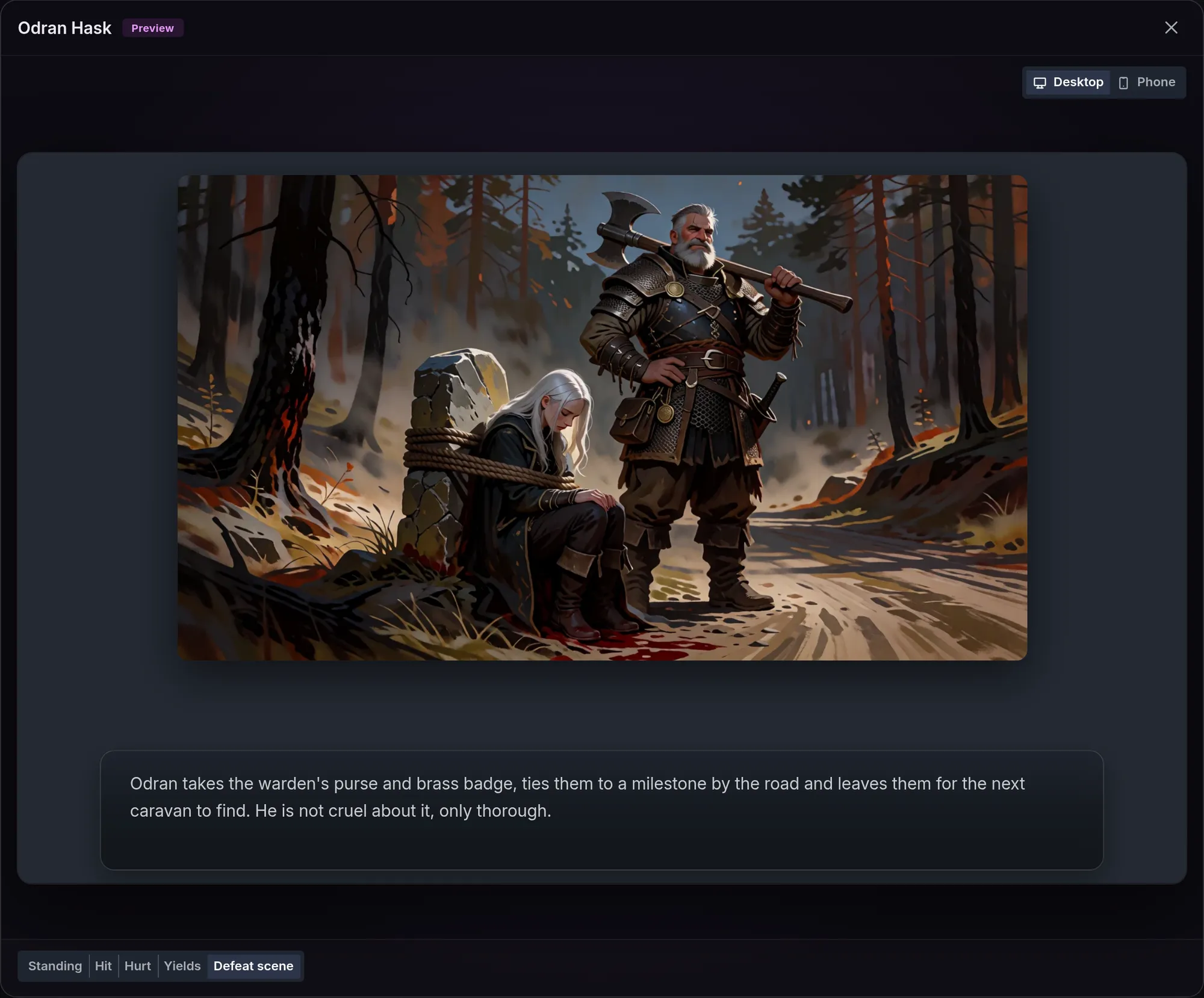
Each button shows only to an author who can use that piece of the RPG system, which on a character page is Bars on stage. Odran Hask's preview adds Yields and Defeat scene: his picture, with his scene text in the box.
Levels
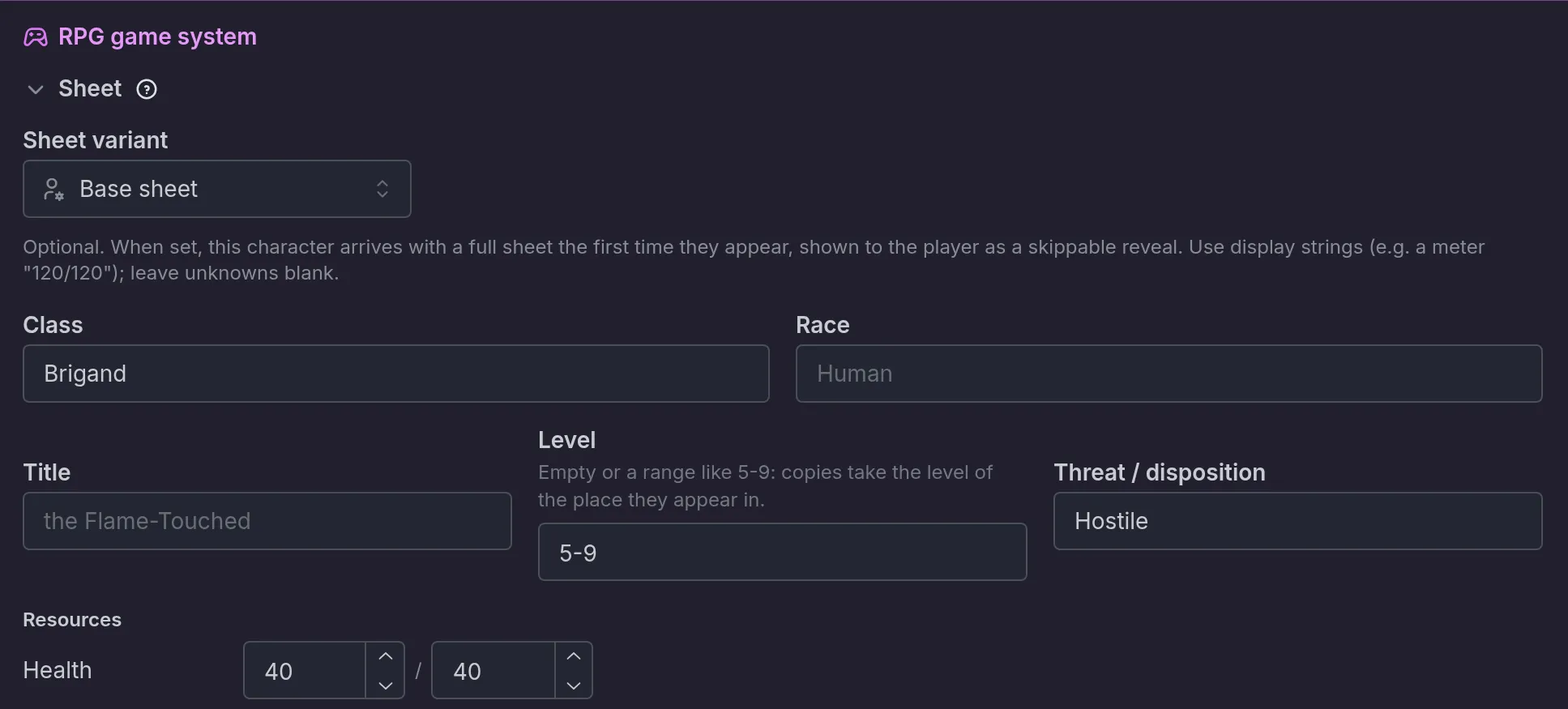
The stat block has a Level field, next to Threat / disposition. How you write the level decides whether it can adapt to a place.
- A fixed level is any text that is not a range: "4" or "Lv. 14". Every copy keeps it.
- A range written with digits, such as
5-9or5 to 9, is open. So is an empty field.
An open enemy takes its level from where the scene is. When copies arrive in a place that has an enemy level range, they take the player's level, held inside the overlap of the place's range and the enemy's own. When several players share a journey, the strongest one counts.
The Tollroad has Lowest enemy level 3 and Highest enemy level 7. The Bandit is written 5-9, so the overlap is 5 to 7. Mara at level 4 meets level 5 Bandits. At level 6 she meets level 6 Bandits, and at level 12 they stop at 7. When the two ranges do not overlap, the enemy's own range decides. When the player has no level, copies take the place's lowest.
A place links to an enemy by name. In the place's Enemies that can appear here, "Bandit" or "Bandits" both match the Bandit template, whatever the case or accents, and, when The storyteller knows about it is on for that enemy, the storyteller is told it lives there. Places, their level range and How often something attacks are covered in Encounters.
Write a range as digits
For an enemy that follows the place, write the range as 5-9 or leave the field empty. With
Location encounters on (see Encounters), the Level
field says so: "Empty or a range like 5-9: copies take the level of the place they appear in."
Without it, the placeholder reads "Lv. 14", a fixed level, and copies keep what you wrote. This
also needs levels in use in the world (see Levels and
points) and a stat block on the enemy.
Copies a beat brings in, such as the 3 Bandits of the ambush at the ford, take the place's level the same way as the storyteller's.
Out rules
Out of the fight decides when a copy stops fighting and what that is called. Each rule reads: when a bar is empty, or is full, the enemy is out under your label. Add rule adds one, up to 4 per enemy. The bar must be one on the stat block, and a label holds up to 24 characters.
The Bandit has one rule: when Health is empty, out as "Runs off". A rule can watch any bar and either end of it. A Morale bar that empties can end the fight as "Yields", and a bar that fills works the same way.
With no rule, a copy goes out when its Health bar empties, or its first bar if the world gives no bar the Health role, and the label reads "Defeated".
Out rules work the same on any character with a stat block. Fights covers them in full.
Battle sprites
Battle sprites are the pictures of the enemy on stage. Enemies stand on the right and face left, toward the player.
Shape sets how they are drawn: Person, from the thighs up, or Beast, the whole animal seen from the side. Pick Beast for an animal such as the Boar.
Below it are four slots, plus one for each out label of the enemy's own out rules that is not one of them. The four:
- Idle is shown when nothing is happening.
- Hurt is shown when the enemy takes a blow.
- Attack is shown when it makes a move against someone.
- Defeated is shown once it is out of the fight.
The Bandit's rule adds a "Runs off" slot, shown when a copy goes out under that label.
On an adult world, or on an account with NSFW on, each slot has a Plain / Adult switch above it. Plain is the picture everyone sees. Adult is an optional second picture for the same moment, and a small dot on Adult marks a slot that has one.
Each slot has an Upload button, or Replace once it is filled. The bin beside Replace empties the slot after a confirmation, and the picture leaves the gallery when you save. A slot takes an image file up to 12 MB (PNG, WebP or JPEG). An uploaded picture is used exactly as it is, so give it a cutout that already faces left. Adult pictures are uploaded, never drawn. The pictures are part of the enemy's gallery and count toward its gallery limit. Save a new world once before uploading.
Generate states
The button above the slots reads Generate while the enemy has no idle sprite and Generate states once it has one. It opens a flow of three steps in the enemy's gallery.
- What we want explains the picture: one idle battle sprite, from which the other three are drawn. Make the base moves on.
- Generate the base starts from a text box describing the enemy, filled in from its Physical Description. Edit it freely: the enemy itself is not changed. Generate 2 candidates draws two, and Generate 2 more draws another pair. Each candidate is billed like a portrait. Pick one and choose Keep this base. Upload your own base takes your own picture instead, which must face left on a plain background.
- Battle states lists hurt, attack and defeated, all checked. Each is one edit of the idle sprite, with the same design and framing. The generate button shows the price before you confirm. Skip the states keeps only the idle sprite.
A base that comes out facing right is flipped. A state that comes out facing right is drawn again once. If it still faces right, its slot shows a Faces right badge: replace it, or generate it again from the gallery.
Which picture shows
A copy that is out shows the picture named like its out label, or Defeated without one. A copy still fighting shows, in this order:
- The state that matches what the narration has it doing.
- Hurt on a turn when one of its bars was struck or a blow landed on it.
- Attack on a turn when it struck at someone. With Fights on, that is any blow it rolled, landed or missed.
- Idle.
A blow taken wins over a blow given on the same turn. An empty slot falls back to the next choice, so an enemy with only an idle sprite still works.
An adult version of a picture shows only where adult content is on, in place of the plain one. Where it is off, a moment that only has an adult picture shows the next picture in line, which for an out is Defeated, then Idle.
Bringing enemies in
By the storyteller
The storyteller sees a short list of your enemies: name, role, the first sentence of the Description, level, threat and out rule. From it, the storyteller decides when a foe shows up, which one, and how many, from 1 to 6 at a time. It can name a copy when the narration does ("Sergeant Orsk" rather than "Bandit 2").
The game holds the limits. At most 8 enemies stand in a journey at once, not counting those already out. An enemy with The storyteller knows about it turned off is refused.
From a beat
For an enemy or an encounter group that must appear at a set moment, use the Bring in enemies effect in a beat. It sits in the Characters group of the effect list and stays greyed out until the world has an enemy. With Enemies off, it says to turn them on in RPG game system.
Once the world has an encounter group, the effect starts with a choice between One enemy, Encounter group and Roll for the place (see Bringing a group in from a beat). One enemy has three fields:
- Enemy picks the template.
- How many goes from 1 to 6.
- Names (optional) gives names to the copies, one per copy, in order. Copies without a name are numbered.
In the Tollroad Wardens, the beat "ambush-at-the-ford" fires when the player enters the Tollroad and brings in the Toll gang, an encounter group.
The effect puts the copies in the scene from that turn on, with their sprites and stat blocks, at the place's level and with the same real values and caps as copies the storyteller brings in. It says nothing in the narration. Use the beat's Describe to AI (one-shot) text to have the Bandits actually show up in the narration.
A beat brings in an enemy even when The storyteller knows about it is off. On that turn the storyteller is told the copies are already there. When 8 enemies already stand, the effect does nothing. A group with room for only some of its enemies brings in the ones that fit. The effect is also available on a player's answer and in a branch (see Beats and story arcs).
Encounter groups
An encounter group is a set of enemies that turn up together. You make it once, in the Enemies section, and each dangerous place picks the groups that appear there and how often. Groups have no switch of their own: they come with the Enemies switch.
What a group is for
Use a group when foes belong together: a gang, a pack, a leader and her followers. The Tollroad Wardens has two. Toll gang is 2 to 4 Bandits, and Boar sounder is 2 to 3 Boars.
A group does two things a single enemy cannot. It arrives whole, in one go, with a number of each enemy rolled inside the range you set. A place can also list it, and the game then rolls which of the place's groups comes.
The storyteller can call a particular group anywhere, whether or not the place lists it, and it can still bring in single enemies.
A place's Enemies that can appear here list stays what it was: advice. The names in it are never rolled, and the storyteller may bring those enemies in one at a time. To have a single enemy rolled, make a group with one member.
Making a group
The Encounter groups card sits under the enemy list, with a counter out of 30 and the line "Enemies that appear together. A place picks the groups that appear there and how often."
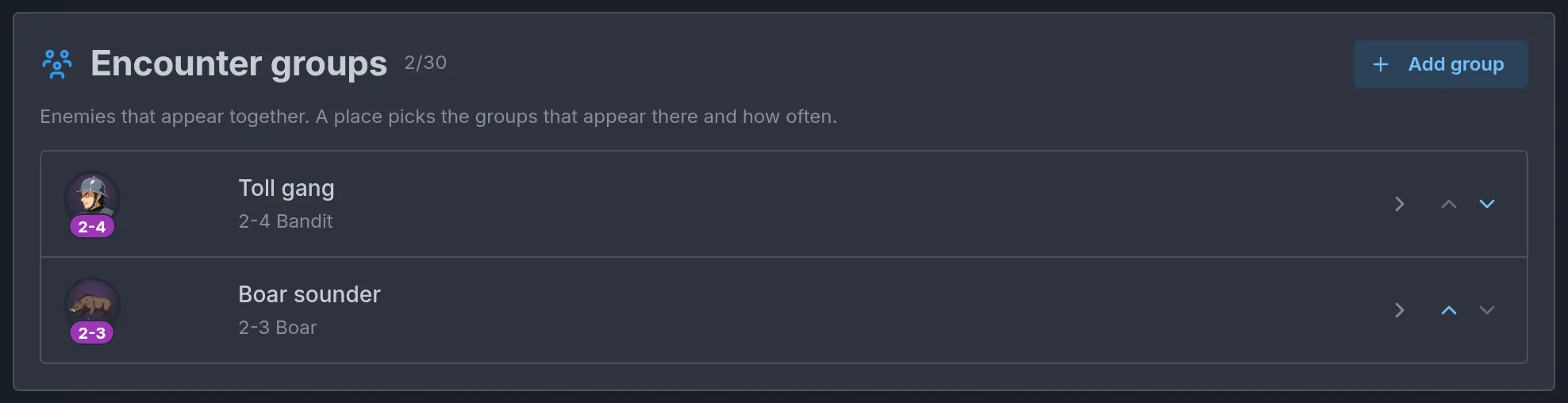
Add group creates an empty group and opens its window at once. Each row of the card shows the members' faces with a count under each, the group's name, and a line such as "2-4 Bandit". A face is the enemy's portrait, then its idle battle sprite, then its initial. Move up and Move down reorder the rows.
The window of a group has three parts:
- Name is what the storyteller calls the group by.
- Note for the storyteller says how the members behave together. Toll gang has "They spread across the road and call for the toll before anyone draws." Only the storyteller reads it.
- Enemies in this group lists the members, the leader first. Add an enemy adds a row, up to 6.
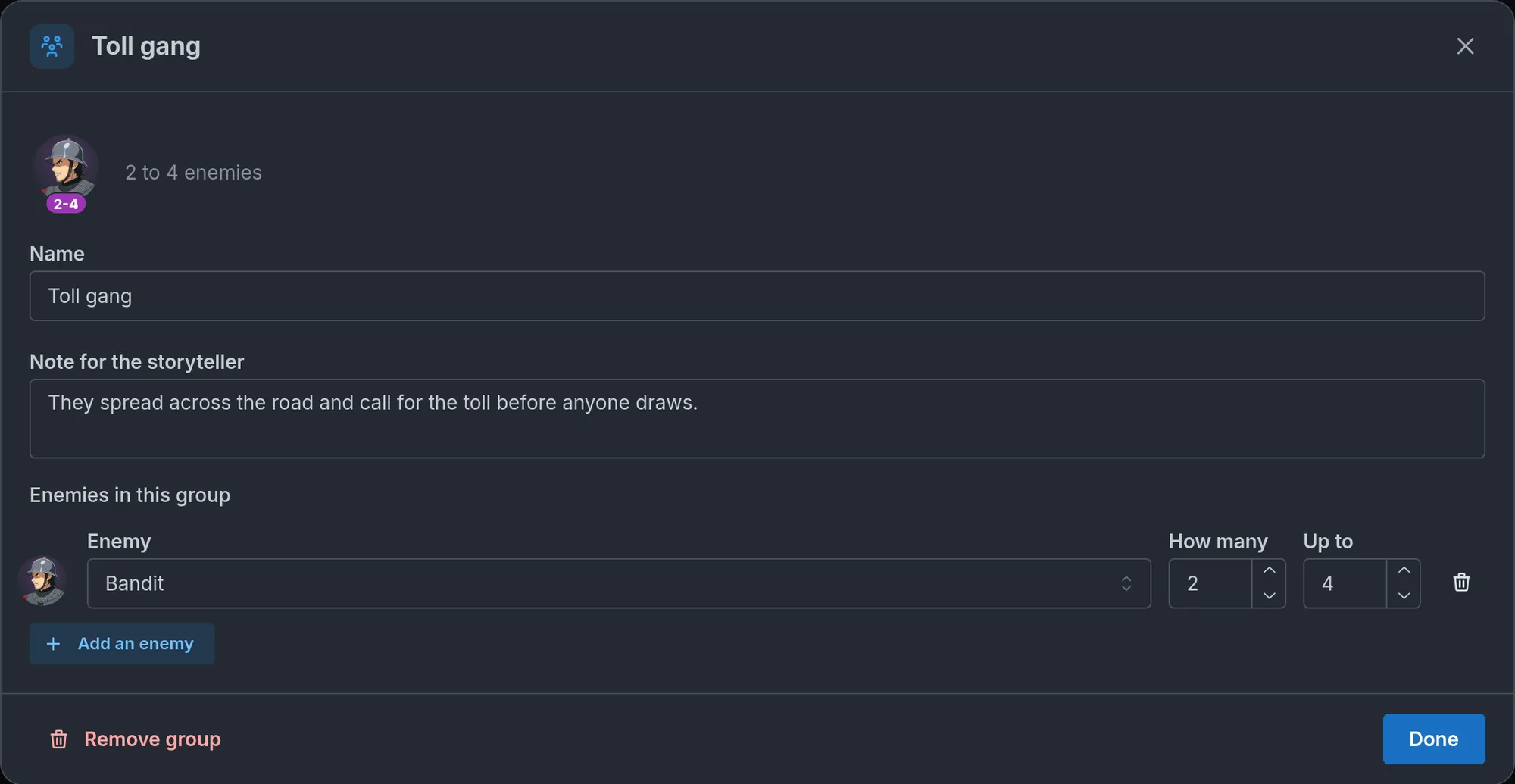
Each member has an Enemy and two numbers:
- How many is the count, from 1 to 6.
- Up to is optional. Left empty, the count is fixed. Set above How many, it makes a range, rolled each time the group comes. The Bandit of Toll gang has How many 2 and Up to 4, so 2, 3 or 4 Bandits arrive, each as likely as the others.
Up to cannot go under How many. Typing the same number or less in it clears the range, and so does raising How many to meet it.
The top of the window gives the total. It reads "2 to 4 enemies" for Toll gang, with the lows added up on one side and the tops on the other. When the tops add up to more than 6, an orange line reads "At most 6 enemies come in at once, so a high roll is cut down to that." The group still works. See How a group comes in.
Remove group deletes the group and Done closes the window.
The editor marks in red what will not work:
- A group without a name reads Unnamed group in red.
- The line under the name turns red when the group has no name, no member, a member that is not one of the world's enemies, or a total above 6. An empty group reads "No enemies yet".
- A member whose enemy was deleted, renamed elsewhere or made a character is kept, marked "(not found)" with "Not one of the world's enemies" under it. It never comes in until you pick another enemy for it or remove it.
Picking groups on a place
Open a location, find the Encounters box and set it to Dangerous. Encounter groups that can appear here sits between Enemies that can appear here and How often something attacks. The rest of the box is covered in Encounters.
Two switches have to be on for this: Location encounters for the box, and Enemies for the groups. With Enemies off, the box is there without its group picks.
Choose a group in Add a group. It joins the list as Common. Each pick has a three-way control:
- Common comes up 6 times as often as Rare.
- Uncommon comes up 3 times as often as Rare.
- Rare is the baseline.
The Tollroad picks Toll gang as Common and Boar sounder as Uncommon, so two encounters in three are Bandits. A place with a single pick always gets that group, whatever its frequency. A group is picked once per place, and a place holds up to 12.
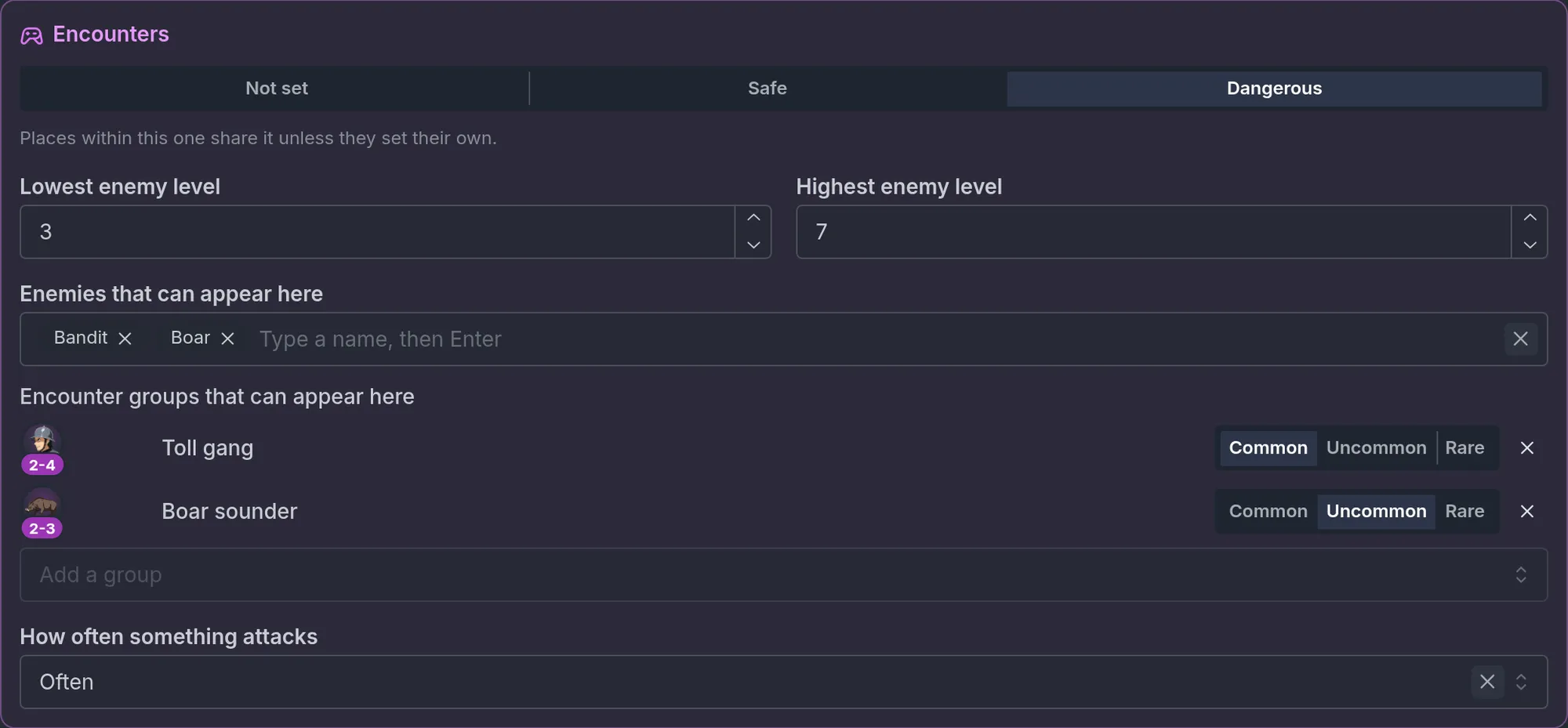
The small x on a pick removes it from the place. A pick whose group was deleted reads A group the world no longer has in red, and the x is all that still works on it.
Places within places
A place takes its encounters from one place, whole. That covers groups too.
- On Same as The Tollroad, Hask's Camp shares the road's groups along with its levels. They are listed greyed under the "Same encounters as" line, each with its frequency.
- A place with a Dangerous setting of its own has only its own picks. The groups of the place above it no longer apply.
- A Safe place has none.
A first group makes the place its own
Adding a group to a place that was on Same as gives that place encounters of its own. It stops sharing the level range of the place above it, and the grey levels in Lowest enemy level and Highest enemy level disappear. Type the levels again, and pick every group that should appear there. Picking only Toll gang on Hask's Camp would leave the camp without the Tollroad's levels 3 to 7 and without Boar sounder.
How a group comes in
The storyteller decides when an encounter happens. Nothing interrupts a scene with a rolled fight, and How often something attacks stays a hint.
Once the storyteller calls for an encounter, the game settles the rest:
- Which group. One of the place's picks, by how often each appears. When the storyteller names a particular group, that one comes.
- How many. Each member's count is rolled inside its range.
- The same roll again. The roll belongs to the journey and the turn. Regenerating the turn, or undoing it and sending the same action, brings the same group with the same counts.
What arrives are ordinary copies. Each kind is numbered on its own, so a Toll gang of three is "Bandit 1", "Bandit 2" and "Bandit 3", and a member that comes alone keeps the bare name. When copies of that kind already stand, the numbers carry on from theirs. Copies of an enemy with an open level take the level of the place (see Levels). They fight, give experience and drop loot like any other copy.
The two caps still hold: at most 6 enemies come in at once, and at most 8 stand in a journey. A group is never refused for its size. What fits comes, in this order:
- The biggest counts are cut first, one enemy at a time.
- Each member keeps one copy for as long as there is room.
- After that, the last members are left out. The first member, the leader, is the one that stays.
With 6 enemies already standing, a Toll gang that rolled 4 brings in 2 Bandits. The storyteller is told exactly who arrived and who stayed out. With 8 already standing, nothing comes.
Bringing a group in from a beat
Once the world has an encounter group, the Bring in enemies effect starts with a three-way choice:
- One enemy is the effect described above, with its Enemy, How many and Names (optional) fields.
- Encounter group brings in the group you choose. Every member comes, with its count rolled inside its range. There is no count to set and no names to give.
- Roll for the place has no field at all. Its text reads "One of the encounter groups of the place the scene is in, by how often each appears there. Where none appears, nothing comes." The place is the one the scene is in when the beat fires.
In the Tollroad Wardens, the "ambush-at-the-ford" beat is set to Encounter group with Toll gang, so the ford is held by 2 to 4 Bandits.
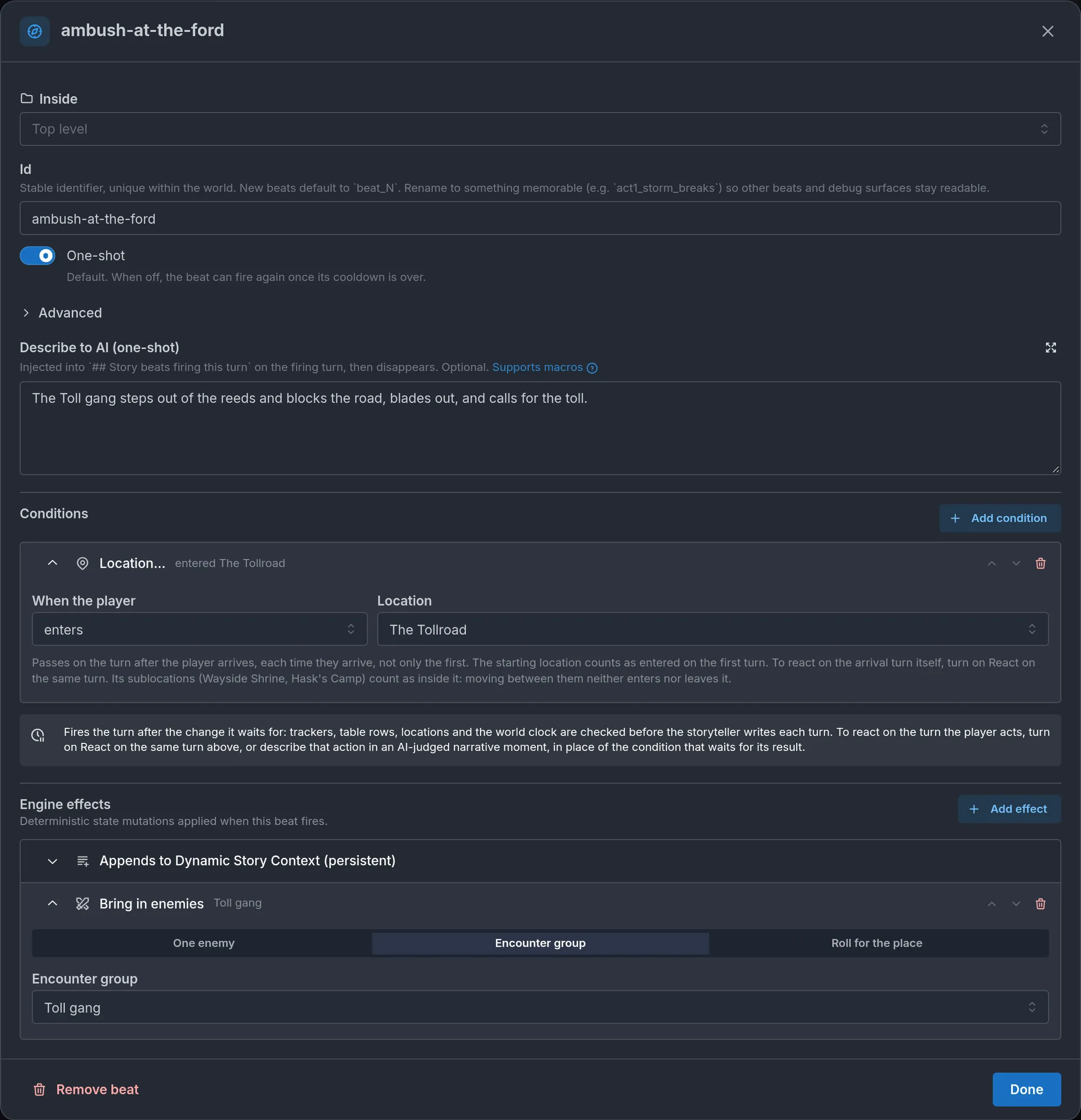
A group brought in by a beat follows the same roll, the same caps and the same levels as one the storyteller calls. On that turn the storyteller is told the copies are already there. Nothing stops it from calling more on a later turn, within the caps. The effect is silent in all three modes, so pair it with the beat's Describe to AI (one-shot) text.
When the group an effect names has been deleted, the effect shows an orange warning: "This group no longer exists, so this effect does nothing."
Renaming an enemy
Changing an enemy's Name on its page renames it in every group and in every Bring in enemies effect that names it, answers and branches included. Clearing the name changes nothing: the last name is kept.
Only a rename typed on the enemy's page does this. After a rename made another way, by an AI helper for example, open your groups and beats and look for a member marked "(not found)".
Group limits
- 30 groups in a world, with up to 6 members each.
- How many and Up to from 1 to 6.
- Name 80 characters, Note for the storyteller 600.
- 12 groups picked on a place.
- In play, at most 6 enemies come in at once and 8 stand in a journey.
What the player sees
On stage. Copies stand on the right, facing the player's side, with their bars always shown. A blow plays on the bar it moves, and a copy that is out carries its label.
In the cast. Copies are listed under an Enemies group, which leads the cast while a fight is on. A copy's row shows its battle sprite cropped to the head, or the whole animal for a beast. A copy that is out is dimmed, tagged with its label and sunk below the others. A killed copy reads Fallen. Copies of one enemy that are out under the same label fold into one row: "Bandit ×2".
Cleared by the game. A copy still standing is removed after 6 turns in which nothing touched it and it was not on stage. A copy that is out is removed 3 turns after the fight last moved, so a Bandit who ran off stays listed while the others fight on. The group empties by itself after the fight.
When several players share a journey, everyone sees the same enemies on stage and in the cast.
The Codex page
The player's Codex gains an Enemies group, after Characters. An enemy's page shows its name, its role, a text and a picture. The text is the Public/Codex description. Without one, the page uses the Description, then the role, so write the public text whenever the Description holds something players should not read. The picture is the portrait, or the idle battle sprite when there is no portrait. The Hidden truth, the appearance and the stat block never show.
Codex page sets when the page is listed:
- Listed from the start: in every journey from the first turn.
- Listed once met: once a copy of the enemy is in the scene with the player at the end of a turn.
- Secret until a beat reveals it: only after a beat reveals it, like any secret Codex entry. See Secret entries and how players find them.
- No Codex page: never.
A published Codex entry of type Character linked to the enemy replaces the automatic page.
What the storyteller decides and what the game settles
The storyteller decides:
- when a foe shows up, which enemy and how many
- what a fight is. Nothing assumes violence: a fight can be about restraint or seduction if your bars and out rules say so
- which moves the enemies use
- taking a copy out under a label of its own (it yields, flees, is tied up), or bringing it back
- naming a copy, and turning one into a real character
The game settles:
- the numbering of copies and the limits of 6 at a time and 8 standing
- each copy's bars, and going out when an out rule is met
- the statuses a copy's landed blows give, counted down each turn and dropped when the copy is out of the fight
- the level of an open enemy in a place with a level range
- experience and loot, once per copy that goes out as a win for the player, when the world uses the fight rules
- which sprite shows, and putting on stage a copy that was hit or beaten this turn
- clearing copies after the fight
A copy becomes a regular character only when the storyteller marks it as important to the story or recruits it into the party. It then keeps the enemy's pictures and stat block, stops being a copy, and is no longer cleared. A copy the storyteller removes is not deleted on the spot: it goes out under its first out rule's label and is cleared with the others.
Limits
- 200 NPCs and enemies together in a world.
- Name 120 characters, role 300, Description 25,000, Physical Description 8,000, Public/Codex description 300.
- 4 out rules per enemy, with a bar name up to 40 characters and a label up to 24.
- 3 statuses in On a hit, each with a chance from 1 to 100%.
- 4 battle sprites. An enemy's gallery holds 200 pictures.
- Experience from 0 to 100,000, for each progression track. 6 loot lines, chance 1 to 100%, amount 1 to 99.
- Bring in enemies: 1 to 6 copies and up to 6 names for one enemy, or one encounter group, of which at most 6 enemies come in. See Group limits.
- 8 enemies standing at once in a journey.
Common mistakes
- Expecting a template to behave like a character. A template is never in the cast, so it cannot be present at the start, shown on the public cast or placed in the party. A foe who is one person with a place in the plot, like Odran Hask, is a regular NPC.
- A level written "Lv. 5". That is a fixed level. Write
5-9, or leave the field empty, for an enemy that follows the place. - A beat that brings enemies in without describing them. The effect is silent. Without Describe to AI (one-shot) text, the Bandits are on stage and nobody has mentioned them.
- Sprites that face right. Opponents face left. An uploaded slot picture is not flipped for you.
- No stat block. Copies of an enemy without one have no bars to fight down, so no out rule ever applies.
- Turning the Enemies switch off to tidy up. The templates and the encounter groups are kept but hidden everywhere. Places lose their group picks in the editor, the storyteller is no longer told about the groups, and every Bring in enemies effect stops working.
- Counting on a copy to last. Copies are cleared a few turns after the fight. Anything that should persist belongs to a regular character.
- An NPC named like a copy. Do not name a unique character "Bandit 2" in a world with a Bandit enemy. Those names belong to the copies.
- Leaving a duplicate as "Bandit (copy)". A duplicate is a template of its own, and its copies are numbered after that name.
- Expecting a group to start a fight. The storyteller decides when an encounter happens. The game only rolls which group comes and how many of each enemy.
- Counting on Enemies that can appear here to be rolled. That list is advice for the storyteller. Only encounter groups are rolled, so make a group of one for an enemy that should come up by chance.
- Adding a first group to a place on Same as. The place gets encounters of its own and stops sharing the level range above it. Type its levels again and pick every group it needs.
Frequently asked questions
Location encounters
Learn how to set the encounters of each location in your Imagina world, with Safe and Dangerous places, enemy levels, the enemies that can appear, how often something attacks, how places within places share those settings, and what players see on the map and the scene card.
Quests
Learn how to give your Imagina world a quest journal. Covers turning Quests on, the Quest rules card, writing a quest with steps, checks, availability and rewards, quests the storyteller makes up, time limits, quest beats, party play, and what players see when a quest is offered, taken and paid.