Can I update my journey to the world's latest version?
Yes. When you start a journey it locks to the version of the world that was live at that moment, so an author publishing changes never disrupts a story you are already playing. If you would rather pull those changes in, you can reload...
Yes. When you start a journey it locks to the version of the world that was live at that moment, so an author publishing changes never disrupts a story you are already playing. If you would rather pull those changes in, you can reload your journey onto the world's latest published version whenever you like.
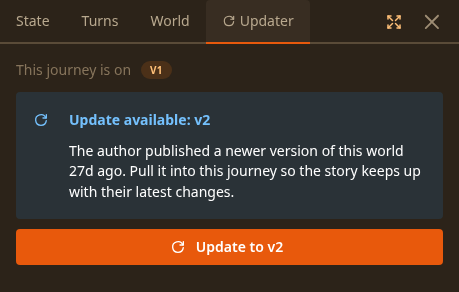
How to update
- Open the journey you want to update.
- Click the Debug button in the top bar (confirm if you are asked to enable debug tools).
- Switch to the Updater tab.
- If the author has published something newer, you will see Update available. Click Update to v{n}, read the warning, and confirm.
The swap only affects your next turn. Every turn you have already played keeps its text exactly as it was, and any turn that is mid-generation finishes on the old version.
Already on the latest version?
Authors sometimes keep polishing a published world in place without bumping its version number. So even when your journey is already on the latest version, the Updater offers a Refresh to latest version button that re-pulls it and brings any of those in-place tweaks into your journey.
What you can and cannot reload
The Updater only ever (re)loads the world's current published version:
- You cannot roll a journey back to an older version.
- Drafts the author has not published yet are never offered.
A word of caution
Reloading mid-journey can break a story when the new version changed a lot: renamed or removed characters, new or removed trackers, rewritten core instructions, reshaped story beats. Small tweaks (wording, extra lore, a new minor character) are usually safe. Big structural changes often are not.
If something looks broken after updating, please start a new game before reporting any issues to the world's author. A fresh journey on the new version is the cleanest way to tell whether a problem comes from the reload or from the world itself.
Different story engine?
Once in a while a newer version runs on a different story engine and cannot be applied to an existing journey. The Updater will tell you when that happens, and starting a new game is the only way to play it.
Why am I charged for memory and chapters?
Long journeys stay coherent because Imagina does a little bookkeeping in the background while you play. Two of those background tasks, journey memory and chapters, cost a small amount of credits, and they show up in your credit history...
How do I export a journey?
Open the top-right menu while playing and pick Export as Markdown or Export as HTML. Your browser downloads the file.