Slash commands and @-mentions
The action box is mostly for writing what your character does, but it has a few power-user shortcuts built in: slash commands for quick controls, and @-mentions for dropping a character's name in without retyping it. Neither is required...
The action box is mostly for writing what your character does, but it has a few power-user shortcuts built in: slash commands for quick controls, and @-mentions for dropping a character's name in without retyping it. Neither is required for normal play; they're just there to make the common things faster.
Slash commands
Type / at the start of the action box and a list pops up showing every command and what it does. Keep typing to filter (for example /u narrows to /undo), then run it. Each command is a shortcut for something you can also do with the on-screen controls.
On a keyboard, the best match is already highlighted as you type:
Tabcompletes the highlighted command, so/stplusTabgives you/steerready for its text.- Arrow up and arrow down move the highlight through the list.
Enterruns the highlighted command, even if you've only typed part of its name (/debthenEnteropens the debug panel).Escapecloses the list. Keep typing and it comes back.
On a phone or tablet, tap a command to put it in the action box, then send it.
Turn controls
-
/undo: roll back the latest turn. The credits already spent aren't refunded. -
/retry: regenerate the latest turn with the same action but a fresh roll. -
/1to/4: send suggested action 1 to 4 straight away, without clicking the chip. -
/steer <text>: drop<text>into the steering box for your next send (see below), then clear the action box. Handy when you want to steer without taking your hands off the keyboard. -
/recap: get a recap of what's happened so far. It costs a few credits (2 to 5), and asking again when nothing has changed is free. -
/omake(beta): turn your recent turns into a four-panel gag strip. It costs credits, and you need a couple of turns behind you first.
Panels
-
/codex: open the Codex. -
/memory: open the journey's memory. -
/cast: open the cast, the characters you've met. -
/notepad: open or close your private notepad. -
/debug: open or close the prompt debug panel, for the curious who want to see what the AI was given.
A panel command only shows up when the journey has that panel. A world without Codex entries has no /codex, for instance.
A slash command only counts when it's the whole line. If you actually want a sentence that starts with a slash, put a space or a word before it.
@-mentions: drop in a character's name
When you want to name a character you've met, type @ and a small list of the NPCs in your journey appears. Keep typing to filter it (matching either the start of the name or any word in it, so @mas finds "The Master"). Pick one and the full name is inserted for you, with the stray @ removed.
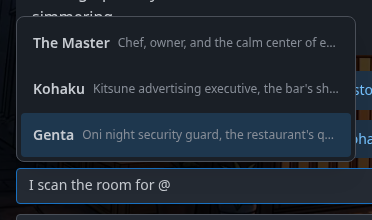
A few details:
- The best match sits at the bottom of the list, closest to where you're typing. On a keyboard, arrow up and arrow down move through the list, and
EnterorTabaccepts the highlighted one.Escapecloses it without inserting anything. - On a phone or tablet, the list is full width with big tappable rows. Just tap the character you mean.
- It works in both the action box and the steering box, so you can write
focus on @Kohakuas a private note to the narrator just as easily as@Kohakuin the story itself. - Only characters you've actually met show up. If the list is empty, the journey hasn't tracked any named characters yet.
See also
- Anatomy of a journey walks through every part of the play screen, including the steering box in full.
- Ask Ima is the way to ask an out-of-character question without it affecting the story.
- Editing, regenerating, and undoing turns covers the same controls the slash commands trigger, in depth.
Playing with friends: party journeys
A party journey is a journey you play with friends. Each of you controls one of the world's characters, the narrator tells one shared story, and a chat between the players sits beside it.
Can I customize and reuse my character?
Yes. Many worlds let you tweak the character you play as before a journey starts, and you can save a character you like so it's a click away in every world that allows it.