What is the credit system?
Credits are Imagina’s in-app balance for paid AI turns. When you submit an action during play, the engine runs your chosen model and deducts credits based on that turn’s cost.
Free credits and Vault
Your credits live in two places. Your free credits are daily-refilling credits that top up automatically the first time you open Imagina each day. Your Vault is your permanent credits: the ones you buy, are gifted, or earn. Free credits are always spent before your Vault, so a normal session costs you nothing until they run out for the day. Free credits carry over up to a cap and refill at midnight UTC, and logging in several days in a row raises the daily grant.
Turn costs covered by your free credits appear in your transaction history with the full credit cost struck through (or noted as partly covered), so you can see what the turn would have cost.
Full details: What are credits, free credits, and the Vault?
Buying credits
You can buy credit packs through Stripe Checkout. Packs may include a bonus on larger tiers. Credits are added to your account after payment completes.
How much does playing cost?
There is no flat price per turn. The cost of a turn depends on two things:
- The AI model you pick. Each model has its own per-token pricing, and some are significantly more expensive than others. You pick the model, and we will not silently swap it for a cheaper one. The model selector shows an estimated cost per turn so you can compare.
- How complex the world is. Worlds with rich lore, many characters, detailed trackers, or long histories send more context to the model on every turn, which makes each turn cost more. A simple world with a short history will be cheaper to play than a sprawling one.
Image generation in the world builder is billed the same way: you pick the model, you pay for what you use.
Track your usage in-game
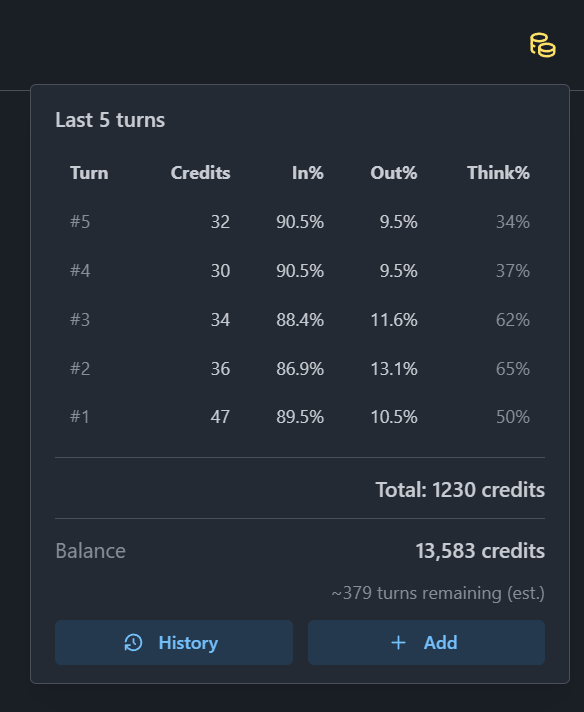
While playing, click the cost button in the journey toolbar to open a panel showing your recent turn costs and an estimate of how many more turns you can play with your current balance. This is the easiest way to see how the model and world you picked are actually performing for your budget, and to plan ahead.
Picking and changing your model
You pick the AI model right before starting a journey, and you can change it at any time during the journey, turn to turn if you want. Open the model picker to see the full list of available models with their estimated cost per turn, so you can switch to something cheaper when your balance is tight, or to a stronger model for a key scene.
Related read: How do I pick a model?
As a rough order of magnitude, the default model (which is picked to balance quality and cost effectiveness) typically costs somewhere between 20 and 30 credits per turn, depending on the world. Cheaper and more expensive models sit on either side of that range.
One small thing worth knowing: AI providers reuse parts of your story between turns through a short-lived cache, which makes follow-up turns cheaper than the first one. That cache only applies as long as you keep playing on the same model, and only for a few minutes between turns. So if you play several turns back-to-back without switching models, you usually pay a bit less per turn than if you switch models frequently or come back hours later. Switching models is still totally fine, just expect the next turn after a switch to land closer to the "first turn" cost. There's a dedicated page on this: Why are consecutive turns cheaper?
While Imagina is in beta, treat the cost estimates in the picker as a guideline, not a contract: we are still calibrating them. Calibration needs a variety of worlds and a meaningful number of turns played across them, which is exactly what the beta period is for. Your actual per-turn cost is always computed from real model usage, never from the estimate.
Creating worlds
Playing is not the only thing that consumes credits. Authoring a world uses them too:
- World generation. When you ask the AI to draft or refine a world (lore, characters, trackers, instructions, and so on), each generation calls a model and is billed against your balance, the same way a turn is.
- Portraits and titlecards. The image generator that produces world portraits and character art has its own per-image cost, depending on the image model you pick.
In other words, building a world is itself an investment of credits, on top of the time and creativity you put into it. We hope that you make it back using the revenue share system.
Creator revenue share
When another player spends credits on paid turns in a published world you own, you earn a share of those credits, so the credits you spent generating and polishing the world can come back to you (and then some) once people start playing it. Payouts are credited to your balance on a schedule (for example overnight). Your own plays in your own worlds do not count toward revenue share.
History
Your credit balance and transaction history are available in the app so you can see purchases, turn charges, and any revenue share or adjustments.